
The right desk boom arm keeps your microphone positioned consistently while clearing valuable workspace. Whether you use a Blue Yeti, Shure SM7B, HyperX QuadCast, or another popular mic, the best option should match your microphone’s weight, your desk, and your recording style.
These 10 desk boom arms cover low-profile designs, heavy-microphone support, cable management, and flexible overhead positioning for gaming, streaming, podcasting, and home studios.
Best 10 Desk Boom Arms Picks for 2026
Professional Pick

- Quiet internal spring damping
- Supports 0.25–1.2 kg microphones
- 360° rotation with hidden cable routing
Best For: Podcast and streaming desks seeking a polished, quiet arm
Low-Profile Choice

- Extends beneath the monitor
- All-metal, stable construction
- 29-inch reach with broad adjustment
Best For: Gaming and streaming setups where screen visibility matters
Heavy-Duty Reach

- Supports microphones up to 3.5 lb
- Reaches 32.3 inches horizontally
- Includes riser and cable channels
Best For: Heavy microphones and extended desktop microphone positioning
Compact Value Pick
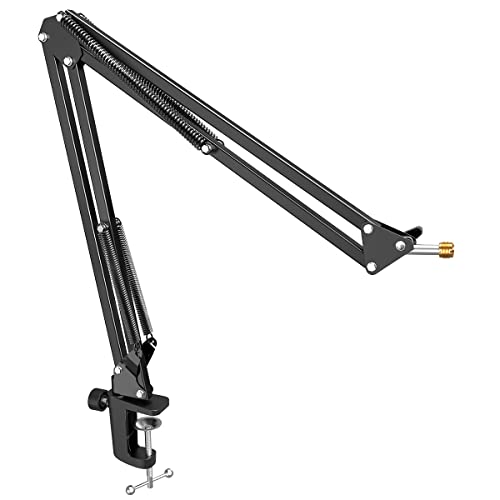
- Folding metal design saves space
- Clamp fits desks up to 2 inches
- 180° vertical adjustment
Best For: Beginners and portable, space-conscious recording setups
Heavy-Duty Pick
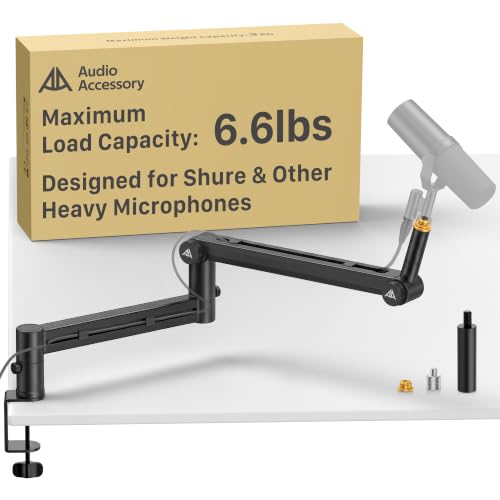
- Supports up to 6.6 pounds
- Gear-lock design helps prevent sagging
- 780 mm reach with cable channels
Best For: Heavy studio microphones and demanding desk setups
Complete Starter Kit
Adjustable Arm with Pop Filter

- Includes pop filter and windscreen
- Supports up to 1.5 kg
- Clamp fits desks up to 2 inches thick
Best For: Standard microphones and beginner recording setups
Flexible Everyday Choice

- Supports microphones up to 3.3 pounds
- Multiple adjustment points and 360-degree rotation
- Folds away for compact storage
Best For: Gaming, streaming, and recording setups
Best with Extra Features
InnoGear LP98 Low-Profile Mic Arm

- Sits only 3.35 inches above the desk
- Magnetic channel hides and organizes cables
- Supports microphones up to 3.3 pounds
Best For: Minimalist and space-conscious desk setups
Best Overhead Design
Adjustable High-Riser Boom Arm

- 31.5-inch riser clears monitors
- Clamp fits desks up to 4.2 inches thick
- Tool-less adjustments support quick repositioning
Best For: Overhead recording and monitor-heavy workstations
Best Simple Pick

- Dual springs help stabilize the microphone
- Pre-installed adapter fits common microphones
- Padded clamp supports desks up to 1.89 inches thick
Best For: Compact gaming and streaming setups
Professional Pick – RØDE PSA1+ Boom Arm
The RØDE PSA1+ is a polished choice among desk boom arms for podcasting, streaming, and other microphone setups where quiet repositioning matters. Its spring damping, broad microphone weight range, and hidden cable routing support a clean, professional workspace.
Best For: Podcasters and streamers who want quiet movement, full reach, and a refined studio-style setup.
Pros:
- Internal spring damping helps reduce creaks and handling noise during adjustments.
- Supports microphones and shock mounts from 0.25 kg to 1.2 kg.
- Offers 360-degree rotation and integrated cable management.
- Includes 3/8-inch and 5/8-inch thread adaptors.
Cons:
- Its 70 mm desk-clamp limit may not suit thicker desktops.
- The 1.2 kg maximum load is lower than some heavy-duty arms.
The PSA1+ stands out when quiet operation and a tidy appearance are priorities. Check your desk thickness and microphone weight before buying.
Low-Profile Choice – FIFINE BM88 Boom Arm
The FIFINE BM88 is one of the more desk-conscious desk boom arms, designed to extend beneath a monitor rather than block the screen. Its all-metal construction, long reach, and broad thread compatibility make it practical for gaming, streaming, and recording.
Best For: Gamers and creators who need a low-profile arm that preserves monitor visibility and desk space.
Pros:
- Low-profile design can extend under the bottom of a monitor.
- All-metal construction and a stable C-clamp help limit wobble.
- Extends up to 29 inches with 220-degree vertical and 360-degree horizontal adjustment.
- Includes 1/4-inch, 3/8-inch, and 5/8-inch thread options.
Cons:
- The clamp is intended for desktops from 0.8 to 2.4 inches thick.
- The section near the C-clamp cannot be adjusted vertically.
- The microphone is not included.
Choose the BM88 when monitor clearance is as important as microphone positioning. Its adjustment range is generous, but confirm the clamp fit and arm geometry for your desk.
Heavy-Duty Reach – InnoGear MU-PSA28 Mic Arm
The InnoGear MU-PSA28 is a strong option among desk boom arms for heavier microphones and setups that need extra height. Its internal springs, extension riser, and built-in cable channels help support substantial microphones while keeping the desk organized.
Best For: Creators using heavier microphones such as the Blue Yeti or SM7B who need extended reach.
Pros:
- Supports up to 3.5 pounds with thickened steel construction and internal springs.
- Reaches up to 32.3 inches horizontally and 37.4 inches vertically.
- Includes a 6.3-inch extension riser for additional height.
- Removable rubber cable covers create built-in cable channels.
Cons:
- The clamp fits desks up to 2 inches thick.
- The standard connector is 5/8 inch, so some microphones may require compatible mounting hardware.
- A shock mount is not included.
The MU-PSA28 is appealing when load capacity and reach matter more than a compact footprint. Its cable covers and riser also make it easier to build a clean, elevated setup.
Compact Value Pick – FIFINE CS1 Boom Arm
The FIFINE CS1 is a straightforward choice among desk boom arms for gaming, voice-over work, and beginner recording setups. Its metal construction, folding design, and upgraded clamp offer useful stability without taking up permanent desk space.
Best For: Beginners and space-conscious users who want a portable arm for gaming, streaming, or podcasting.
Pros:
- Metal clamp includes an anti-scratch pad and fits desks up to 2 inches thick.
- Provides 180-degree up-and-down adjustment.
- Folds for easier storage and portability.
- Includes a 5/8-inch to 3/8-inch metal adapter.
Cons:
- Its stated maximum height is 13 inches, limiting reach compared with longer arms.
- It supports fewer thread options than some included-adapter kits.
- The microphone is not included.
The CS1 makes sense for smaller desks, occasional recording, or users who value easy storage. Consider a longer arm if you need to position a microphone far across a large desktop.
Heavy-Duty Pick – Low-Profile Gear-Lock Mic Arm
For desk boom arms that can handle demanding microphone setups, this low-profile model emphasizes load capacity and long-term stability. Its reinforced aluminum-alloy and glass-fiber nylon construction supports up to 6.6 pounds, while the gear-lock mechanism is designed to resist sagging better than spring-loaded arms.
Best For: Heavy microphones such as the Shure SM7B, MV7, RODE PodMic, Blue Yeti, and similar studio models.
Pros:
- Supports microphones and setups up to 6.6 pounds.
- Gear-lock design is built for stable, sag-resistant positioning.
- Extra-long 780 mm reach with 360-degree horizontal and 120-degree vertical adjustment.
- Deep cable channels help route multiple cables neatly.
Cons:
- Its 1.63 kg arm weight may be more than needed for lightweight microphones.
- The desk clamp and arm require adequate desk space for the extended reach.
This is the strongest choice in the group for heavier microphones and users who prioritize a low-profile design with extensive positioning range. Tool-free knobs and included thread adapters also make setup more flexible.
Complete Starter Kit – Adjustable Arm with Pop Filter
This Amazon Basics option is a practical starting point for standard microphone setups. Among desk boom arms, it stands out by including both a pop filter and windscreen, while adjustable tension helps users position a compatible microphone on a desk clamp rated for desks up to 2 inches thick.
Best For: Standard microphones and beginner recording, streaming, or voice setups that need basic accessories included.
Pros:
- Includes a foam windscreen and dual-layer pop filter.
- Adjustable tension allows positioning based on microphone weight.
- Supports up to 1.5 kg and includes 3/8-inch and 5/8-inch compatibility.
- Desk clamp fits desks up to 2 inches thick when securely tightened.
Cons:
- Heavy microphones, shock mounts, or accessories may affect performance.
- Fully extended or unevenly loaded positions may require additional tension adjustment.
- The 14-inch arm offers less reach than the longer option in this roundup.
This arm makes sense when you want a straightforward setup with useful recording accessories in the box. Keep the microphone load moderate and adjust the tension carefully for more reliable positioning.
Flexible Everyday Choice – Foldable Steel Boom Arm
This InnoGear model is a versatile option for users who want desk boom arms that can move out of the way between sessions. Its steel construction, strong springs, and multi-axis adjustment support microphones up to 3.3 pounds, while the arm folds for more compact storage.
Best For: Gaming, streaming, and recording setups using microphones such as the Blue Yeti, HyperX models, Shure SM7B, or MV7.
Pros:
- Offers 360-degree base rotation, 135-degree back-and-forth extension, and 180-degree arm movement.
- Supports up to 3.3 pounds with steel construction and strong springs.
- Folds away when not in use to save desk space.
- Includes a standard microphone clip and 5/8-inch to 3/8-inch adapter.
Cons:
- Maximum capacity is lower than the heavy-duty 6.6-pound model.
- The clamp is intended for flat, squared desk edges up to 2 inches thick.
- A shock mount is not included.
This is a balanced pick for everyday creators who need broad adjustment and convenient storage. Verify that your desk has a compatible flat edge, and account for the separate shock-mount requirement if your microphone needs one.
Best with Extra Features – InnoGear LP98 Low-Profile Mic Arm
For desk boom arms that keep a clean workstation appearance, the InnoGear LP98 uses a low-profile design that sits just 3.35 inches above the desk. Its magnetic cable channel, broad adjustment range, and 3.3-pound capacity make it a practical choice for compact streaming, recording, and podcasting setups.
Best For: Minimalist desks, small workstations, and users who want concealed cable management.
Pros:
- Low-profile arm helps preserve desk space and visibility.
- Integrated magnetic cable channel keeps wires hidden and organized.
- 360-degree base rotation, 180-degree swivel, and 170-degree tilt provide flexible positioning.
- Supports microphones weighing up to 3.3 pounds and includes 3/8-to-5/8-inch and 3/8-to-1/4-inch adapters.
Cons:
- The clamp fits flat-edged desks up to 2.36 inches thick.
- A shock mount is not included.
The LP98 stands out among desk boom arms when low visual bulk and tidy cable routing matter most. Its alloy-steel construction and padded C-clamp add stability, while the clamp-size limit is worth checking before purchase.
Best Overhead Design – Adjustable High-Riser Boom Arm
This overhead option is one of the more versatile desk boom arms for setups where a microphone must clear a monitor. Its 31.5-inch extension riser, heavy-duty steel construction, and tool-less joint adjustments support flexible positioning for seated or standing recording.
Best For: Overhead microphone placement, large desks, and users who need the arm to rise above monitors.
Pros:
- 31.5-inch riser can cross monitors without blocking the screen.
- Heavy-duty steel construction and clamps fit desks up to 4.2 inches thick.
- Quick-moving clips allow height and angle changes without tools.
- Includes adapters for 3/8-to-5/8-inch and 1/4-to-3/8-inch microphone connections.
Cons:
- Its 2.6-pound maximum capacity is lower than the InnoGear LP98.
- The tall overhead design occupies more visual and physical space than a low-profile arm.
Choose this arm when clearance and reach are more important than a compact footprint. The broad clamp range and adjustable riser are useful for multi-position setups, but confirm your microphone stays within the 2.6-pound load limit.
Best Simple Pick – SUNMON QuadCast Boom Arm
The SUNMON is a compact suspension-style choice among desk boom arms, with dual springs and reinforced knobs designed to help keep a microphone steady. It supports popular microphones such as the Blue Yeti and HyperX QuadCast and clamps to desktops up to 1.89 inches thick.
Best For: Budget-conscious gaming, streaming, and podcasting setups using common USB microphones.
Pros:
- Dual suspension springs help reduce shaking, sinking, and unwanted noise.
- Pre-installed 3/8-to-5/8-inch adapter supports many popular microphones and shock mounts.
- Compact alloy-steel design supports up to 1.4 kilograms.
- Padded desk clamp helps protect the desktop from scratches.
Cons:
- The clamp is limited to desktops up to 1.89 inches thick.
- A microphone is not included.
- Compared with the other options, the listed adjustment and height details are more limited.
The SUNMON makes sense for a straightforward microphone upgrade without a large arm footprint. Its broad microphone compatibility and spring suspension are useful, though the narrower clamp range may exclude thicker desktops.
How We Picked These Desk Boom Arms
We selected models based on the factors that matter most in everyday use: load capacity, adjustment range, mounting stability, joint smoothness, cable management, microphone compatibility, and overall desk footprint. The list includes traditional scissor arms, low-profile options, overhead riser designs, and models aimed at heavier microphones.
We also considered how easily each arm fits common setups. Compatibility with 3/8-inch and 5/8-inch mounts, included adapters, clamp design, and clearance for thicker desks can make a major difference after installation.
Quick Comparison
| Best For | What to Look For |
|---|---|
| Streaming and gaming | Quiet movement, compact reach, and easy positioning |
| Heavy microphones | High load capacity, reinforced joints, and a secure clamp |
| Clean desk setups | Low-profile construction and integrated cable routing |
| Podcasting and recording | Stable positioning, broad adjustment range, and smooth tension control |
Key Buying Factors for Desk Boom Arms
Weight Capacity and Stability
Check the arm’s rated capacity against your complete microphone setup, including a shock mount, pop filter, and any adapter. Heavy broadcast microphones need more than a basic arm’s minimum support. A strong desk clamp and joints that resist sagging are equally important.
Reach and Adjustment Range
Measure the distance from your desk edge to your preferred speaking position. A longer arm offers more flexibility, while a low-profile arm can keep the microphone below monitor height when you want an unobstructed view. Overhead risers are useful when the microphone must clear a display or keyboard.
Mounting and Compatibility
Confirm that the clamp fits your desk thickness and that the arm includes the correct 3/8-inch or 5/8-inch adapter. Some microphones require a shock mount or special thread configuration, so verify the complete connection before buying.
Cable Management and Noise
Built-in clips or channels help prevent USB or XLR cables from hanging across the desk. For live recording, choose an arm with smooth, quiet joints and avoid repeatedly tightening tension knobs, which can make repositioning slower.
Who Should Buy Which Desk Boom Arms?
Choose a low-profile model if you stream at a compact desk or want your microphone out of the way between uses. A conventional scissor arm is a practical all-purpose choice for gaming, calls, and recording. If you use a Shure SM7B or another heavy microphone, prioritize a reinforced arm with a clearly stated higher load rating. For a polished studio setup, select an arm with integrated cable management and broad adjustment range. Finally, beginners or occasional users may prefer an adjustable model that includes useful accessories, such as a pop filter or mounting adapters.
