
A good desk boom arm can make remote calls, livestreams, podcasts, and recordings easier by keeping your microphone positioned consistently while clearing space around your keyboard and monitor.
We selected 10 options with different mounting styles, adjustment ranges, cable-management features, and weight capacities so you can match the arm to your microphone, desk, and daily workflow.
Best 10 Desk Boom Arms for Remote Work Picks for 2026
Low-Profile Stability Pick
Aokeo AK-55 Low-Profile Mic Arm

- Low-profile design reduces visual distraction
- 2 kg capacity with steel construction
- Adapters support common mic threads
Best For: Stable, discreet remote-work microphone setups
Multi-Accessory Conferencing Pick

- Works with mics, webcams, and lights
- Long horizontal and vertical extensions
- Clamp fits desks up to 2.36 inches thick
Best For: Flexible video-conferencing workstations
Foldable Studio-Style Pick

- 360-degree rotatable arm
- Spring-supported stability
- Folds for storage and transport
Best For: Home recording and remote setups needing easy storage
Heavy-Duty Cable-Managed Pick

- 3.5 lb capacity for heavier microphones
- Built-in cable channels reduce desk clutter
- Includes an extension riser for extra height
Best For: Remote workers with larger microphones and cable-management needs
Best Compact Pick
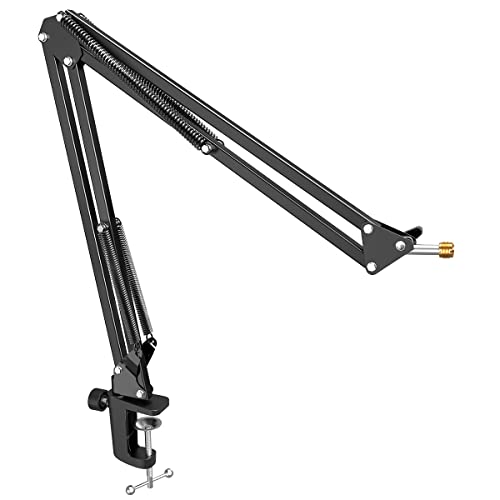
- Anti-scratch clamp fits desks up to 2 inches thick
- 180-degree vertical adjustment
- Foldable metal design with included thread adapter
Best For: Compact remote-work desks and beginner creators
Best Low-Profile Pick

- Dual-arm design sits below a monitor
- Cable channels support USB and XLR cables
- 360-degree rotation with 3.3-pound load capacity
Best For: Clean, monitor-centered workstations and streaming setups
Best Heavy-Duty Pick

- Steel double-arm construction supports up to 3.5 pounds
- 31.5-inch reach extends over most monitors
- Internal cable channels and 360-degree adjustment
Best For: Heavier microphones and extended-reach home setups
Best with Extra Features
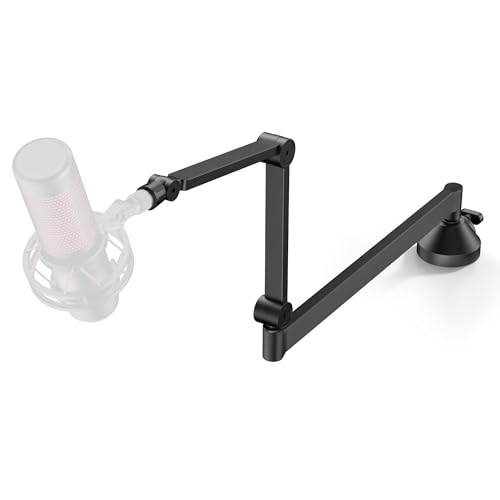
- Sits just 3.27 inches above the desk
- 26.1-inch reach with multi-axis adjustment
- Supports microphones up to 1.5 kg
Best For: Monitor-friendly desks and versatile microphone setups
Best Overhead Design
360° Rotatable Aluminum Boom Arm

- 15.7-inch overhead pole clears the monitor
- Supports up to 1.81 kg
- Includes cable management and headphone hook
Best For: Elevated microphone placement on flat-edged desks
Best for Lightweight Gear
Low-Profile Multi-Adapter Mic Arm

- 27.1-inch reach with 360° rotation
- Fits desks 0.4–2.36 inches thick
- Includes 1/4-, 3/8-, and 5/8-inch adapters
Best For: Lightweight microphones and multi-device creator setups
Low-Profile Stability Pick – Aokeo AK-55 Low-Profile Mic Arm
For remote workers who want desk boom arms for remote work without adding much visual clutter, the Aokeo AK-55 uses a low-profile design that keeps the microphone arm below the screen area. Its steel construction, broad compatibility, and 2 kg capacity make it a practical option for calls, streaming, podcasting, and recording.
Best For: Remote workers prioritizing a stable, discreet microphone setup.
Pros:
- Low center of gravity helps reduce shaking and shifting.
- 360-degree arm rotation and 180-degree vertical movement support flexible positioning.
- Includes adapters for 1/4-inch, 3/8-inch, and 5/8-inch connections.
- Hidden cable routing helps keep the workspace tidy.
Cons:
- Fits tables less than 7 cm thick, limiting desk compatibility.
- Microphone is not included.
The AK-55 is a strong choice when monitor visibility and desk neatness matter. Check your desk thickness and microphone mounting thread before buying.
Multi-Accessory Conferencing Pick – Kensington A1020 Boom Arm
Kensington A1020 Boom Arm for Microphones, Webcams, and Lighting Systems (K87652WW)
Check Price On AmazonThe Kensington A1020 is one of the more versatile desk boom arms for remote work because it can support microphones, webcams, and lighting systems. Its long reach and wide clamp suit video-conferencing desks where accessories need to move into position quickly and then out of the way.
Best For: Remote professionals building a flexible microphone, webcam, or lighting setup.
Pros:
- Supports 3/8-inch, 1/4-inch, and 5/8-inch connections.
- Offers up to 32.5 inches of horizontal and 37.36 inches of vertical extension.
- Clamp attaches to desks up to 2.36 inches thick.
- Cable holder and swing-away design help maintain a tidy workspace.
Cons:
- Its broad accessory compatibility may be more than needed for a microphone-only setup.
- At 1.9 kg, it is not a lightweight arm.
The A1020 stands out for adaptable conferencing layouts rather than minimalism. It is particularly useful if your remote-work station includes several mounted accessories.
Foldable Studio-Style Pick – IXTECH HERO Mic Boom Arm
For remote workers seeking desk boom arms for remote work with a familiar studio-style design, the IXTECH HERO combines 360-degree rotation with spring-supported positioning. Its folding construction and cable holder are useful for home offices that need a microphone arm that can be stored or repositioned easily.
Best For: Podcasters, gamers, and remote workers who value foldability and smooth mic positioning.
Pros:
- 360-degree rotation makes microphone placement easier.
- Suspension springs help hold the microphone steady.
- Folding design supports storage and transportation.
- Includes a strong C-clamp and supports 3/8-inch and 5/8-inch threads.
Cons:
- Maximum recommended load is 1 kg.
- It provides less stated load capacity than heavier-duty alternatives.
The HERO is a practical match for standard microphones and compact recording spaces. Confirm that your microphone and any attached accessories stay within the 1 kg capacity.
Heavy-Duty Cable-Managed Pick – InnoGear MU-PSA28 Mic Arm
The InnoGear MU-PSA28 is a strong contender among desk boom arms for remote work when cable organization and microphone support are priorities. Built-in cable channels, an extension riser, and a 3.5 lb capacity make it suitable for larger microphones such as the Blue Yeti and Shure SM7B.
Best For: Remote workers using heavier microphones and wanting integrated cable management.
Pros:
- Built-in channels and removable rubber covers conceal microphone cables.
- Supports up to 3.5 lb and uses thickened steel with internal springs.
- Reaches up to 32.3 inches horizontally and 37.4 inches vertically.
- Includes a 6.3-inch extension riser for additional height.
Cons:
- Desk clamp fits surfaces up to 2 inches thick.
- Shock mount is not included.
- Uses a 5/8-inch microphone connection, so an adapter may be needed for other threads.
The MU-PSA28 is well suited to substantial microphones and tidy, permanent desk setups. Check your desk thickness and mounting requirements, especially if you plan to add a shock mount.
Best Compact Pick – FIFINE CS1 Scissor Boom Arm
For shoppers comparing desk boom arms for remote work, the FIFINE CS1 is a practical choice for compact setups. Its clamp fits desks up to 2 inches thick, while the 180-degree adjustment and foldable design make it easy to position or store.
Best For: Remote workers, beginners, and creators with limited desk space.
Pros:
- Wider clamp includes an anti-scratch pad and fixed locking knob.
- 180-degree vertical adjustment provides flexible microphone positioning.
- Foldable metal arm is convenient for storage or transport.
- Includes a 3/8-inch to 5/8-inch adapter for broad microphone compatibility.
Cons:
- Clamp is limited to desks 2 inches thick or less.
- Microphone is not included.
The CS1 suits voice calls, streaming, and home recording when you want a straightforward arm that saves space without sacrificing basic adjustability.
Best Low-Profile Pick – NEEWER MS007 Boom Arm
The NEEWER MS007 stands out among desk boom arms for remote work because its low-profile dual-arm layout can sit beneath a monitor. It combines broad positioning options, hidden cable channels, and support for microphones or other small accessories.
Best For: Monitor-based workstations, streamers, and users who want a cleaner desktop.
Pros:
- Low-profile design helps keep the screen and camera view clear.
- Supports 360-degree horizontal rotation, 100-degree arm tilt, and a swiveling ball head.
- Built-in channels and four straps help organize USB and XLR cables.
- Supports up to 3.3 pounds and includes 1/4-inch, 3/8-inch, and 5/8-inch adapters.
Cons:
- Its 3.3-pound capacity may not suit heavier microphone setups.
- Requires wrench adjustment for the damping hinge.
Choose the MS007 if keeping your monitor view unobstructed and reducing visible cable clutter matter as much as microphone positioning.
Best Heavy-Duty Pick – MS808 Suspension Boom Arm
For buyers seeking desk boom arms for remote work with extra reach and support, the MS808 uses a steel double-arm construction and strong springs. Its 31.5-inch reach can extend over most monitors, while integrated cable channels keep the setup more streamlined.
Best For: Larger microphones, podcasting, gaming, and workstations that need extended reach.
Pros:
- Steel double-support arms and strong springs support up to 3.5 pounds.
- Internal springs and cable channels create a cleaner appearance.
- 360-degree adjustment helps position the microphone around a monitor.
- 5/8-inch connector fits many popular microphones, including Blue Yeti and AT2020 models.
Cons:
- Its larger, heavier construction may be more than compact desks need.
- Supplied information lists a 5/8-inch connector without additional thread adapters.
The MS808 is a strong fit when stability and reach take priority, particularly for heavier microphones or setups where the arm must clear a monitor.
Best with Extra Features – InnoGear Foldable Mic Arm
For remote workers who want desk boom arms for remote work without blocking a monitor, the InnoGear MS153 uses a low-profile design that sits just 3.27 inches above the desk’s lower arm. Its 26.1-inch reach, broad articulation, and 1.5 kg capacity make it suitable for calls, recording, streaming, and podcasting.
Best For: Clean, monitor-friendly workstations using microphones such as the Blue Yeti, HyperX QuadCast, SoloCast, Fifine models, or AT2020.
Pros:
- Low-profile construction helps preserve screen visibility and desk space.
- Offers 360° horizontal rotation, 270° arm-joint adjustment, and 250° microphone-joint adjustment.
- Supports microphones up to 1.5 kg and includes 3/8-to-5/8-inch and universal clip options.
- Rubber-padded C-clamp fits desks up to 2.75 inches thick and includes a headphone hook.
Cons:
- The clamp is not specified for desks thicker than 2.75 inches.
- Its 3.3 lb capacity may not suit heavier microphone setups.
The MS153 is a practical choice when keeping the area beneath a monitor clear matters most. Its sturdy alloy-steel construction and flexible positioning provide a balanced setup for everyday remote work and content creation.
Best Overhead Design – 360° Rotatable Aluminum Boom Arm
This overhead model is one of the more distinctive desk boom arms for remote work because its 15.7-inch vertical pole can position a microphone above the monitor. The aluminum arm reaches up to 25.5 inches horizontally and supports equipment up to 1.81 kg.
Best For: Streamers, podcasters, and remote workers who want an elevated microphone position that preserves monitor visibility.
Pros:
- Overhead design keeps the microphone above the monitor and frees desk space.
- Aluminum construction and reinforced springs support up to 1.81 kg without advertised sagging.
- Provides 360° base swiveling with broad arm articulation and a 25.5-inch reach.
- Includes cable clips, a headphone hook, a universal clip, and 3/8-to-5/8-inch compatibility.
Cons:
- The clamp fits desks up to 2 inches thick and requires a flat edge.
- It is not compatible with slanted or curved desk edges.
Choose this arm if an elevated microphone position is more useful than a low-profile one. The overhead layout can reduce visual obstruction while the integrated cable management keeps a remote-work setup orderly.
Best for Lightweight Gear – Low-Profile Multi-Adapter Mic Arm
For lighter microphones and accessories, this low-profile option is among the adaptable desk boom arms for remote work. It extends up to 27.1 inches, folds away when not needed, and includes 1/4-, 3/8-, and 5/8-inch adapters for microphones and compatible small devices.
Best For: Remote workers and creators using lightweight microphones, phone holders, LED lights, webcams, or action cameras.
Pros:
- 27.1-inch reach, stepless joints, and 360° rotation enable precise positioning.
- Carbon-steel clamp fits desks from 0.4 to 2.36 inches thick and uses silicone protection pads.
- Metal ball head supports up to 2.8 lb and is designed for stable locking.
- Foldable construction, built-in cable management, and multiple adapters add flexibility.
Cons:
- It is not recommended for setups exceeding 2.8 lb.
- The arm is intended for lightweight equipment rather than heavy microphone rigs.
This arm makes the most sense for compact, multi-device workstations where portability and compatibility matter. Its generous reach and folding design are useful, but users should stay within the stated 2.8 lb limit.
How We Picked the Best Desk Boom Arms for Remote Work
We focused on the practical features that matter in a home office: stable desk clamps, smooth positioning, useful reach, microphone compatibility, and a design that keeps cables manageable. The selection includes low-profile models for compact desks, foldable arms for flexible storage, and heavier-duty options for larger microphones or accessories.
Compatibility was also important. Many arms use standard 3/8-inch or 5/8-inch threads, but included adapters and the microphone holder can vary. Before buying, confirm the arm supports your microphone’s weight and mounting hardware.
Quick Comparison
| Best For | What to Look For |
|---|---|
| Video calls and compact desks | Low-profile construction and a small clamp footprint |
| Streaming and podcasting | Strong tension adjustment, broad reach, and smooth rotation |
| Heavy microphones | Reinforced joints and a high stated load capacity |
| Shared or temporary workspaces | Foldable arms and a quick-to-adjust desk clamp |
| Neat cable routing | Integrated channels, clips, or removable cable sleeves |
Key Buying Factors for Desk Boom Arms for Remote Work
Desk Clamp and Stability
Measure your desk thickness and check the clamp’s maximum opening. A wide, padded clamp is generally more secure and helps protect the desktop. If your desk has a rear shelf, cable tray, or unusually shaped edge, verify that the clamp can sit flat.
Reach, Height, and Adjustment
Choose an arm that can place the microphone close to your mouth without blocking your monitor. Low-profile arms work well under screens, while longer scissor arms offer more positioning freedom. Smooth 360-degree rotation is helpful when switching between typing and speaking.
Load Capacity and Threading
Check the microphone, shock mount, pop filter, and any other attached accessories as one combined load. Standard adapters improve compatibility, but they do not make an under-rated arm suitable for a heavy setup.
Cable Management and Noise Control
Built-in channels or clips keep USB and XLR cables away from moving joints. Also look for secure tension controls and a rigid mount: excessive arm movement can transfer bumps and desk vibrations into the microphone.
Who Should Buy Which Desk Boom Arms for Remote Work?
Choose a low-profile arm if you work in a compact setup or want the microphone tucked below the monitor. Choose a heavy-duty scissor arm for a larger broadcast microphone, shock mount, or frequent repositioning. Choose a foldable model if you clear your desk regularly or share the workspace. Choose an arm with cable management if you want a cleaner appearance and fewer snags during calls.
For most remote workers, the best choice is the model that fits the desk securely, supports the complete microphone setup, and places the mic comfortably near your mouth without interfering with the screen or keyboard.
