
The right boom arm can make a content setup cleaner, quieter, and easier to adjust. Whether you record podcasts, stream games, film overhead videos, or create short-form content, a stable desk mount keeps your microphone or camera positioned exactly where you need it.
We selected 10 desk boom arms and related mounting systems for different workflows, from compact low-profile microphone arms to articulating camera mounts and all-in-one USB microphone kits. Use the guide below to match the arm’s capacity, reach, and mounting style to your workspace.
Best 10 Desk Boom Arms for Content Creators Picks for 2026
Low-Profile Stability

- Low-profile arm extends beneath a monitor
- Metal build with cable management
- 29-inch reach and multiple thread adapters
Best For: Streamers and podcasters needing a stable, monitor-friendly mic arm
Multi-Device Flexibility

- Supports phones, cameras, webcams, mics, and lights
- 22-inch arm with 360-degree ball heads
- Clamp handles flat or cylindrical mounting surfaces
Best For: Creators mounting lightweight devices from one adjustable arm
Heavy-Duty Mic Support

- Supports microphones up to 1.5 kilograms
- Steel build with broad positioning controls
- Folds away and includes clip plus adapter
Best For: Streamers and recording users with compatible heavier microphones
Overhead Shooting Workspace

- Positions cameras and phones above the desk
- Includes 1/4-inch screw and 360-degree ball head
- Padded clamp fits desks 0.5–2.1 inches thick
Best For: Creators producing overhead tutorials and tabletop videos
Complete RGB Mic Kit
TONOR TC310+ Gaming Microphone Set

- All-in-one USB mic and metal boom arm kit
- Tap mute, gain control, and four RGB modes
- Clamp fits desks up to 2.36 inches thick
Best For: Streamers wanting a ready-to-use microphone arm setup
Overhead Creator Mount
K&F CONCEPT 22-Inch Magic Arm Clamp Kit
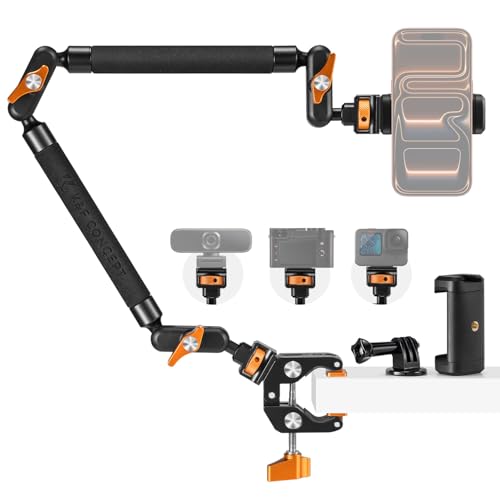
- 22-inch all-metal magic arm for creator rigs
- Three 360-degree ball heads for angle control
- Supports static setups up to 2.2 pounds
Best For: Overhead phone, camera, light, and microphone mounting
Low-Profile Mic Arm

- Low-profile arm extends up to 25.6 inches
- 3.3-pound capacity with 360-degree rotation
- Clamp fits desks up to 2.75 inches thick
Best For: Clean streaming and recording desks with larger microphones
Best Versatile Camera Boom

- Detachable three-section design reaches up to 41.14 inches
- Supports cameras, lights, projectors, and 1/4-inch accessories
- Nearly 6.6-pound capacity with adjustable padded C-clamp
Best For: Overhead filming and multi-device tabletop content setups
Best Heavy-Duty Pick

- Low-profile design helps reduce visual clutter
- 360-degree arm rotation and 180-degree vertical adjustment
- Supports microphones or mounts up to 2 kilograms
Best For: Discreet gaming, podcasting, and streaming workstations
Best Accessory-Friendly Mic Arm
GEEKRIA for Creators Mic Boom Arm
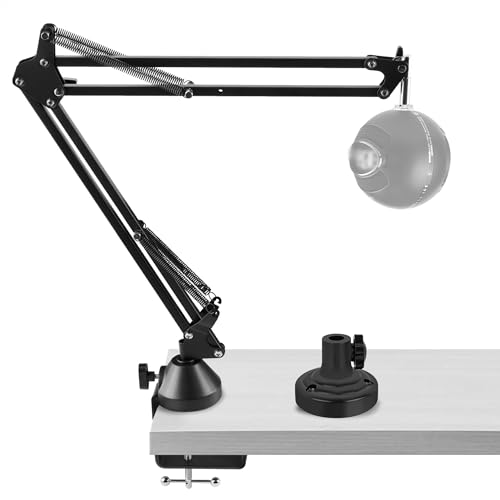
- 28.7-inch reach with a 2.5-pound microphone capacity
- Includes C-clamp and desktop flange mounting options
- Supports accessories such as shock mounts, pop filters, and webcams
Best For: Microphone-focused creator setups with multiple accessories
Low-Profile Stability – FIFINE BM88 Boom Arm
For content creators comparing desk boom arms for content creators, the FIFINE BM88 emphasizes a clean, low-profile setup that stays below the monitor while leaving desktop space open. Its metal construction, cable management, broad adjustment range, and included thread adapters make it a practical option for streaming, podcasting, and recording.
Best For: Streamers and podcasters who want a sturdy, monitor-friendly microphone arm.
Pros:
- Low-profile design can extend beneath the bottom of a monitor.
- Metal construction and a clamp designed to resist slipping help support a stable setup.
- Offers 29 inches of reach, 220 degrees of vertical adjustment, and 360 degrees of horizontal rotation.
- Includes cable management and 1/4-inch, 3/8-inch, and 5/8-inch thread options.
Cons:
- The clamp fits desks from 0.8 to 2.4 inches thick, so desk compatibility should be checked.
- The microphone is not included.
- The section nearest the C-clamp cannot be adjusted vertically.
The BM88 is a strong fit when stability and an unobstructed monitor view matter more than an especially compact arm. Confirm your desk thickness and microphone mounting needs before choosing it.
Multi-Device Flexibility – NEEWER UA057 Magic Arm
The NEEWER UA057 takes a different approach to desk boom arms for content creators by supporting cameras, phones, webcams, microphones, and compact lights. Its 22-inch articulating arm, dual ball heads, and super clamp suit creators who regularly change angles or devices for streaming, calls, overhead shots, and podcasts.
Best For: Creators who need one adjustable desk arm for lightweight cameras, phones, webcams, or microphones.
Pros:
- Supports several device types up to 500 grams or 17.6 ounces.
- Two 360-degree ball-head adapters provide flexible positioning.
- Clamp fits flat surfaces up to 2 inches thick or round objects up to 1.6 inches in diameter.
- Anti-twist pins and nonslip clamp pads help reduce unwanted movement and scratching.
Cons:
- The listed 500-gram capacity limits it to lighter devices.
- It is a general-purpose magic arm rather than a dedicated microphone boom arm.
- Phone and camera accessories may require checking fit and compatibility before use.
The UA057 is appealing for flexible content stations where a microphone is only one of several devices being mounted. It is best suited to lightweight gear and frequent repositioning rather than heavy camera equipment.
Heavy-Duty Mic Support – InnoGear MU01 Mic Boom Arm
For creators seeking desk boom arms for content creators with a traditional microphone focus, the InnoGear MU01 combines steel construction with a 1.5-kilogram load rating. Its adjustable joints, fold-away design, and included microphone clip and adapter make it suited to gaming, streaming, and recording setups.
Best For: Users who need a durable microphone arm for compatible dynamic microphones and heavier microphones.
Pros:
- Steel construction and a 3.3-pound/1.5-kilogram capacity provide substantial support.
- Offers 360-degree base rotation, 135-degree back-and-forth extension, and 180-degree vertical arm movement.
- Folds away for more compact storage when not in use.
- Includes a standard microphone clip and a 5/8-inch-to-3/8-inch adapter.
Cons:
- The clamp is intended for flat, squared desk edges up to 2 inches thick.
- A shock mount is not included.
- Microphone compatibility still depends on the included clip, adapter, or an additional mount.
The MU01 is a sensible choice when load capacity and a familiar scissor-arm layout are priorities. Check that your desk edge is flat and that your microphone or shock mount matches the available connection.
Overhead Shooting Workspace – CACENCAN 3-Section Desk Arm
The CACENCAN overhead arm expands the role of desk boom arms for content creators beyond microphones, positioning cameras, phones, webcams, and compact lights above a workspace. Its three-section design, 360-degree ball head, and padded C-clamp are useful for tutorials, product photography, drawing demonstrations, and hand-cam video.
Best For: Creators making overhead tutorials, unboxing videos, tabletop demonstrations, and webcam content.
Pros:
- Creates an overhead shooting position while keeping hands free.
- Includes a 1/4-inch screw, phone holder, and 360-degree ball head.
- Padded C-clamp fits suitable desk edges from 0.5 to 2.1 inches thick.
- Three arm sections allow adjustable placement for compatible cameras, webcams, and lights.
Cons:
- Camera, webcam, light, and phone compatibility should be verified before installation.
- Mounted gear should be supported while adjusting joints and tightened before recording.
- The light and other recording devices are sold separately.
This arm is more useful for visual content than for a dedicated microphone setup. It makes the most sense for creators who need repeatable top-down angles and have lightweight, tripod-ready equipment.
Complete RGB Mic Kit – TONOR TC310+ Gaming Microphone Set
For creators who want desk boom arms for content creators without assembling a separate audio setup, the TONOR TC310+ combines a USB condenser microphone, metal boom arm, shock mount, pop filter, and desk clamp. It adds tap-to-mute, gain control, and adjustable RGB lighting for streaming and gaming workflows.
Best For: Streamers and content creators who want an all-in-one USB microphone and boom arm package with visual lighting effects.
Pros:
- Complete kit includes the microphone, arm, shock mount, pop filter, USB cable, and stand.
- Tap-to-mute and rotating gain control make quick audio adjustments convenient.
- Four RGB modes and adjustable brightness add customizable desk lighting.
- Adjustable joints help position the microphone around a desk and monitor.
Cons:
- The clamp fits desks no thicker than 2.36 inches.
- It uses a USB connection and is designed around a single-channel setup.
The TC310+ is a practical choice when you need both a microphone and arm in one purchase. Its integrated controls and RGB features favor streaming-focused desks, while the included accessories reduce setup decisions.
Overhead Creator Mount – K&F CONCEPT 22-Inch Magic Arm Clamp Kit
The K&F CONCEPT 22-inch magic arm is a flexible option for creators comparing desk boom arms for content creators across cameras, phones, lights, and microphones. Its super clamp supports flat surfaces up to 50 mm or cylindrical objects from 20 to 60 mm, while three 360-degree ball heads enable overhead and multi-angle positioning.
Best For: Creators who need a versatile overhead mount for phones, action cameras, lights, or compact microphones in static shooting setups.
Pros:
- Supports phones, action cameras, LED lights, microphones, and other compatible devices.
- Three 360-degree ball heads provide flexible positioning.
- All-metal construction, anti-twist pins, and silicone pads improve stability.
- Clamp accepts flat or cylindrical surfaces and includes 1/4-inch and 3/8-inch threads.
Cons:
- Its maximum supported load is 1 kg (2.2 lb).
- It is designed for static scenes rather than dynamic outdoor activities.
- The included components are a magic arm and super clamp; phone and action-camera adapters are listed as compatible accessories.
This kit is better suited to camera and overhead content work than to a dedicated microphone-only setup. Its broad mounting compatibility and clamp range make it useful when your desk rig changes from one device to another.
Low-Profile Mic Arm – InnoGear MU-LP26 Boom Arm
For creators comparing desk boom arms for content creators, the InnoGear MU-LP26 emphasizes a tidy, under-monitor profile without giving up reach. The alloy-steel arm extends to 25.6 inches, rotates 360 degrees horizontally, and supports microphones or compatible accessories weighing up to 3.3 pounds.
Best For: Streamers, podcasters, and home-recording users who want a discreet microphone arm with broad adjustment and a sturdy clamp.
Pros:
- Low-profile design can tuck beneath a monitor to reduce visual clutter.
- Offers 360-degree horizontal rotation and 250-degree vertical adjustment.
- Supports up to 3.3 pounds and uses a solid alloy-steel construction.
- Adapters support 3/8-inch, 5/8-inch, and 1/4-inch accessories, with a clamp that also works as a headphone hook.
Cons:
- The C-style clamp fits desks up to 2.75 inches thick.
- The microphone, webcam, or ring light is not included.
- Its maximum height is listed as 12.2 inches, so vertical positioning may be limited for some layouts.
The MU-LP26 is a strong fit when desk space and monitor visibility matter. Its higher weight capacity and included adapters make it more flexible than a microphone-only arm, provided your desk thickness is within the clamp’s limit.
Best Versatile Camera Boom – JEBUTU Overhead Desk Mount
If you need desk boom arms for content creators that can handle more than a microphone, the JEBUTU overhead mount offers a flexible tabletop setup for cameras, lights, projectors, and other 1/4-inch-compatible gear. Its detachable sections, broad angle adjustment, and reinforced clamp make it useful for overhead filming, streaming, podcasting, and online meetings.
Best For: Creators who need an adjustable overhead arm for cameras, lights, webcams, or projectors.
Pros:
- Three detachable extension poles adjust the height from 14.76 to 41.14 inches.
- Each section adjusts left and right for up to 360 degrees of overall positioning.
- Supports up to nearly 6.6 pounds while weighing 2.2 pounds itself.
- Adjustable C-clamp fits surfaces up to 1.96 inches thick and includes a protective rubber pad.
Cons:
- Designed around 1/4-inch screw-compatible equipment rather than dedicated microphone mounts.
- The clamp and multiple extension sections may require more setup than a compact arm.
Choose this model when reach and equipment versatility matter most. It is particularly practical for overhead shots and tabletop content where a standard microphone arm would be too limited.
Best Heavy-Duty Pick – Aokeo AK-58i Desk Boom Arm
The Aokeo AK-58i is a sensible choice among desk boom arms for content creators who want a stable microphone position without a prominent arm blocking the workspace. Its low-profile design, cable-hiding arm, and broad thread compatibility suit gaming, podcasting, recording, and streaming desks.
Best For: Streamers and podcasters who prioritize a discreet, stable microphone arm.
Pros:
- Low center of gravity is designed to reduce shaking and unwanted movement.
- Both arms rotate 360 degrees, while the microphone arm swings 180 degrees up and down.
- Supports microphones or shock mounts weighing up to 2 kilograms.
- Includes 3/8-to-1/4-inch and 3/8-to-5/8-inch adapters for broad compatibility.
Cons:
- Fits tables less than 7 centimeters thick, which may exclude some thicker desks.
- Its listed maximum height is 30 centimeters, limiting vertical reach compared with taller boom arms.
- The microphone is not included.
This arm is a strong fit for a clean, screen-friendly setup. Its low-profile routing and cable management are useful when you want the microphone positioned close to the desk without adding much visual clutter.
Best Accessory-Friendly Mic Arm – GEEKRIA for Creators Mic Boom Arm
The GEEKRIA for Creators arm is one of the more accessory-ready desk boom arms for content creators. It combines a 28.7-inch reach with a C-clamp and desktop flange mount, while its friction hinges are designed for quiet positioning of compatible microphones and add-ons such as shock mounts, pop filters, cables, and webcams.
Best For: Blue and Logitech microphone users who want flexible mounting and accessory support.
Pros:
- Reaches 28.7 inches and supports microphones up to 2.5 pounds.
- Included C-clamp fits desks up to 2.4 inches thick and swivels 360 degrees.
- Friction hinges enable easy, silent positioning.
- Includes both C-clamp and desktop flange mounts plus 1/4-to-5/8-inch adapters.
Cons:
- Its 1.13-kilogram weight limit is lower than the Aokeo model’s stated capacity.
- The longer arm and included mounting hardware may take more space than a low-profile design.
- Compatibility is focused on microphones and accessories rather than general camera mounting.
This is a versatile pick for creators building a microphone-centered desk setup. The dual mounting options and accessory support give it an advantage when you plan to add filters, shock mounts, cable ties, or a webcam around the same arm.
How We Picked the Best Desk Boom Arms for Content Creators
We focused on the features that matter during regular recording: desk stability, arm reach, adjustment range, compatibility, cable management, and ease of installation. The selection includes microphone boom arms for popular USB microphones, overhead camera mounts for top-down filming, and complete microphone kits for creators who want a more straightforward setup.
Because desks and recording styles vary, we also considered mounting footprint and positioning flexibility. A low-profile arm may suit a compact workstation, while a multi-section articulating arm is more useful for overhead shots or devices that need frequent repositioning.
Quick Comparison
- Best for low-profile microphone setups: InnoGear Low Profile and Aokeo AK-58i arms.
- Best for general USB microphone compatibility: InnoGear standard arm and GEEKRIA microphone arm.
- Best for overhead camera recording: NEEWER UA057, K&F CONCEPT, and the 3-section camera mounts.
- Best all-in-one option: TONOR’s gaming microphone set with boom arm.
Key Buying Factors for Desk Boom Arms for Content Creators
Microphone or Camera Compatibility
Check the thread size, included adapters, and stated compatibility before buying. Microphone arms typically use a standard mounting thread or shock-mount connection, while camera arms usually need a 1/4-inch screw and may include a ball head or phone holder.
Weight Capacity and Stability
Heavy microphones, cameras, lights, and phones can cause an arm to sag if the springs or joints are not designed for the load. A sturdy C-clamp and reinforced joints are especially important for overhead equipment. Confirm that your desk is thick enough for the clamp and has a solid edge free from obstructions.
Reach, Rotation, and Workspace
Measure the distance from the clamp to your preferred recording position. Low-profile arms keep equipment out of the way, while longer, multi-section arms provide more reach but require additional clearance. Look for 360-degree rotation or adjustable joints if you need to switch between seated, standing, and overhead positions.
Cable Management and Noise
Integrated channels, clips, or a tidy routing path help prevent cables from catching on the arm. For microphones, choose a design that moves smoothly and minimizes desk vibration; tightening every joint securely can reduce unwanted movement during recording.
Who Should Buy Which Desk Boom Arms for Content Creators?
Streamers and podcasters should prioritize a stable microphone arm with smooth positioning and enough clearance for their keyboard and monitor. Compact desk users will generally prefer a low-profile model. Overhead video creators should choose an articulating camera arm with a secure 1/4-inch mount, broad adjustment range, and a strong clamp. Beginners may save time with the TONOR kit, which combines a USB microphone and boom arm in one package. If you frequently change equipment, choose a versatile arm with standard threads and a higher stated load capacity.
