
The right desk boom arm makes a microphone easier to position, keeps your workspace less cluttered, and helps beginners achieve a more consistent recording setup. The best choice depends on your microphone’s weight, your desk space, and how often you reposition the arm.
We selected 10 options ranging from compact low-profile models to heavier-duty arms with adjustable tension, shock mounts, and broad microphone compatibility.
Best 10 Desk Boom Arms for Beginners Picks for 2026
Best Low-Profile Stability
Aokeo AK-58i Low Profile Mic Arm

- Low-profile design helps keep the arm out of the way.
- Supports microphones and mounts up to 2 kg.
- Includes common thread adapters and cable management.
Best For: Beginners who want a stable, unobtrusive setup
Best Quiet Premium Arm

- Internal spring damping helps minimize handling noise.
- Rotates 360 degrees with full extension.
- Supports 0.25- to 1.2-kg microphones on desks up to 70 mm thick.
Best For: New podcasters and streamers prioritizing quiet operation
Best Starter Bundle
InnoGear MU059 Mic Boom Arm Set

- Includes arm, pop filter, shock mount, adapters, and cable ties.
- Clamp fits desktops up to 2 inches thick.
- Supports microphones up to 1.5 kg.
Best For: Beginners who want accessories included in one kit
Best Height and Flexibility
IXTECH VALIANT Microphone Boom Arm
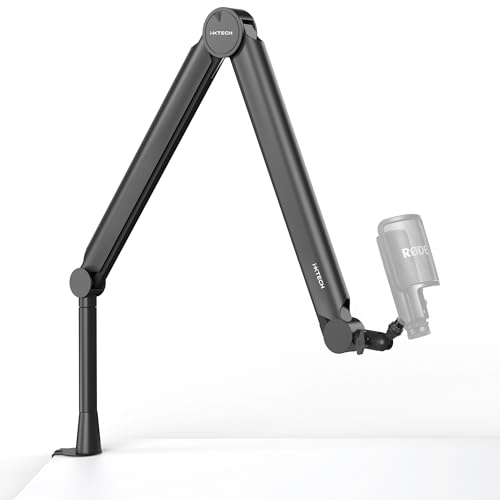
- Offers a 25.5-inch arm with extra height for tall monitors.
- Rotates 360 degrees and includes cable management.
- Supports up to 1 kg with C-clamp and grommet mounting options.
Best For: Beginners needing extra reach or a taller microphone position
Best QuadCast Compatibility

- Dual suspension springs support steady positioning
- Includes 3/8-inch-to-5/8-inch adapter
- Clamp fits desks up to 1.89 inches thick
Best For: Beginners with Blue Yeti, HyperX QuadCast, or similar microphones
Best Beginner Audio Extras
Amazon Basics 14-Inch Boom Arm

- Includes pop filter and foam windscreen
- Adjustable tension supports standard microphones
- Clamp fits desks up to 2 inches thick
Best For: Beginners wanting an arm with basic recording accessories
Best for Small Desks
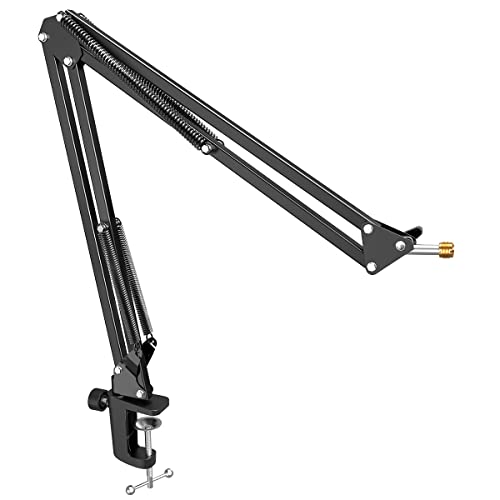
- Foldable design saves desk space
- Offers 180-degree vertical adjustment
- Metal clamp fits desks up to 2 inches thick
Best For: Beginners with limited workspace or portable recording needs
Heavy-Duty Stability Pick
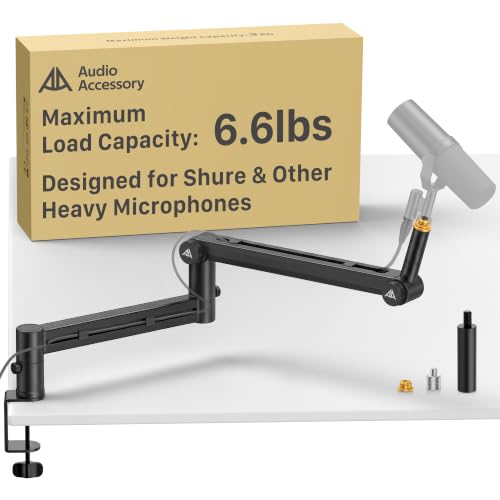
- Supports microphones up to 6.6 pounds
- Gear-lock design helps prevent sagging
- 780 mm reach with cable channels
Best For: Beginners with heavier studio microphones
Beginner-Friendly Value Pick

- Supports microphones up to 2.2 pounds
- Clamp fits desks up to 2.2 inches thick
- Includes adapter, clip, and cable straps
Best For: Lightweight podcasting and streaming microphones
Stable Desktop Alternative
CAHAYA Weighted-Base Boom Stand

- 4.4-pound weighted base with foam pads
- Converts between boom and straight stand
- Includes two clips and a 3/8-inch to 5/8-inch adapter
Best For: Beginners who prefer a freestanding desktop stand
Best Low-Profile Stability – Aokeo AK-58i Low Profile Mic Arm
For beginners comparing desk boom arms for beginners, the Aokeo AK-58i is a practical low-profile option that prioritizes stability and a clean workspace. Its metal construction supports up to 2 kg, while the adjustable arms make positioning straightforward.
Best For: Gamers, streamers, and new podcasters who want a stable arm that stays mostly below the monitor.
Pros:
- Low center of gravity helps reduce shaking and shifting.
- 360-degree arm rotation and 180-degree vertical movement provide flexible positioning.
- Includes 3/8-to-1/4-inch and 3/8-to-5/8-inch adapters.
- Integrated cable concealment reduces desktop clutter.
Cons:
- Fits desks less than 7 cm thick, which may exclude some larger desktops.
- Microphone is not included.
The AK-58i is an approachable choice when stability and minimal visual distraction matter more than maximum reach. Its 2 kg capacity also gives beginners room to use many common microphones and shock mounts.
Best Quiet Premium Arm – RØDE PSA1+ Studio Boom Arm
Among desk boom arms for beginners, the RØDE PSA1+ stands out for quiet operation and polished cable management. Its internal spring damping is designed to reduce creaks and handling noise when you reposition the microphone during recording.
Best For: Beginners who want a refined podcasting or streaming setup and value quiet adjustments.
Pros:
- Internal spring damping supports quiet repositioning during recordings.
- 360-degree rotation and full extension offer broad positioning flexibility.
- Clamps to desks up to 70 mm thick.
- Supports microphones from 0.25 to 1.2 kg and includes thread adapters.
Cons:
- Its 1.2 kg weight capacity is lower than some competing arms.
- The microphone and shock mount are not listed as included components.
The PSA1+ is a strong fit for beginners who are ready to invest in quieter, more controlled microphone movement. Its weight range should be checked carefully against your microphone and accessories.
Best Starter Bundle – InnoGear MU059 Mic Boom Arm Set
If you want desk boom arms for beginners with several accessories included, the InnoGear MU059 is a convenient starter bundle. It combines the arm with a pop filter, shock mount, cable ties, adapters, and a desk clamp, reducing the need to shop for basic add-ons separately.
Best For: First-time streamers and home recordists who want an all-in-one microphone mounting kit.
Pros:
- Includes a pop filter, shock mount, adapters, and five cable ties.
- Extra-strong springs are designed to reduce dropping, shaking, and noise.
- Clamp adjusts for desktops up to 2 inches thick.
- Supports up to 1.5 kg and fits 3/8- and 5/8-inch threading.
Cons:
- The included shock mount is not designed to fit Blue Yeti.
- Its 1.5 kg capacity may limit heavier microphone and accessory combinations.
The MU059 offers particularly good convenience for a beginner building a setup from scratch. Confirm the shock-mount fit for your exact microphone, especially if you use a Blue Yeti.
Best Height and Flexibility – IXTECH VALIANT Microphone Boom Arm
The IXTECH VALIANT is one of the more flexible desk boom arms for beginners, offering a 25.5-inch arm, 360-degree adjustment, and extra height for setups with taller monitors. Its stabilization system and dual springs are intended to help the microphone hold position while recording.
Best For: Beginners with elevated monitors or desks who need extra reach and flexible positioning.
Pros:
- 25.5-inch arm and additional 5.9-inch section provide extra height.
- 360-degree adjustment supports flexible microphone placement.
- Dual suspension springs support microphones up to 1 kg.
- Includes cable management, a C-clamp, and a grommet mounting option.
Cons:
- The stated 1 kg capacity may limit heavier microphone setups.
- Manufacturer warranty is listed as 90 days.
The VALIANT is a useful choice when standard boom arms do not provide enough height or reach. Its two mounting options add setup flexibility, but beginners should stay within the 1 kg weight recommendation.
Best QuadCast Compatibility – Compact SUNMON Boom Arm
If you are comparing desk boom arms for beginners and use a Blue Yeti, HyperX QuadCast, or a similar microphone, this SUNMON arm offers a straightforward setup. Its reinforced knobs, dual suspension springs, and included 3/8-inch-to-5/8-inch adapter make positioning relatively simple.
Best For: Beginners using Blue Yeti, HyperX QuadCast, SoloCast, Fifine, Shure, Rode, or other compatible microphones.
Pros:
- Dual suspension springs and reinforced knobs help reduce shaking and unwanted movement.
- Includes a pre-installed 3/8-inch-to-5/8-inch adapter for broad microphone compatibility.
- Desk clamp fits surfaces up to 1.89 inches thick and includes protective sponge padding.
Cons:
- Microphone is not included.
- The clamp supports desks only up to 1.89 inches thick.
- Beginners may need to loosen and retighten the knob when setting the arm angle.
For a beginner-friendly arm focused on popular USB microphones, the SUNMON is a practical pick. Its compatibility and included adapter are especially useful, though desk thickness should be checked before ordering.
Best Beginner Audio Extras – Amazon Basics 14-Inch Boom Arm
Among desk boom arms for beginners, this Amazon Basics model stands out for including a pop filter and windscreen alongside the arm. Adjustable tension helps accommodate standard microphones, but you will need to tune it to the microphone’s weight and position.
Best For: Beginners with standard microphone setups who want basic plosive and wind-noise accessories included.
Pros:
- Includes a dual-layer pop filter and foam windscreen for improved recording clarity.
- Adjustable tension allows the arm to be tuned for different microphone weights.
- Clamp fits desks up to 2 inches thick and supports 3/8-inch and 5/8-inch connections.
Cons:
- Heavier microphones, shock mounts, or accessories may affect performance.
- Fully extended or unevenly loaded positions may require additional tension adjustment.
- Incorrect tension can cause upward movement or difficulty holding position.
This is a sensible starting point if you want a complete beginner setup rather than an arm alone. Its stability depends on careful clamp installation, tension adjustment, and balanced microphone placement.
Best for Small Desks – FIFINE CS1 Scissor Boom Arm
For beginners comparing desk boom arms for beginners, the FIFINE CS1 offers a compact, foldable design with broad movement and a reinforced clamp. Its 180-degree vertical adjustment and included adapter make it easy to bring a compatible microphone closer for gaming, streaming, or recording.
Best For: Beginners with limited desk space who need a foldable arm for gaming, streaming, podcasting, or voice recording.
Pros:
- Foldable design helps save desktop space and makes the arm easier to transport.
- Provides 180-degree up-and-down adjustment and a wide range of motion.
- Upgraded metal clamp includes an anti-scratch pad, fixed knob, and opening up to 2 inches.
Cons:
- Microphone is not included.
- The clamp is intended for desks 2 inches thick or less.
- Compatibility is described through the included 3/8-inch-to-5/8-inch adapter, so the microphone connection should be checked first.
The CS1 is a strong practical option when workspace and portability matter. Its foldable construction and stable clamp suit beginners, while the 2-inch desk limit remains an important installation check.
Heavy-Duty Stability Pick – Low-Profile Gear-Lock Mic Arm
For beginners shopping for desk boom arms for beginners, this low-profile model is a strong choice when microphone weight and long-term stability matter. Its gear-lock mechanism, 6.6-pound capacity, and tool-free adjustments make positioning straightforward while helping prevent sagging.
Best For: Beginners using heavier microphones such as the Shure SM7B, Shure MV7, RODE PodMic, or Blue Yeti.
Pros:
- Supports microphones up to 6.6 pounds with reinforced aluminum-alloy arms.
- Gear-lock design is built to resist sagging over time.
- Extra-long 780 mm reach with 360-degree horizontal and 120-degree vertical adjustment.
- Deep cable channels help route multiple cables neatly.
Cons:
- Its 1.63 kg construction is heavier than a basic entry-level arm.
- The low-profile design may require checking desk clearance before installation.
This is the most capable option here for beginners who want a sturdy arm that can accommodate heavier studio microphones. The generous reach and broad compatibility add flexibility, while the gear-lock system prioritizes stability over a lightweight setup.
Beginner-Friendly Value Pick – MAONO BA20 Metal Boom Arm
The MAONO BA20 is a practical starting point for anyone comparing desk boom arms for beginners. Its steel construction, simple knob adjustments, included clip, and 2.2-pound capacity cover common podcasting, gaming, and streaming setups without adding unnecessary complexity.
Best For: Beginners using lightweight microphones for podcasts, gaming, streaming, or recording.
Pros:
- Steel arm supports microphones up to 2.2 pounds.
- Wider clamp fits desks up to 2.2 inches thick and includes a protective rubber pad.
- Includes a 3/8-inch to 5/8-inch adapter, microphone clip, and cable straps.
- Knob-based adjustments allow straightforward positioning.
Cons:
- Not intended for microphones weighing more than 1 kg.
- May not work with glass tables.
- Its 70 cm maximum height is shorter than the longest arm in this group.
The BA20 offers the easiest all-around entry point for a typical lightweight microphone. Confirm your microphone stays within the 2.2-pound limit and that your desk is compatible with the clamp for the best results.
Stable Desktop Alternative – CAHAYA Weighted-Base Boom Stand
For beginners who prefer a freestanding setup, the CAHAYA is a useful alternative to clamp-mounted desk boom arms for beginners. Its 4.4-pound weighted base, counterweight, and foam pads provide desktop stability, while the detachable boom converts the stand into a straight microphone stand.
Best For: Beginners who want a stable desktop stand that can also be used as a straight mic stand.
Pros:
- Weighted A-frame base and foam pads help improve stability and protect the desk.
- Counterweight supports up to 8.8 pounds with the arm half-extended.
- Detachable boom arm creates a 2-in-1 boom or straight stand.
- Includes two microphone clips and a 3/8-inch to 5/8-inch adapter.
Cons:
- The boom extends only up to 10.2 inches, limiting reach compared with full desk arms.
- Maximum height is 13 inches.
- The weighted base occupies more desk space than a clamp mount.
This CAHAYA stand makes sense when you want stability without clamping anything to the desk. It is especially versatile for meetings, interviews, podcasts, and other desktop or floor applications, though its compact boom reach is better suited to close-range positioning.
How We Picked the Best Desk Boom Arms for Beginners
We focused on the features that matter most when setting up a microphone for the first time: stable desk mounting, straightforward adjustment, useful reach, microphone compatibility, and value. We also considered whether an arm is suitable for common beginner microphones such as the Blue Yeti, HyperX QuadCast, FIFINE models, Elgato Wave, and standard handheld or studio microphones.
Because desk layouts vary, this list includes low-profile arms, scissor-style suspension arms, and stronger models designed for heavier microphones. Accessories such as shock mounts, pop filters, and thread adapters were also considered where included.
Quick Comparison
| Best For | What to Look For |
|---|---|
| Small desks | Low-profile design and compact clamp |
| Heavy microphones | High load capacity and locking tension |
| Frequent repositioning | Smooth joints and strong spring or friction control |
| First-time setups | Simple clamp, broad compatibility, and included adapters |
| Podcasting or streaming | Quiet movement, sufficient reach, and cable management |
Key Buying Factors for Desk Boom Arms for Beginners
Microphone Weight and Compatibility
Check the arm’s stated weight capacity before buying. A microphone may become significantly heavier when paired with a shock mount, pop filter, or adapter. Confirm the thread size as well; many arms use 3/8-inch or 5/8-inch fittings, while adapters may be required for specific microphones.
Desk Clamp and Available Space
Measure your desk thickness and inspect the area where the clamp will sit. A sturdy clamp helps prevent movement, while a low-profile arm can preserve monitor space and reduce visual clutter. Avoid mounting directly to a fragile or hollow desktop edge.
Reach, Movement, and Tension
Choose an arm with enough horizontal and vertical reach to place the microphone near your mouth without blocking your screen. Adjustable tension is useful for balancing different microphones, and smoother joints make repositioning easier during calls, streams, or recordings.
Cable Management and Included Accessories
Integrated clips or channels help keep the cable away from your keyboard and reduce strain at the microphone connector. A bundled shock mount, pop filter, or thread adapter can also improve the overall value, but verify that the included accessory fits your microphone.
Who Should Buy Which Desk Boom Arms for Beginners?
Beginners with limited desk space should prioritize a low-profile arm. If you use a heavier USB or XLR microphone, choose a model with a clearly stated higher load rating and secure tension control. Streamers and podcasters who reposition their microphone often should look for smooth joints and dependable clamp hardware. If you want the simplest setup, select an arm with broad compatibility and included adapters or a shock mount.
Before buying, compare the arm’s capacity with your complete microphone setup—not just the microphone alone. That single check helps prevent sagging and makes the best Desk Boom Arms for Beginners easier to identify.
