
The right controller charging dock keeps gamepads powered, organized, and ready without adding another loose cable to your desk. That matters even more in a home office, where limited workspace must serve both work and play.
We selected 10 charging stations for different consoles and needs, including compact single-controller docks, dual charging stands, rechargeable battery solutions, and models designed to double as desktop displays.
Best 10 Controller Charging Docks for Remote Work Picks for 2026
Best DualSense Twin Dock

- Charges two PS5 DualSense controllers
- Includes AC adapter and charging indicator
- Officially licensed with a two-year warranty
Best For: PS5 users charging two controllers at a time
Best Multi-Platform Dock
PURBHE 6-in-1 Controller Charger

- Supports Joy-Cons, Switch Pro, and PS5 controllers
- Charges up to six controllers simultaneously
- Includes LED status and built-in protection
Best For: Multi-console setups with several controllers
Best Single DualSense Stand

- Dedicated stand for one DualSense controller
- Snap-down charging and display design
- Officially licensed with a two-year warranty
Best For: Compact PS5 workstations with one controller
Best Joy-Con Organizer
FASTSNAIL Switch Charging Dock

- Charges up to four Joy-Cons
- Individual LED charging indicators
- Lightweight storage and display stand
Best For: Switch users organizing multiple Joy-Cons
Fast Dual Charging
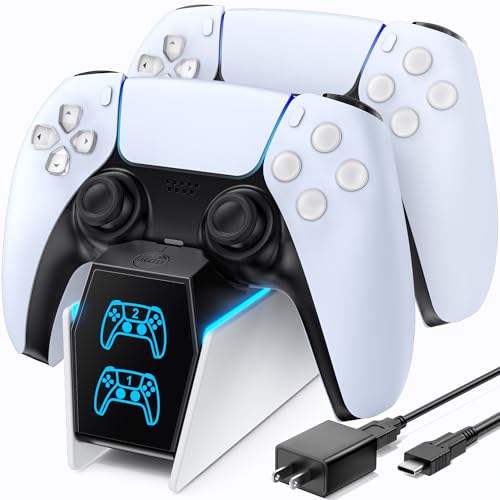
- Charges two PS5 controllers in about two hours
- Includes AC adapter and charging-status LEDs
- Adds tabletop storage with an on/off switch
Best For: PS5 users charging two controllers at a desk
Magnetic Xbox Setup

- Officially licensed for Xbox controllers
- Includes an 1100 mAh battery pack and two doors
- Uses magnetic charging with amber/white LEDs
Best For: Xbox users wanting a tidy licensed charging station
Flexible PS5 Charging
NEWDERY PS5 Dual Controller Dock
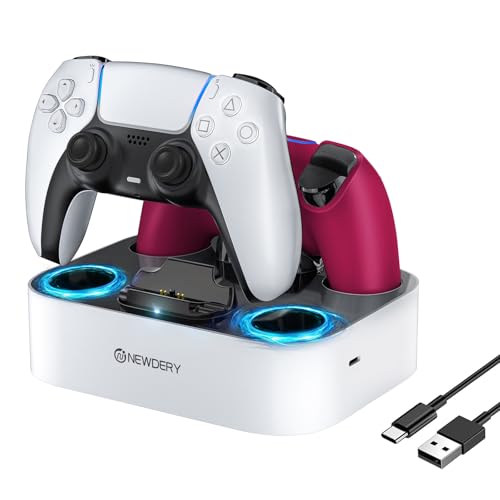
- Charges DualSense and Edge controllers together
- Includes a 3.3-foot USB charging cable
- Uses anti-slip mats and four organizing slots
Best For: PS5 desks needing flexible USB-powered charging
Xbox Dual-Dock Power Station
Long-Life Xbox Controller Charger

- Two 6200mWh rechargeable battery packs
- Supports official Xbox One and Series X|S controllers
- Red/green charging indicators with safety protection
Best For: Xbox users who want dual charging and extended battery life
PS4 Quick-Charge Dock
Compact DualShock 4 Charging Station

- Charges a PS4 controller in about 1.8 hours
- Works with console, PC, or wall USB power
- LEDs show charging and completion status
Best For: PS4 users who want a compact, fast USB charging dock
PS5 Dual-Charge Organizer
Self-Aligning DualSense Charging Dock
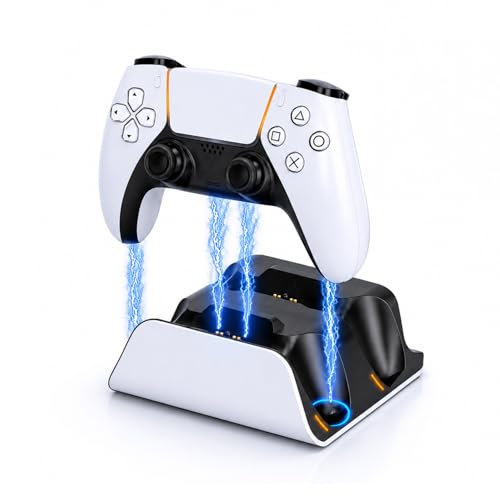
- Charges two PS5 controllers in up to about 2.5 hours
- Drop-and-charge self-aligning design
- Stable desktop stand with dual LED indicators
Best For: PS5 owners who need organized simultaneous controller charging
Best DualSense Twin Dock – PowerA Twin Charging Station
For remote work setups that also serve as gaming stations, the PowerA Twin Charging Station is a straightforward choice among controller charging docks for remote work. It charges and displays two PS5 DualSense controllers from a tabletop stand powered by an AC adapter.
Best For: PS5 owners who want to keep two DualSense controllers charged and neatly displayed between work sessions.
Pros:
- Charges two DualSense wireless controllers simultaneously.
- Simple charging design with a compact tabletop form.
- Includes an AC adapter and charging indicator.
- Officially licensed for PlayStation 5 and backed by a two-year limited warranty.
Cons:
- Designed for DualSense controllers rather than a range of controller types.
- Uses corded AC power, so it needs a nearby outlet.
This is a practical dual-controller dock when tidy desk organization and official PS5 compatibility matter more than multi-platform flexibility.
Best Multi-Platform Dock – PURBHE 6-in-1 Controller Charger
The PURBHE dock is one of the more versatile controller charging docks for remote work, supporting Nintendo Switch Joy-Cons, Switch Pro controllers, and PS5 DualSense controllers. Its multiport design can charge up to four Joy-Cons plus two Pro or PS5 controllers at the same time.
Best For: Households or desks with several Nintendo and PlayStation controllers that need one shared charging station.
Pros:
- Supports Joy-Cons, Switch Pro controllers, and PS5 DualSense controllers.
- Can charge four Joy-Cons and two Pro or PS5 controllers simultaneously.
- Offers USB-C input, LED charging status, and multiple power options.
- Includes overcharge, over-voltage, over-current, and short-circuit protection.
Cons:
- Controllers are not included.
- Requires a USB power source or wall charger rather than operating independently.
- Comes with a one-year quality promise, shorter than some competing options.
Its broad compatibility and six-controller capacity make it a strong organization-focused option, provided you already have the required controllers and USB power source.
Best Single DualSense Stand – PowerA Solo Charging Station
The PowerA Solo Charging Station keeps a single PS5 controller ready without taking much room on a work desk. As controller charging docks for remote work go, its snap-down design is especially simple: place the DualSense controller on the stand to charge and display it.
Best For: Individual PS5 players who need a compact, dedicated charging stand for one DualSense controller.
Pros:
- Officially licensed for charging a DualSense wireless controller.
- Snap-down charging design is easy to use.
- Charges and displays the controller in a compact tabletop format.
- Includes a two-year limited warranty.
Cons:
- Charges only one controller at a time.
- Designed for Sony DualSense controllers rather than multi-platform use.
- Uses a wired connection and requires a suitable power source.
This stand is a sensible minimalist pick for a single-controller workstation, especially when desk space matters more than charging capacity.
Best Joy-Con Organizer – FASTSNAIL Switch Charging Dock
The FASTSNAIL Switch Controller Charging Dock combines charging and storage for Nintendo Switch Joy-Cons. It fits naturally into a remote-work desk setup by keeping up to four Joy-Cons organized, with individual LED indicators showing their charging status.
Best For: Nintendo Switch and Switch OLED owners who want a lightweight Joy-Con charging and display stand.
Pros:
- Charges up to four Joy-Cons simultaneously.
- Slide-in design supports simple plug-and-play operation.
- Individual LED indicators show charging status.
- Lightweight, portable stand with short-circuit protection.
Cons:
- Joy-Cons are not included.
- Designed for Joy-Cons rather than Switch Pro or PS5 controllers.
- Includes a 180-day warranty.
For a Switch-focused desk, this dock offers useful capacity and visible charging status while also serving as a dedicated storage stand.
Fast Dual Charging – OIVO PS5 Controller Dock
If you need controller charging docks for remote work and gaming, the OIVO PS5 dock is a practical choice for keeping two compatible controllers powered and stored in one place. Its included AC adapter supports fast dual charging, while the tabletop design helps reduce cable clutter around your desk.
Best For: PS5 users who want to charge and organize two DualSense or DualSense Edge controllers together.
Pros:
- Charges up to two PS5 controllers in about two hours.
- Includes a dedicated AC power adapter for charging performance.
- Provides charging-status LEDs and an on/off switch.
- Stores two controllers in a compact tabletop stand.
Cons:
- Designed specifically for PS5-compatible controllers.
- Requires the included corded power setup rather than battery operation.
With dual-controller capacity, status lighting, and an included adapter, this dock suits a desk where controllers need to stay ready without occupying much space.
Magnetic Xbox Setup – 8BitDo Xbox Charging Dock
For controller charging docks for remote work, the officially licensed 8BitDo Xbox dock combines charging with a dedicated storage compartment. Its magnetic connection is designed for Xbox Series X|S and Xbox One wireless controllers, making it easy to return the controller to a consistent charging position between sessions.
Best For: Xbox users who prefer a licensed, compact dock with magnetic charging and a rechargeable battery pack.
Pros:
- Compatible with Xbox Series X|S and Xbox One wireless controllers.
- Uses magnetic secure charging for straightforward placement.
- Includes an 1100 mAh rechargeable battery pack and two battery doors.
- LED changes from amber while charging to white when full.
Cons:
- Limited to compatible Xbox wireless controllers.
- Uses a single included rechargeable battery pack.
The 8BitDo dock is a neat desk-friendly option when you want Xbox compatibility, visible charging feedback, and a built-in place to keep the controller and related accessories.
Flexible PS5 Charging – NEWDERY PS5 Dual Controller Dock
The NEWDERY dock is a useful option among controller charging docks for remote work because it can connect through the included USB cable to a PS5 console, laptop, or adapter. It supports simultaneous charging for PS5 DualSense and DualSense Edge controllers while keeping them arranged on a stable stand.
Best For: PS5 users who want flexible USB power and simultaneous charging for DualSense and DualSense Edge controllers.
Pros:
- Charges DualSense and DualSense Edge controllers simultaneously.
- Fully charges controllers in about 2.5 hours when used with a 5V/3A adapter.
- Includes a 3.3-foot USB Type-C charging cable.
- Uses anti-slip mats and four slots to help keep controllers organized.
Cons:
- Controllers should be used without skins or cases while charging.
- A suitable 5V/3A adapter is required for the stated charging setup.
Its included cable and multiple placement slots make the NEWDERY a convenient choice for a workstation that needs flexible power connections and orderly PS5 controller storage.
Xbox Dual-Dock Power Station – Long-Life Xbox Controller Charger
For Xbox users building a remote-work gaming setup, this dual dock combines controller storage with two rechargeable battery packs. It supports official Xbox One and Xbox Series X|S wireless controllers and can provide an organized charging spot between work breaks.
Best For: Xbox One and Xbox Series X|S owners who want two high-capacity rechargeable battery packs and a visible charging-status display.
Pros:
- Includes two 6200mWh battery packs rated for approximately 18–25 hours of play time.
- Charges two battery packs at once and includes covers for compatible Xbox controller models.
- Uses red and green X-shaped LED indicators to show charging and standby or full-charge status.
- Includes protection against overcharging, over-current, overheating, and short circuits.
Cons:
- Compatible with official Xbox wireless controllers, not third-party controllers, Xbox 360, or Xbox Elite Series 2.
- Controllers are not included.
- Battery packs require about 4–5 hours to charge.
This is a practical controller charging dock for remote work if you use compatible Xbox hardware and want to avoid disposable AA batteries. Its dual-battery design is useful for keeping one set ready while another is in use, though compatibility should be checked before buying.
PS4 Quick-Charge Dock – Compact DualShock 4 Charging Station
This compact PS4 dock is a straightforward option for remote workers who want a dedicated place to charge a DualShock 4 controller between gaming sessions. It uses USB power from a PS4 console, computer, or wall source, although a wall adapter is not included.
Best For: PS4 owners seeking a simple tabletop charging station with fast charging and clear status lights.
Pros:
- Charges compatible PS4 controllers in approximately 1.8 hours.
- Can draw power from a PS4, PS4 Slim, PS4 Pro, PC, or wall power source.
- Front LED indicators show charging in red and completed charging in blue.
- Built-in protection covers overcharge, over-discharge, temperature, voltage, current, and circuit issues.
Cons:
- Wall adapter is not included.
- Designed for Sony PS4 controllers rather than PS5 or Xbox controllers.
- The package includes one charging station and one USB cable.
With a listed 1.8-hour charge time and simple USB connectivity, this dock fits neatly into a desk setup where quick controller turnaround matters. It is best suited to PS4 users who already have a suitable USB power source.
PS5 Dual-Charge Organizer – Self-Aligning DualSense Charging Dock
This PS5 charging dock is designed for an organized desktop or remote-work gaming corner, charging two DualSense controllers at the same time while keeping them upright. Its drop-and-charge design and status LEDs reduce cable handling when switching between work and play.
Best For: PS5 owners who need simultaneous charging for two controllers and a stable desktop organizer.
Pros:
- Charges two PS5 controllers simultaneously in as fast as 2.5 hours with a 5V/3A input.
- Self-aligning charging pins allow a drop-and-charge setup without plugging in each controller.
- Orange and blue LED indicators show charging and full or standby status.
- Anti-slip pads help keep the dock stable and reduce tipping or controller collisions.
Cons:
- A 5V/3A power adapter is recommended for optimal performance.
- Designed for PS5 controllers and is not presented as a multi-console dock.
- The listed warranty duration is 90 days.
This is a convenient controller charging dock for remote work setups that use two PS5 controllers. Its simultaneous charging and self-aligning design make it especially useful for a shared or frequently used gaming station, provided the appropriate power input is available.
How We Picked the Best Controller Charging Docks for Remote Work
We focused on docks that make a shared work-and-gaming desk easier to manage. Our shortlist considers console compatibility, charging configuration, cable and adapter requirements, docking stability, indicator lights, footprint, and whether the dock keeps controllers conveniently stored between sessions.
Because charging specifications vary by model, confirm the listed console and controller compatibility before buying. A dock designed for a standard PS5 DualSense, for example, may not support a DualSense Edge or another controller without an appropriate fit.
Quick Comparison
| Best For | Recommended Type | What to Look For |
|---|---|---|
| One primary controller | Single-controller dock | Small footprint and reliable alignment |
| Two-player setups | Dual charging station | Independent charging bays and stable base |
| Shared office and gaming desks | Display-style dock | Compact design, clear status lights, and tidy cable routing |
| Xbox users | Battery-pack charging dock | Included rechargeable packs and controller compatibility |
| Multiple consoles | Multi-platform charger | Support for each controller type and separate charging contacts |
Key Buying Factors for Controller Charging Docks for Remote Work
Compatibility and Charging Method
Check the exact console generation and controller model first. Some docks use direct contact points, while others charge through adapters, battery packs, or a supplied cable. A universal-looking design is not automatically compatible with every controller.
Desk Footprint and Stability
For remote work, prioritize a weighted or stable base that will not slide when you place a controller on it. Vertical stands can save space, while wider dual docks may be better for households with two frequently used controllers.
Charging Feedback and Speed
LED indicators are useful when the dock sits beside a monitor because they show whether a controller is charging or full at a glance. Advertised charging times depend on the controller, power adapter, battery condition, and whether the dock includes a suitable AC adapter.
Cable Management and Daily Convenience
A good dock reduces desk clutter rather than creating another cable problem. Look for included adapters where needed, accessible ports, secure alignment, and a design that lets you dock the controller one-handed.
Who Should Buy Which Controller Charging Docks for Remote Work?
Choose a single-controller dock if you mainly use one gamepad and want the smallest possible workstation footprint. A dual dock is the better choice for couch co-op, households with multiple users, or anyone who wants a spare controller ready.
PS5 owners should select a DualSense-compatible model and verify Edge support when relevant. Xbox users who dislike disposable batteries should consider a dock with rechargeable battery packs. Nintendo Switch owners should confirm whether the station supports Joy-Con, Pro Controller, or both. If your desk serves several consoles, choose a genuinely multi-platform model and compare its charging method for each device before purchasing.
