
A good controller charging dock keeps gamepads powered, organized, and easy to grab between work sessions. The right model can also reduce desk clutter by combining charging, storage, and sometimes headset or device support.
We selected 10 charging docks covering PS5, Xbox, Nintendo Switch, PS4, and mixed-device setups, with options for solo players, households, and compact home offices.
Best 10 Controller Charging Docks for Home Offices Picks for 2026
Best Dual-Controller Dock
PowerA Twin DualSense Charging Station

- Charges two DualSense controllers
- Officially licensed for PS5
- Includes AC adapter and two-year warranty
Best For: PS5 users charging two controllers at once
Best Multi-Platform Dock
PURBHE 6-in-1 Controller Charger

- Charges Joy-Cons and PS5 controllers
- Offers six charging positions
- Includes USB-C cable and safety protection
Best For: Mixed Nintendo Switch and PS5 controller setups
Best Compact PS5 Stand
PowerA Solo DualSense Charging Station

- Charges one DualSense controller
- Snap-down desktop design
- Officially licensed with two-year warranty
Best For: Single-controller PS5 home office setups
Best Xbox Battery Kit
Dual Xbox Charging Dock with 6200mWh Packs

- Includes two rechargeable battery packs
- Charges two compatible Xbox controllers
- LED status indicators and safety protection
Best For: Official Xbox One and Series X|S controllers
Best All-in-One Organizer
Multi-Device Controller Charging Station

- Four USB charging ports plus accessory storage
- Detachable controller holder and rotating headset hanger
- Stable base with rubber feet and protective pads
Best For: Home offices needing charging and gaming-accessory organization
Best for Xbox Controllers

- Officially licensed for Xbox Series X|S and Xbox One
- Magnetic secure charging with amber/white LED indicator
- Includes 1,100mAh battery pack and two battery doors
Best For: Xbox users wanting a dedicated tabletop charging station
Best for Comfort
PS5 DualSense and Edge Charger

- Charges two PS5 controllers simultaneously
- Drop-and-charge contacts avoid precise alignment
- Includes USB-C cable and charging-safety protections
Best For: PS5 owners charging DualSense and Edge controllers together
Best Multi-Platform Pick

- Charges two supported controllers at once
- Works with select Switch, PS5, and Xbox controllers
- USB-C adapters and charging-status LEDs included
Best For: Mixed-console gaming desks with compatible controllers
Best for Switch 2 Desks
Joy-Con 2 Magnetic Charging Stand

- Charges four Switch 2 Joy-Cons together
- Magnetic placement doubles as desktop storage
- Includes RGB modes and charging indicators
Best For: Switch 2 owners organizing a multiplayer gaming desk
Best Budget PS4 Option
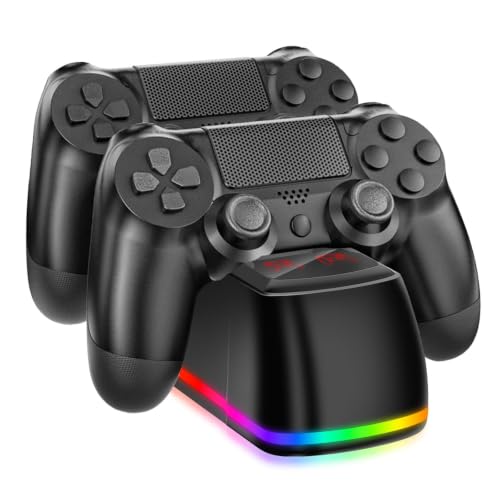
- Charges a PS4 controller in about two hours
- LEDs clearly show charging status
- Works from a PS4 console or PC USB port
Best For: PS4 users wanting a simple single-controller dock
Best Dual-Controller Dock – PowerA Twin DualSense Charging Station
For home offices using two PS5 controllers, the PowerA Twin Charging Station is a straightforward option among controller charging docks for home offices. It charges and displays two DualSense wireless controllers on a tabletop, using the included AC adapter.
Best For: PS5 households that want one officially licensed dock for charging and displaying two DualSense controllers.
Pros:
- Charges two DualSense wireless controllers simultaneously.
- Simple tabletop charging and display design.
- Includes an AC adapter and a two-year limited warranty.
- Officially licensed for PlayStation 5.
Cons:
- Designed specifically for DualSense controllers rather than multiple console types.
- Uses a corded AC power connection.
This is a practical, space-conscious pick when two PS5 controllers need a dedicated charging spot. Its focused compatibility makes it less suitable for mixed-console setups.
Best Multi-Platform Dock – PURBHE 6-in-1 Controller Charger
The PURBHE charging station stands out among controller charging docks for home offices when several controller types share the same space. It can charge four Joy-Cons plus two Nintendo Pro controllers or two PS5 controllers, with USB-C power and charging-status LEDs.
Best For: Multi-console home offices that need one dock for Nintendo Switch controllers and PS5 DualSense controllers.
Pros:
- Supports four Joy-Cons and two Pro controllers or two PS5 controllers at the same time.
- Can draw power from a console, USB hub, or wall charger.
- Includes a USB-C charging cable and charging-status LED indicator.
- Built-in protection covers overcharging, over-voltage, over-current, and short circuits.
Cons:
- Controllers are not included.
- Requires a separate USB power source or wall charger.
- Its broad compatibility may be unnecessary for a single-console setup.
With six charging positions across Nintendo and PlayStation accessories, this is the most flexible choice in the group. It makes the most sense when controller variety matters more than a console-specific fit.
Best Compact PS5 Stand – PowerA Solo DualSense Charging Station
For a single PS5 controller, the PowerA Solo Charging Station offers a compact alternative among controller charging docks for home offices. Its snap-down design charges and displays one DualSense Wireless Controller on a desktop.
Best For: Individual PS5 players who want a small, officially licensed charging stand for one DualSense controller.
Pros:
- Officially licensed for the DualSense Wireless Controller.
- Snap-down charging design is simple to use.
- Charges and displays the controller in one desktop location.
- Includes a two-year limited warranty.
Cons:
- Charges only one controller at a time.
- Designed for Sony DualSense controllers rather than mixed devices.
- Uses a corded USB charging connection.
This stand is a good fit for a tidy single-controller workstation. Choose the twin model instead if two DualSense controllers need to charge together.
Best Xbox Battery Kit – Dual Xbox Charging Dock with 6200mWh Packs
Xbox users looking for controller charging docks for home offices may prefer this dual dock with two rechargeable battery packs. It supports official Xbox One and Xbox Series controllers, provides two charging slots, and uses LED indicators to show charging status.
Best For: Xbox One and Xbox Series X|S owners who want rechargeable battery packs and a two-controller charging station.
Pros:
- Includes two 6200mWh rechargeable battery packs.
- Compatible with official Xbox One, One S, One X, Elite, Series X, and Series S controllers.
- Two individual LED indicators show charging and standby or full status.
- Battery packs are rated for more than 2,000 recharge cycles and include multi-protection features.
Cons:
- Controllers are not included.
- Not compatible with Xbox 360, Xbox Elite Series 2, or third-party controllers.
- Battery packs require the included compatible back covers and several hours to charge.
This kit combines storage, charging, and replacement power for two compatible Xbox controllers. Confirm the controller model before buying, especially if using an Elite Series 2 or third-party controller.
Best All-in-One Organizer – Multi-Device Controller Charging Station
For home offices that double as gaming spaces, this KDD station combines controller and headphone storage with four USB charging ports. Its compact, stationary design helps reduce desk clutter while charging phones, tablets, controllers, and other USB devices.
Best For: Home-office users who want one dock for gaming accessories and multiple everyday devices.
Pros:
- Combines four charging ports, a controller stand, and a headphone holder.
- Includes three USB-A ports and one USB-C port, with up to 2.4A per port.
- Detachable controller holder and 360-degree rotating headset hanger add flexibility.
- Rubber feet and padded hooks help stabilize the station and protect surfaces.
Cons:
- It is a corded charging station rather than a wireless dock.
- The plastic enclosure may feel less premium than metal alternatives.
- Its broad accessory focus may be more than needed for a single-controller setup.
The KDD is a practical choice when desk organization matters as much as charging. It stands out among controller charging docks for home offices by adding storage and four USB connections, although dedicated console users may prefer a simpler controller-specific dock.
Best for Xbox Controllers – 8BitDo Magnetic Charging Dock
Xbox users seeking streamlined controller charging can use this officially licensed 8BitDo dock with Xbox Series X|S and Xbox One wireless controllers. Its magnetic connection, charging indicator, and storage compartment keep the controller ready without adding unnecessary desk complexity.
Best For: Xbox owners who want a dedicated, tabletop charging dock with secure magnetic placement.
Pros:
- Officially licensed and compatible with Xbox Series X|S and Xbox One wireless controllers.
- Magnetic charging helps secure the controller in place.
- LED changes from amber while charging to white when fully charged.
- Includes a 1,100mAh rechargeable battery pack and two battery doors.
Cons:
- Designed for Xbox controllers rather than multiple controller platforms.
- Provides one USB-C charging connection, so it is not a multi-device hub.
- The included battery pack means replacing or removing the controller’s standard battery setup may be part of installation.
This 8BitDo model is a focused option among controller charging docks for home offices. It is especially appealing if you value a clean Xbox-matched design and clear charge status, but it is less versatile than multi-port organizer docks.
Best for Comfort – PS5 DualSense and Edge Charger
This Svetaecho dock is built for PS5 workstations where two controllers need a consistent home. It charges DualSense and Edge controllers simultaneously through guided contacts, while its USB-C connection lets you use a console or common 5V/2A power source.
Best For: PS5 owners who need simultaneous charging for DualSense and DualSense Edge controllers.
Pros:
- Charges two PS5 controllers at once, including DualSense and Edge editions.
- Drop-and-charge design does not require precise alignment.
- Rated charging times are approximately two hours for Edge and three hours for DualSense.
- Includes a 1-meter USB-C-to-C cable and built-in protection against over-voltage, over-current, and short circuits.
Cons:
- Its compatibility is focused on PS5 controllers rather than mixed-platform setups.
- It requires a separate USB power source; no dedicated power brick is included in the supplied details.
- The distinctive beetle-inspired styling may not suit every home-office setup.
With simultaneous dual charging and a space-saving desktop form, this is a strong dedicated option among controller charging docks for home offices. Choose it when PS5 compatibility and easy drop-in charging matter more than charging phones or other desk devices.
Best Multi-Platform Pick – Dual-Controller Charging Dock
For home offices that double as gaming spaces, this compact dock is a practical option among controller charging docks for home offices. It charges two supported controllers at once and uses removable USB-C adapters for convenient drop-in charging.
Best For: Gamers who use supported Switch Pro, PS5, Xbox Series X|S, or Xbox Elite Series 2 controllers and want one shared desktop charging station.
Pros:
- Charges two compatible controllers simultaneously.
- Includes removable USB-C adapters for easier drop-in charging.
- LEDs show charging and full-charge status, with built-in protection features.
- Compact tabletop design suits a desk or TV setup.
Cons:
- Does not support PowerA, Luna, or other third-party pro controllers.
- USB wall adapter is not included.
- Thick protective cases may need to be removed, and a 5V/2A adapter is recommended for stable charging.
This is a flexible choice for a mixed-console home office, provided your controllers are on the compatibility list and you have an appropriate USB power adapter.
Best for Switch 2 Desks – Joy-Con 2 Magnetic Charging Stand
Switch 2 owners looking for controller charging docks for home offices may appreciate this dedicated Joy-Con 2 stand. Its magnetic alignment, four-controller capacity, and storage-focused design help keep a gaming workspace organized.
Best For: Nintendo Switch 2 households that need to charge and store up to four Joy-Con 2 controllers in one desktop station.
Pros:
- Charges up to four Switch 2 Joy-Con controllers simultaneously.
- Magnetic alignment makes placement quick and helps reduce repeated plugging.
- Offers nine RGB lighting modes with touch controls and memory functionality.
- Charging indicators distinguish charging from standby or full status.
Cons:
- Designed exclusively for Nintendo Switch 2 Joy-Con controllers.
- Switch 2 console and Joy-Con controllers are not included.
- Its RGB lighting may be unnecessary for a distraction-free office setup.
With a stated full-charge time of about 2.5–3 hours and multiple power-source options, this stand combines controller storage with charging, though its narrow compatibility limits it to Switch 2 setups.
Best Budget PS4 Option – PS4 Controller Charging Dock
This PS4-focused station is a straightforward choice among controller charging docks for home offices. It stores and charges a compatible PS4 controller through a USB connection, making it easy to keep a controller ready beside a computer or console.
Best For: PS4 owners who want a simple replacement charging dock with clear status lighting and a compact footprint.
Pros:
- Fully charges a controller in about two hours, according to the supplied specifications.
- Red and blue LEDs indicate charging and full-charge status.
- Can connect to a PS4, PS4 Slim, PS4 Pro, or PC through USB.
- Includes the dock, USB data cable, and user manual.
Cons:
- Compatible with PS4 controllers and Pro/Slim controllers rather than multiple console platforms.
- Charges one controller at a time.
- Uses a USB Type-A connection and does not include a wall plug.
For a PS4-centered home office, this lightweight dock keeps charging simple and adds useful protection features, but it is less suitable for households needing multi-controller or cross-platform support.
How We Picked the Best Controller Charging Docks for Home Offices
We focused on practical features that matter in a work-and-play environment: controller compatibility, charging convenience, desk footprint, storage, connection options, and overall versatility. The selection includes single- and dual-controller docks, console-specific chargers, multi-device stations, and models designed for newer systems such as Nintendo Switch 2.
Compatibility deserves special attention because charging contacts and battery systems are often platform-specific. A dock made for DualSense controllers may not support Xbox or Switch controllers without separate accessories, while universal-looking models may still require the correct cable or battery pack.
Quick Comparison
- Best for PS5: PowerA and dedicated DualSense charging stations offer simple drop-and-charge use.
- Best for Xbox: Look for magnetic charging support or included rechargeable battery packs.
- Best for Switch: Choose a Joy-Con or Pro Controller dock that clearly lists your controller generation.
- Best for mixed setups: Multi-port stations provide broader flexibility for controllers, phones, and headsets.
- Best for older consoles: A dedicated PS4 dock can add both charging and controller storage.
Key Buying Factors for Controller Charging Docks for Home Offices
Compatibility and Included Accessories
Confirm the exact controller model before buying. Check whether the dock includes rechargeable battery packs, replacement battery covers, adapters, or only charging cables. For Xbox products, included battery packs can make a major difference in convenience.
Capacity and Desk Footprint
A single-controller dock saves space and suits solo players, while a dual dock is more useful for multiplayer households. Multi-device stations may take up more room but can replace several loose chargers and stands.
Charging Method and Indicators
Drop-in contacts are usually easier to use than repeatedly plugging in cables. LED indicators help confirm charging status, but bright lighting may be distracting in an office. Magnetic connectors can improve alignment when they are securely designed.
Organization and Build Quality
Consider whether the dock stores controllers upright, supports a headset, or offers USB-A and USB-C ports for other devices. A stable base, protected contacts, and a short, tidy cable route are especially valuable on a shared desk.
Who Should Buy Which Controller Charging Docks for Home Offices?
Choose a dedicated PS5 or Xbox dock if you mainly use one console and want the simplest drop-and-charge routine. Choose a Switch-focused model if Joy-Con, Pro Controller, or Switch 2 compatibility is your priority. Choose a multi-device station if your home office also needs charging for a phone, headset, or several peripherals.
For households with multiple players, prioritize dual-controller capacity and reliable simultaneous charging. If desk space is limited, a compact single dock may be the better everyday choice. Before ordering, verify the listed controller generation, included power supply, and whether the dock charges batteries directly or requires a proprietary pack.
