
A reliable charging dock keeps controllers ready without adding cable clutter to your gaming area. The best compact controller charging docks also make it easier to store multiple gamepads neatly between sessions.
This roundup compares 10 options for PS5, Xbox, Nintendo Switch, Switch 2, and Meta Quest setups, focusing on compatibility, footprint, charging convenience, and everyday usability.
Best 10 Compact Controller Charging Docks Picks for 2026
Best DualSense Twin Dock

- Charges two DualSense controllers
- Includes AC adapter
- Officially licensed for PS5
Best For: PS5 players charging two controllers
Best Joy-Con Organizer
FASTSNAIL Switch Charging Dock

- Charges up to four Joy-Cons
- Individual LED charge indicators
- Works with Switch and Switch OLED
Best For: Multiplayer Switch setups
Best Single DualSense Dock

- Snap-down charging design
- Charges and displays one DualSense
- Two-year limited warranty
Best For: Single-controller PS5 setups
Best Fast PS4 Dock
OIVO DualShock 4 Charging Station

- Stated 1.8-hour charging time
- LED charging-status indicators
- Multiple built-in protection features
Best For: PS4 owners wanting quick, monitored charging
Simple Xbox Stand

- Charges Xbox Series X|S and Xbox One controllers
- Includes 1100 mAh battery and two battery doors
- Officially licensed with a two-year limited warranty
Best For: Xbox players wanting a simple, compact single-controller stand
Compact PS5 Option
OSTROGEAR PS5 Controller Charging Dock

- Fits PS5 and PS5 Edge controllers
- LED turns green when charging is complete
- Includes USB-C cable and non-slip pads
Best For: PS5 owners wanting a small single-controller charging stand
Magnetic Xbox Dock

- Officially licensed for Xbox Series X|S and Xbox One
- Magnetic charging secures the controller
- Includes battery pack, doors, and storage compartment
Best For: Xbox users wanting magnetic docking and organized tabletop storage
Meta Quest Essential
Quest 3/3S Compact Charging Dock
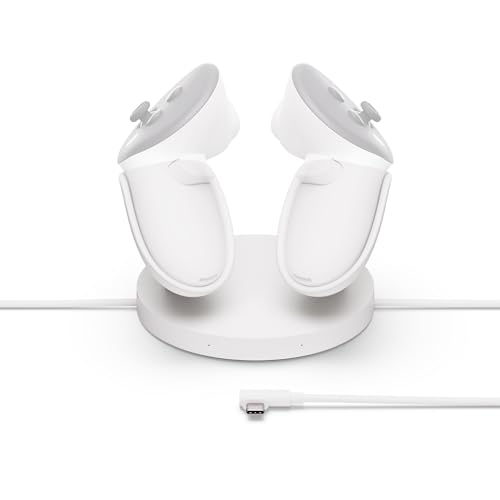
- Officially designed for Quest 3/3S and Touch Plus Controllers
- Includes two rechargeable controller batteries
- Also charges the headset with an extended cable
Best For: Quest 3/3S owners wanting one compact charging setup
Universal Desk Station

- Charges two supported controllers at once
- Includes removable USB-C charging adapters
- LED status lights and smart protection are built in
Best For: Multi-console setups using supported first-party controllers
Switch 2 Playroom Hub
4-in-1 Joy-Con 2 Charging Dock

- Charges up to four Switch 2 controllers
- Magnetic snap-in charging design
- Includes eight RGB lighting modes and night mode
Best For: Switch 2 households with multiple Joy-Con 2 controllers
Best DualSense Twin Dock – PowerA Twin Charging Station
For PS5 owners who want compact controller charging docks with room for two gamepads, the PowerA Twin Charging Station combines charging and display in a simple tabletop design. It is officially licensed for PlayStation 5 and includes an AC adapter.
Best For: PS5 players who regularly charge two DualSense wireless controllers.
Pros:
- Charges two DualSense wireless controllers at once.
- Displays controllers in a tidy, organized position.
- Includes an AC adapter and a two-year limited warranty.
Cons:
- Designed for DualSense controllers rather than multiple console types.
- Uses a corded AC power setup.
This is a practical pick when shared charging and a clean PS5 setup matter more than charging a single controller.
Best Joy-Con Organizer – FASTSNAIL Switch Charging Dock
The FASTSNAIL dock is a compact controller charging dock for Nintendo Switch and Switch OLED Joy-Cons. Its slide-in design charges up to four controllers simultaneously while the individual LED indicators show charging status.
Best For: Switch owners who want to charge and organize up to four Joy-Cons in one stand.
Pros:
- Charges up to four Joy-Cons simultaneously.
- Uses a simple slide-in, plug-and-play design.
- Includes charging indicators and a USB Type-C cable.
- Lightweight, portable, and designed for storage and display.
Cons:
- Joy-Cons are not included.
- Has a 180-day warranty.
- Requires a USB power source.
With four charging positions and status lights, this stand suits households that keep several Joy-Cons ready for multiplayer sessions.
Best Single DualSense Dock – PowerA Solo Charging Station
For a single PS5 controller, the PowerA Solo Charging Station offers a compact controller charging dock with a snap-down charging design. It is officially licensed for the DualSense Wireless Controller and also displays the controller when docked.
Best For: PS5 players who need a dedicated dock for one DualSense controller.
Pros:
- Uses a snap-down charging design.
- Charges and displays one DualSense controller.
- Officially licensed and backed by a two-year limited warranty.
Cons:
- Charges only one controller at a time.
- Designed for DualSense controllers rather than broader device compatibility.
This space-saving desktop station is a straightforward choice when one controller needs a dedicated charging spot.
Best Fast PS4 Dock – OIVO DualShock 4 Charging Station
The OIVO dock is a compact controller charging dock for PlayStation 4 DualShock 4 controllers, with supplied notes indicating a 1.8-hour charging time. It can draw power from a PS4, PS4 Slim, PS4 Pro, PC, or wall power source, though a wall adapter is not included.
Best For: PS4 owners who want quick charging, clear status lights, and built-in protection features.
Pros:
- Designed to charge controllers in about 1.8 hours.
- LED indicators show charging and completion status.
- Includes protection against overcharging, overheating, over-voltage, over-current, and short circuits.
- Includes a USB cable and works with console or PC USB power.
Cons:
- Wall adapter is not included.
- Designed for PS4 DualShock 4 controllers.
- Supplied warranty information is limited to one year.
This dock is a sensible PS4 accessory for buyers who value charging feedback and multiple safety protections alongside a short stated charging time.
Simple Xbox Stand – PowerA Solo Charging Stand
The PowerA Solo is a practical choice for compact controller charging docks if you want a dedicated Xbox stand that also replaces disposable batteries. It charges and displays one Xbox Series X|S or Xbox One Wireless Controller and includes a rechargeable battery, battery doors, and a USB cable.
Best For: Xbox players who want a straightforward tabletop charging stand with an included rechargeable battery.
Pros:
- Works with Xbox Series X|S and Xbox One Wireless Controllers.
- Includes an 1100 mAh rechargeable battery and two battery doors.
- Vertical design charges and displays the controller while reducing the need for replacement batteries.
- Officially licensed and backed by a two-year limited warranty.
Cons:
- Designed for one controller at a time.
- Uses a USB Type-A charging connection rather than USB-C.
Choose this model when simplicity and Xbox compatibility matter more than extra ports or multi-controller charging. Its compact vertical form keeps the setup tidy while providing the essential charging accessories.
Compact PS5 Option – OSTROGEAR PS5 Controller Charging Dock
This OSTROGEAR dock fits compact controller charging docks buyers looking for a small PS5 charging and display stand. Its contact-based design supports both standard PS5 and PS5 Edge controllers, while the included USB-C cable and status LED make everyday charging easy to monitor.
Best For: PS5 owners who need a compact stand for a standard or Edge controller and prefer visible charging status.
Pros:
- Compatible with PS5 and PS5 Edge controllers, including the Edge back button attachment.
- Charges standard controllers in approximately 2.5–3 hours and Edge controllers in approximately 1.5–2 hours.
- LED changes during charging and turns solid green when charging is complete.
- Non-slip pads, automatic shutoff, and short-circuit protection support stable charging.
Cons:
- Charges one controller at a time.
- Has a relatively short six-month warranty.
Its small footprint and lightweight design make it suitable for desks, entertainment centers, or travel. The main appeal is the combination of PS5 and Edge compatibility, contact charging, and clear visual feedback.
Magnetic Xbox Dock – 8BitDo Charging Dock for Xbox
The 8BitDo Charging Dock is a polished option among compact controller charging docks for Xbox. It uses magnetic charging to secure compatible Xbox controllers, includes a rechargeable battery pack and two battery doors, and adds a storage compartment for a tidier tabletop setup.
Best For: Xbox Series X|S and Xbox One owners who value magnetic docking, a coordinated design, and built-in accessory storage.
Pros:
- Officially licensed and compatible with Xbox Series X|S and Xbox One wireless controllers.
- Magnetic secure charging helps keep the controller positioned on the dock.
- Includes a 1100 mAh rechargeable battery pack and two battery doors.
- Amber and white LED indicators show charging status, with light adjustment available.
Cons:
- Designed to charge one controller at a time.
- Provides one USB port.
This dock is a strong fit when you want charging to double as controller storage and display. Its magnetic connection and integrated storage give it a more feature-focused design than a basic stand, while retaining a compact tabletop footprint.
Meta Quest Essential – Quest 3/3S Compact Charging Dock
For Meta Quest owners seeking compact controller charging docks, this official dock offers a tidy drop-in setup for Quest 3/3S Touch Plus Controllers while also including an extended cable for headset charging.
Best For: Meta Quest 3 or 3S users who want an official, space-saving charging station for their headset and controllers.
Pros:
- Designed for Meta Quest 3/3S, Touch Plus Controllers, and Active Straps.
- Includes two rechargeable lithium-ion batteries for the controllers.
- Built-in protection helps guard against overheating.
- Lets users check controller battery status within the headset.
Cons:
- Compatibility is limited to the listed Meta Quest ecosystem.
- The extended headset charging cable may add cable length to a compact setup.
This is a focused premium accessory rather than a universal dock, but its headset-and-controller compatibility and included rechargeable batteries make it a convenient choice for Quest 3/3S setups.
Universal Desk Station – Dual Controller Charging Dock
This compact controller charging dock is built for a desk or TV setup and can charge two supported controllers at once, using removable USB-C adapters for convenient drop-in charging.
Best For: Gamers with supported Switch Pro, PS5, Xbox Series X|S, or Xbox Elite Series 2 controllers who need a dual-controller station.
Pros:
- Supports two controllers simultaneously across several major console platforms.
- Removable USB-C adapters make drop-in charging easier and reduce connector wear.
- LED indicators show charging and full-charge status.
- Smart protection helps guard against short circuits and other charging issues.
Cons:
- Not compatible with PowerA, Luna, or other listed third-party pro controllers.
- A 5V/2A USB wall adapter is recommended but not included.
- Thick protective cases may need to be removed for charging.
Its broad compatibility is useful, but buyers should verify the exact controller model before ordering. With the recommended power adapter, it provides a practical two-controller charging solution for a gaming desk or entertainment center.
Switch 2 Playroom Hub – 4-in-1 Joy-Con 2 Charging Dock
For Switch 2 players comparing compact controller charging docks, this magnetic station charges up to four Joy-Con 2 controllers while organizing them in a desktop-friendly stand with configurable RGB lighting.
Best For: Nintendo Switch 2 households that keep multiple Joy-Con 2 controllers ready for multiplayer gaming.
Pros:
- Charges two pairs, or four Switch 2 controllers, in about two hours according to the supplied product claims.
- Magnetic snap-in design avoids aligning individual plugs.
- Offers eight lighting modes plus a one-touch night mode.
- Safety features help protect against overcharging, overheating, and short circuits.
Cons:
- Designed primarily for Nintendo Switch 2 Joy-Con controllers rather than universal controller use.
- RGB lighting may be unnecessary for users seeking a simple, unlit dock.
- The supplied details list a Type-C power plug, so buyers should confirm power compatibility.
This dock stands out for capacity and presentation: it combines four-controller storage with magnetic charging and adjustable lighting. It is a strong fit for multiplayer Switch 2 setups, especially where desk organization matters.
How We Picked These Compact Controller Charging Docks
We selected docks across the major gaming platforms and prioritized clear device compatibility, compact designs, secure controller placement, practical charging indicators, and useful included accessories. Because charging requirements vary by controller, we also considered whether each dock uses dedicated contacts, magnetic adapters, USB-C, or platform-specific connections.
A small footprint matters, but it should not come at the expense of stability. The most useful docks are easy to load, remain steady on a desk or media console, and let you remove a controller without disturbing the others.
Quick Comparison
| Best For | What to Look For | Typical Advantage |
|---|---|---|
| PS5 | DualSense or DualSense Edge compatibility | Dedicated fit and quick drop-in charging |
| Xbox | Series X|S, Xbox One, or Elite support | Secure magnetic or contact charging |
| Switch | Joy-Con or Pro Controller support | Multi-controller organization |
| Switch 2 | Explicit Switch 2 compatibility | Updated fit and connector placement |
| Meta Quest | Headset and controller charging support | One compact home for VR accessories |
Key Buying Factors for Compact Controller Charging Docks
Compatibility Comes First
Check the exact controller generation before buying. A dock designed for a PS5 DualSense may not support a DualSense Edge, and Xbox docks can differ between standard, Series, and Elite controllers. For Nintendo products, verify whether the dock supports Joy-Cons, a Pro Controller, Switch 2 controllers, or a combination.
Charging Method and Speed
Contact-based docks are usually the simplest for daily use because you can place the controller down without connecting a cable. Magnetic adapters can improve alignment, while USB-C docks may offer broader flexibility. Treat advertised charging times as estimates and confirm whether the power adapter is included.
Footprint, Stability, and Indicators
Measure the available space around your console or monitor. A narrow dock is useful in a crowded setup, but a weighted or well-shaped base is less likely to slide. LED indicators are helpful for checking charge status, especially when the dock sits away from your main display.
Capacity and Cable Management
Choose a single-controller stand if you normally play alone, or a multi-slot station if several controllers need to stay ready. Consider where the power cable exits and whether the dock leaves access to nearby ports, storage, or console ventilation.
Who Should Buy Which Compact Controller Charging Docks?
PS5 owners should choose a dock that specifically names their DualSense generation, while DualSense Edge owners need an Edge-compatible model. Xbox players should match the dock to Series X|S, Xbox One, or Elite controller support rather than relying on appearance alone.
Switch households with several Joy-Cons will benefit from a multi-slot charging station, and Switch 2 owners should select a model explicitly designed for the newer system. If you use multiple platforms, a universal dock can reduce clutter, but check its charging connectors and fit for every controller you plan to use. Meta Quest users who want a tidier VR setup should prioritize a dock that supports both the headset and its controllers.
