
The right compact conference room camera can make a small meeting space feel more professional without requiring a full AV installation. This roundup compares 10 options with combinations of 4K video, AI framing, speaker tracking, microphones, speakers, and wide-angle coverage.
Whether you need a simple USB webcam for a huddle room or an all-in-one system for Zoom and Teams, use the guide below to match features, room size, and setup requirements to your team’s everyday meetings.
Best 10 Compact Conference Room Cameras Picks for 2026
Best AI-Tracking System
TONGVEO 4K PTZ Camera and Speakerphone
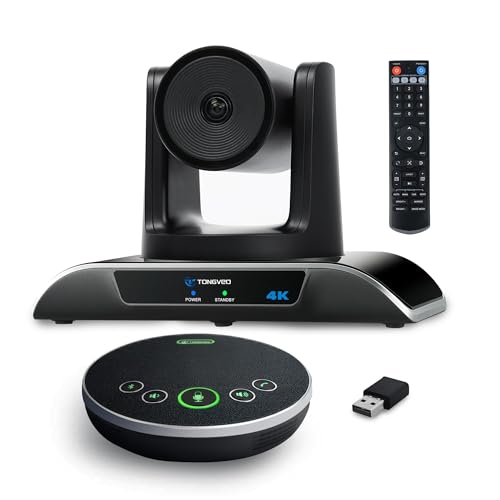
- 4K/30fps video with 120° wide-angle coverage
- AI tracking, gesture control, and 5x digital zoom
- Separate speakerphone with 5-meter pickup range
Best For: Small and medium meetings needing presenter tracking and flexible PTZ control
Best for Huddle Rooms
Logitech MeetUp 4K Conference Camera
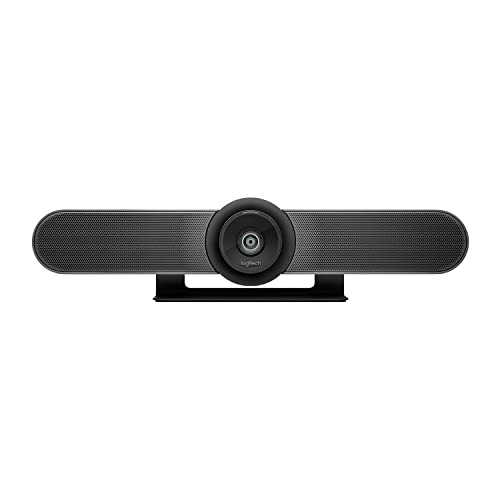
- 4K camera with 120° view and 5x HD zoom
- Motorized pan and tilt expands coverage to 170°
- Beamforming microphones cover up to 4 meters
Best For: Small conference rooms and huddle spaces
Best Low-Light Image Quality
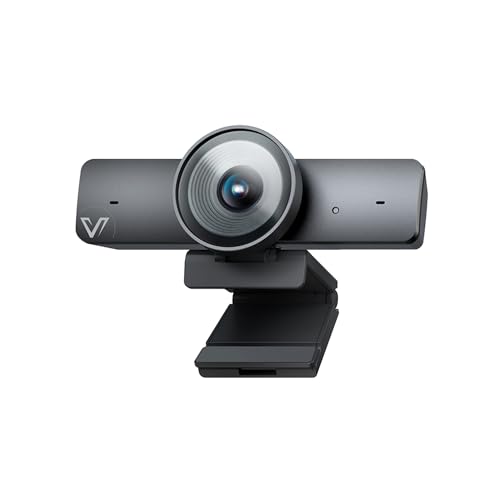
- Large 1/1.8-inch CMOS sensor for low-light detail
- AI framing, presenter tracking, and gallery modes
- USB plug-and-play design with built-in microphone
Best For: Small rooms and hybrid workspaces needing compact AI framing
Best All-in-One Audio and Video

- Integrated 4K camera, microphones, and speakers
- AI auto framing plus presenter and speaker tracking
- 120° view with four-microphone noise reduction
Best For: Medium and large rooms needing a single video-bar solution
Flexible 360° Coverage
TOUCAN SC360 Conference Camera
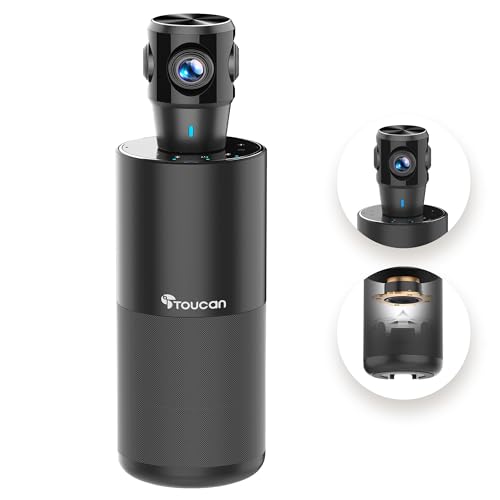
- 360-degree video capture for room-wide visibility
- 1080p camera with four noise-reduction microphones
- Plug-and-play USB with Type-C adapter included
Best For: Small teams needing an all-in-one 360-degree meeting camera
Smart Small-Room Framing

- 4K video with a 120-degree field of view
- AI auto framing and presenter tracking
- Dual noise-canceling microphones with up to 5m pickup
Best For: Small rooms with presentations and multi-person meetings
Enterprise-Ready Huddle Room System
Yealink UVC34 4K Conference Camera

- 4K video with 120-degree wide-angle coverage
- Eight-microphone array with up to 5m pickup
- Automatic privacy shutter and AI speaker tracking
Best For: Professional huddle rooms needing integrated audio and privacy features
Most Immersive Pick
PANOCORE360 All-in-One Meeting Camera
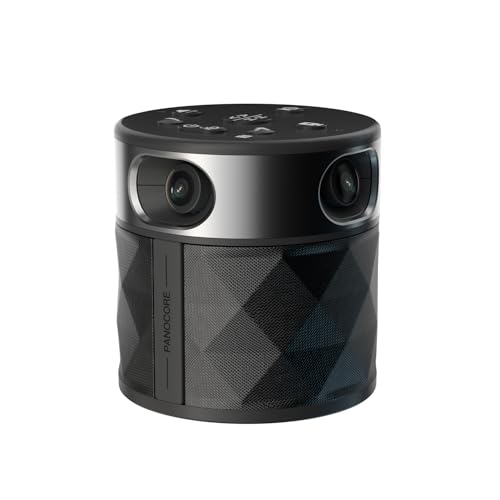
- 360-degree capture with dual viewing modes
- Integrated speaker and three-mic array
- Auto speaker focus and MicroSD recording
Best For: Small to medium rooms needing panoramic coverage and integrated audio
Best Tracking Controls
RayBit SeeUp 4C 4K Conference Camera

- 4K video with a 94-degree field of view
- AI auto framing and presenter tracking
- Remote control with zoom and view presets
Best For: Compact rooms needing high-resolution video and hands-off framing
Best Value Setup
PolaTab Q95 3-in-1 Conference Camera

- 1080p webcam with built-in speaker and microphone
- 95-degree wide-angle lens for small rooms
- Plug-and-play USB compatibility with major apps
Best For: Simple home-office and small-room video calls
Best AI-Tracking System – TONGVEO 4K PTZ Camera and Speakerphone
For buyers comparing compact conference room cameras, the TONGVEO system stands out as a flexible PTZ setup that combines 4K video, AI tracking, gesture control, and a separate wireless-capable speakerphone. Its 120-degree view, 5x digital zoom, and broad pan-and-tilt range suit meetings where participants or presenters move around the room.
Best For: Small and medium-sized meetings that need flexible camera positioning, presenter tracking, and integrated room audio.
Pros:
- 4K video at 30fps with a 120-degree wide-angle field of view.
- AI auto-tracking, gesture controls, remote control, and up to nine preset positions.
- Includes a speakerphone with two noise-reducing microphones and a stated 5-meter pickup range.
- Supports USB 3.0 plug-and-play connectivity plus RS232 and RS485 joystick control.
Cons:
- The system uses separate camera and speakerphone connections, so setup involves more components than an all-in-one bar.
- The listed 5x zoom is digital rather than optical.
- Some remote focus buttons do not apply to this version.
This is a feature-rich choice when tracking and mounting flexibility matter more than having the simplest possible footprint. Confirm that your meeting hardware and software support 4K to take full advantage of the camera.
Best for Huddle Rooms – Logitech MeetUp 4K Conference Camera
Logitech MeetUp is a practical option for compact conference room cameras in huddle rooms and small meeting spaces. Its all-in-one design combines a 4K camera, wide 120-degree view, motorized pan and tilt, and built-in beamforming microphones for a relatively straightforward room setup.
Best For: Huddle rooms and small conference rooms that need a well-known all-in-one USB conferencing system.
Pros:
- 4K capture with a 120-degree field of view and 5x HD zoom.
- Motorized pan and tilt can expand coverage to 170 degrees.
- Beamforming microphones pick up voices from up to 4 meters, or up to 5 meters with the optional expansion mic.
- Supports wall or credenza mounting and can connect to room solutions for Teams, Zoom, or Google Meet.
Cons:
- The expansion microphone is sold separately.
- Its listed operating-system compatibility is limited to Windows 10 or Mac OS X.
- The unit is designed for small and huddle rooms rather than larger spaces.
MeetUp is a strong fit for buyers who prioritize simple deployment and broad room-solution support. It offers useful framing flexibility, but larger rooms may require the optional microphone or a more expansive audio system.
Best Low-Light Image Quality – AV Access BizEye 90 4K Webcam
Among compact conference room cameras, the AV Access BizEye 90 emphasizes image quality and automated framing in a small USB webcam format. Its large 1/1.8-inch CMOS sensor is designed to capture more light, while AI framing, presenter tracking, and individual gallery modes help keep participants visible during calls.
Best For: Small meeting rooms, hybrid workspaces, and users who want a compact USB camera with AI framing and improved low-light performance.
Pros:
- 4K video at 30fps with a large 1/1.8-inch CMOS sensor.
- AI auto framing, presenter tracking, and individual gallery modes for up to four people.
- 120-degree wide-angle lens with 5x electronic pan, tilt, and digital zoom control.
- Built-in noise-reducing microphone and plug-and-play compatibility with Zoom, Teams, OBS, and Webex.
Cons:
- The camera uses fixed focus rather than autofocus.
- The microphone’s stated voice pickup range is up to 3 meters.
- Gesture control may require a firmware update if it is not enabled on the received unit.
This model makes sense when a compact footprint and strong sensor performance are more important than optical zoom or extensive room audio coverage. Its included mounting clip also makes it easy to move between a monitor, laptop, or tripod.
Best All-in-One Audio and Video – WYRESTORM HALO VX10
The WYRESTORM HALO VX10 is a compact conference room camera system built around an all-in-one video bar. It combines 4K video, AI auto framing and speaker tracking, a 120-degree lens, a four-microphone array, and built-in speakers to reduce the number of separate devices and cables needed in a meeting room.
Best For: Medium and large conference rooms that need one integrated camera, microphone, and speaker solution.
Pros:
- 4K camera with a 120-degree wide-angle view and 5x zoom flexibility.
- AI auto framing and presenter or speaker tracking support dynamic meetings.
- Four-microphone array with noise reduction helps cover the room.
- Built-in speakers and plug-and-play support for Teams, Zoom, Google Meet, and other PC platforms.
Cons:
- The bar is 18 inches wide, so it may be less suitable for very small desk setups.
- The supplied notes specify digital rather than optical zoom.
- It is primarily a USB indoor system and does not provide wireless room connectivity in the listed features.
Choose the HALO VX10 if minimizing separate audio equipment is a priority. Its tracking and integrated room audio are particularly useful for larger meeting spaces, while the included wall bracket supports a clean installation.
Flexible 360° Coverage – TOUCAN SC360 Conference Camera
For teams comparing compact conference room cameras, the TOUCAN SC360 stands out with 360-degree video capture, a built-in speaker, and four noise-reduction microphones. Its plug-and-play USB setup and included Type-C-to-USB-A adapter make it practical for PCs, Macs, tablets, and common conferencing platforms.
Best For: Small teams that want an all-in-one camera, microphone, and speaker with full-room coverage.
Pros:
- 360-degree viewing angle helps capture participants throughout the room.
- 1080p video provides clear visuals for meetings and presentations.
- Four microphones and a built-in speaker support two-way communication.
- Works with Zoom, Microsoft Teams, Google Voice, and other platforms.
Cons:
- Video resolution is 1080p rather than 4K.
- The 1.28 kg weight may be more than expected for a compact webcam.
- 360-degree capture may be more coverage than a small, front-facing meeting requires.
The SC360 is a versatile choice when room-wide visibility matters more than maximum resolution. Its simple connectivity and integrated audio reduce the amount of equipment needed for a meeting setup.
Smart Small-Room Framing – WYRESTORM FOCUS 210 4K Webcam
Product not found.The WYRESTORM FOCUS 210 is a strong option among compact conference room cameras for small meeting spaces. It combines 4K video, a 120-degree field of view, AI auto framing, presenter tracking, and dual noise-canceling microphones in a USB plug-and-play design.
Best For: Small conference rooms, presentations, and hybrid meetings where automatic framing and speaker tracking are useful.
Pros:
- 4K video delivers detailed footage for professional meetings.
- 120-degree wide-angle lens helps include the entire room.
- AI auto framing detects and frames meeting participants.
- Presenter tracking and microphones rated for pickup across up to 5 meters add meeting flexibility.
Cons:
- Its tracking and framing features may be unnecessary for simple one-person calls.
- Digital zoom is limited to 8x and does not replace optical zoom.
- The supplied notes identify USB connectivity but do not specify wireless operation.
For small-room collaboration, the FOCUS 210 offers a useful balance of wide coverage, intelligent framing, and high-resolution video. The physical lens cover is also a practical privacy feature for shared office environments.
Enterprise-Ready Huddle Room System – Yealink UVC34 4K Conference Camera
The Yealink UVC34 is designed for buyers seeking compact conference room cameras with integrated audio and business-focused controls. It pairs 4K video and a 120-degree field of view with an eight-microphone array, AI framing, speaker tracking, and an automatic electric privacy shutter.
Best For: Huddle rooms and professional meeting spaces that need broad audio pickup, platform certification, and hardware privacy protection.
Pros:
- 4K, 8MP video and a 120-degree field of view provide detailed room coverage.
- Eight microphones offer up to 5 meters of far-field voice pickup.
- AI auto framing, speaker tracking, and face enhancement support natural meetings.
- Certified for Microsoft Teams and Zoom, with a long 7-meter USB cable.
Cons:
- The 1,620 g weight is relatively substantial for a compact room device.
- The supplied notes list a USB-B-to-USB-A cable, so connection requirements should be checked against the host computer.
- The system may offer more features than needed for basic video calls.
The UVC34 is a feature-rich choice for huddle rooms where clear group audio, wide-angle 4K video, and privacy controls are priorities. Its certified platform support and long cable can also simplify installation in a dedicated meeting space.
Most Immersive Pick – PANOCORE360 All-in-One Meeting Camera
For compact conference room cameras that can show the whole room while keeping the active speaker prominent, the PANOCORE360 combines four cameras, a microphone array, and a speaker in one compact unit. Its 360-degree capture, dual viewing modes, and plug-and-play USB setup suit small to medium rooms with up to 12 participants.
Best For: Small to medium meeting rooms needing panoramic video, integrated audio, and automatic speaker focus.
Pros:
- Captures a full 360-degree view and can switch to dual 180-degree widescreen viewing.
- Combines a camera, omnidirectional three-microphone array, and speaker in one device.
- Supports auto speaker focus, AI voice processing, local MicroSD recording, and major meeting platforms.
Cons:
- Outputs video at 1080p despite using a 4K 360-degree capture system.
- The integrated microphone is specified for pickup up to 10 feet, which may limit larger rooms.
- Full performance on some computers may require the included power adapter and splitter.
The PANOCORE360 is a strong all-in-one option when room coverage matters more than conventional forward-facing framing. Its compact design and platform-independent operation reduce setup complexity, while local recording adds flexibility for meetings that need to be saved without relying on a conferencing app.
Best Tracking Controls – RayBit SeeUp 4C 4K Conference Camera
The RayBit SeeUp 4C is one of the more feature-rich compact conference room cameras for teams that want high-resolution video and remote control. It combines a 4K camera, speakers, noise-cancelling microphones, AI auto framing, and presenter tracking in a compact USB system.
Best For: Teams that want 4K video, automatic framing, presenter tracking, and camera controls from across the room.
Pros:
- Provides 4K video from a UHD sensor with a 94-degree viewing angle.
- AI face detection automatically frames participants, while presenter tracking follows the active speaker.
- Includes a remote with 5X digital zoom, presets, rotation, microphone, and volume controls.
- Built-in speakers and microphone array use dereverberation and full-duplex audio processing.
Cons:
- The remote requires batteries, which are not included.
- Its 94-degree field of view is narrower than the panoramic coverage of some room cameras.
- The product relies on digital rather than optical zoom despite listing 5X zoom capability.
The SeeUp 4C is a practical choice for compact rooms where participants sit in front of the camera and need polished framing without constant manual adjustment. The included remote adds useful control during presentations, while the integrated audio helps keep the setup uncluttered.
Best Value Setup – PolaTab Q95 3-in-1 Conference Camera
For buyers seeking straightforward compact conference room cameras, the PolaTab Q95 combines a 1080p webcam, omnidirectional microphone, and speaker in a single USB device. Its 95-degree lens, automatic light correction, and plug-and-play compatibility make it suited to home offices, small meeting spaces, and online teaching.
Best For: Individuals and small teams wanting an affordable, simple camera-and-audio setup for everyday video calls.
Pros:
- Combines 1080p video, a microphone, and a full-range speaker in one unit.
- The 95-degree wide-angle lens helps include participants near the edges of the frame.
- DSP-based noise reduction, echo cancellation, and automatic gain control support clearer calls.
- Offers driver-free USB setup and works with Windows, macOS, Zoom, Teams, Skype, and WebEx.
Cons:
- Video resolution is limited to 1080p rather than 4K.
- The fixed lens has only 2X digital zoom and no stated presenter-tracking feature.
- The supplied USB 2.0 connection may be less suitable for buyers seeking newer connectivity.
The Q95 focuses on convenience rather than advanced automation. It is a sensible pick for a small room or desk when you want to avoid separate speakers and microphones, although buyers needing tracking, panoramic views, or higher-resolution video should consider a more advanced model.
How We Picked These Compact Conference Room Cameras
We focused on cameras designed for shared meeting spaces rather than standard personal webcams. The selection includes compact USB devices, all-in-one camera-and-speaker systems, PTZ-style models, and 360-degree cameras. We considered video resolution, field of view, microphone pickup, speaker quality, AI framing or tracking, platform compatibility, installation simplicity, and the needs of small rooms.
Resolution alone does not determine meeting quality. A camera with dependable autofocus, clear voice pickup, and useful framing can outperform a higher-resolution model with poor audio or limited coverage. Product specifications and stated compatibility should be confirmed before purchase, particularly for Teams, Zoom, Google Meet, Windows, and macOS setups.
Quick Comparison
| Best For | Features to Prioritize | Recommended Type |
|---|---|---|
| Two- to four-person huddle room | Wide angle, USB plug-and-play, echo cancellation | Compact all-in-one webcam |
| Small boardroom | 4K video, multiple microphones, speaker tracking | AI conference camera system |
| Flexible seating layouts | 360-degree coverage, automatic speaker focus | Panoramic meeting camera |
| Hybrid presentations | PTZ movement, remote control, auto-tracking | PTZ or tracking camera system |
Key Buying Factors for Compact Conference Room Cameras
Room Size and Field of View
Measure the distance between the camera and the farthest seat. A wide-angle model is usually best for a small huddle room, while larger rooms may benefit from PTZ movement or automatic tracking. Avoid choosing an extremely wide lens if it makes faces appear distant or distorted.
Video Quality and Framing
4K capture can provide sharper images and useful cropping, but the meeting platform may reduce the final stream resolution. AI auto-framing, speaker tracking, and gesture control can be more valuable than extra pixels when participants move or sit at different distances.
Microphones and Speakers
Look for beamforming microphones, noise reduction, echo cancellation, and a speaker that is loud enough for the room. Integrated audio simplifies installation, but larger rooms may still need expansion microphones or a separate sound system.
Compatibility and Setup
USB plug-and-play models are generally easiest to deploy. Check operating-system support, USB cable length, mounting options, remote-control requirements, and certification for your preferred meeting software before ordering.
Who Should Buy Which Compact Conference Room Cameras?
Choose a basic 1080p all-in-one camera if you need an affordable device for occasional meetings in a very small room. Choose a 4K AI-powered model if image clarity, automatic framing, and polished hybrid meetings are priorities. A PTZ system makes more sense for rooms where participants move, present, or sit farther from the display. For a table with people seated all around it, a 360-degree camera can reduce blind spots and simplify placement.
Teams with demanding audio needs should prioritize microphone pickup and speaker performance over headline resolution. If your organization uses a managed meeting-room platform, verify software and hardware compatibility first. The best Compact Conference Room Cameras are the ones that cover everyone clearly, keep voices understandable, and fit your room without unnecessary complexity.
