
Need one setup that handles a laptop, desktop, and all your peripherals without constant cable swapping? The right KVM switch can make a desk feel instantly simpler.
This roundup focuses on the best options for fast switching, strong display support, and practical power delivery in 2026.
Best 10 Cable Matters USB C Kvm Switches Picks for 2026
Best for USB4 Dock Sharing
Cable Matters 20Gbps USB-C KVM Switch

- Shares one USB-C or TB4 monitor/dock across 3 computers
- Up to 8K@30Hz on Windows and 4K@60Hz on macOS
- Includes RF remote and up to 140W PD for the active device
Best For: People who need a three-computer USB-C or Thunderbolt 4 switch for a monitor or dock.
Best for High-Resolution USB Sharing
UGREEN 8K@60Hz HDMI KVM Switch

- 8K@60Hz HDMI support for dual-computer setups
- 3 USB-A ports plus 1 USB-C for shared peripherals
- Includes HDMI and USB cables with desktop controller
Best For: Users who want a high-resolution HDMI KVM with flexible USB device sharing.
Best for USB4/TB4 Dock Sharing
Cable Matters 20Gbps USB-C KVM Switch

- 8K@30Hz on Windows, 4K@60Hz on macOS
- 140W USB-C power delivery pass-through
- Included 20Gbps cables help ensure compatibility
Best For: Dual-computer users sharing a USB-C or Thunderbolt 4 monitor/dock with charging.
Best for 8K USB-C Sharing
Cable Matters 20Gbps USB-C KVM Switch

- 8K@30Hz on Windows, 4K@60Hz on macOS
- RF remote for easy two-computer switching
- 140W pass-through charging for the active laptop
Best For: People sharing a USB-C or Thunderbolt 4 monitor/dock between two computers.
Best for Dual-Monitor Sharing

- Shares 2 HDMI monitors between a laptop and desktop
- Supports USB-C MST dual-screen expansion
- Includes wired remote, USB-C cable, and power adapter
Best For: People who want a dual-monitor KVM for a laptop-and-desktop setup with easy switching.
Best for Comfort
Cable Matters 20Gbps USB-C KVM Switch

- 20Gbps USB-C switching for two computers
- Up to 140W power delivery pass-through
- 8K@30Hz on Windows, 4K@60Hz on macOS
Best For: Two-computer setups that need to share a USB4 or Thunderbolt 4 dock, monitor, or charging workflow.
Best Triple-Monitor Pick
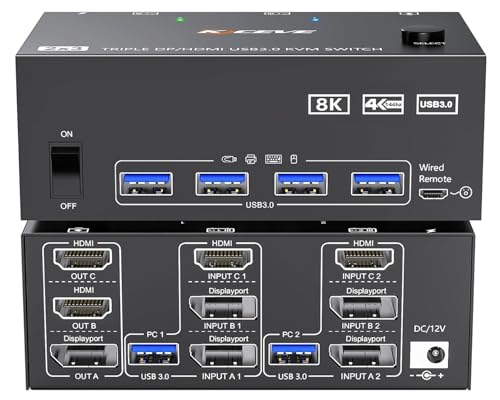
- 2 PCs can share 3 monitors with extended or mirrored modes
- Includes USB 3.0 support, wired remote, power adapter, and cables
- High-resolution output up to 8K/4K class on compatible hardware
Best For: People building a dual-computer, triple-monitor desk with shared USB peripherals.
Best for Triple-Monitor Switching
HDMI KVM Switch for 3 Monitors, 2 PCs

- Supports 3 monitors across 2 computers
- Up to 8K@60Hz or 4K@120Hz output
- Includes USB-A, USB-C, and wired remote
Best For: Users who want a plug-and-play KVM for dual-PC, triple-monitor desks.
Best for USB4 Dock Sharing – Cable Matters 20Gbps USB-C KVM Switch
If you want one box that can share a USB-C monitor or Thunderbolt 4 dock between three computers, this is one of the more capable cable matters usb c kvm switches to consider. It prioritizes high-resolution display sharing, fast USB4 data paths, and a simple remote-based workflow, but it does have some compatibility rules you need to follow.
Best For: Users who want to switch a USB-C/TB4 monitor or detachable-cable dock between three laptops without software.
Pros:
- Supports 20Gbps USB4 switching and up to 8K@30Hz on Windows
- Can share a compatible USB-C or Thunderbolt 4 dock with three computers
- Includes RF remote control for easy switching without drivers
- Offers up to 140W Power Delivery to the active device
Cons:
- Must use the included USB4 20Gbps cables, not TB3/TB4/TB5 cables
- Compatibility can be limited with captive-cable docks and some 40Gbps setups
- macOS is limited to one external display
For buyers comparing cable matters usb c kvm switches, this model stands out for dock-sharing flexibility and strong display support, but it works best when you match the cabling and dock types exactly to its requirements.
Best for High-Resolution USB Sharing – UGREEN 8K@60Hz HDMI KVM Switch
If you’re comparing cable matters usb c kvm switches and want a higher-end HDMI option for two computers, this UGREEN model stands out for its 8K@60Hz support and built-in USB 3.0 sharing. It’s a practical pick for people who need one monitor, keyboard, mouse, and a few peripherals controlled from a single desk setup.
Best For: Dual-computer workstations that need fast USB peripheral sharing and very high display resolution support.
Pros:
- Supports up to 8K@60Hz with backward compatibility for common lower resolutions
- Shares 4 USB devices, including 3 USB-A ports and 1 USB-C port
- Includes HDMI cables, USB cables, and a desktop controller for easier setup
- Plug-and-play design works across Windows, macOS, and Linux
Cons:
- Not a DisplayPort KVM, so it only fits HDMI-based systems
- No hotkey switching or EDID emulation
- 8K performance depends on compatible devices and short HDMI cables
For buyers cross-shopping cable matters usb c kvm switches, this UGREEN unit is a strong alternative when HDMI, USB 3.0 speed, and 8K-ready specs matter more than compact simplicity. It’s especially appealing if you want a cable-included package for a dual-PC desk.
Best for USB4/TB4 Dock Sharing – Cable Matters 20Gbps USB-C KVM Switch
If you need one of the more versatile cable matters usb c kvm switches for sharing a USB-C monitor or Thunderbolt 4 dock between two computers, this model stands out for its 20Gbps bandwidth, 140W pass-through charging, and strong 8K/4K display support. It’s a practical fit for laptop users who want a clean desk setup without giving up fast data or high-end video output.
Best For: Dual-laptop setups that share a USB-C or Thunderbolt 4 monitor/dock and need high-res video with charging.
Pros:
- Supports up to 8K@30Hz on Windows and 4K@60Hz on macOS
- Delivers up to 140W USB-C power delivery pass-through
- Works with USB4 and Thunderbolt 4 docks that use detachable host cables
- Included 20Gbps cables simplify setup and help avoid compatibility issues
Cons:
- Not ideal for captive-cable docks
- 20Gbps bandwidth can limit some multi-display dock setups
- Thunderbolt 3/4/5 cables should not be substituted for the included USB4 cables
This is a strong pick if your priority is sharing a modern USB-C or TB4 workspace rather than driving the absolute most demanding dock configuration. Among cable matters usb c kvm switches, it’s especially compelling for users who want a tidy two-computer setup with high-resolution support and meaningful charging headroom.
Best Dual-Monitor USB-C Setup – USB-C KVM Switch for 2 Monitors
If you’re comparing cable matters usb c kvm switches for a dual-screen desk, this model is built around a practical laptop-and-desktop sharing setup. It lets two computers share two monitors and four USB peripherals, while also adding USB-C power delivery and fast 4K output for a cleaner workspace.
Best For: Users who want a dual-monitor USB-C KVM with charging, wired switching, and shared peripherals for both a laptop and desktop.
Pros:
- Supports 2 computers sharing 2 monitors plus 4 USB devices
- USB-C input can carry video, data, and power from a compatible laptop
- PD charging supports up to 87W output for laptop use
- 4K@60Hz support makes it a strong fit for sharper displays
Cons:
- Needs compatible USB-C cables and a laptop that supports Alt Mode
- Switching can show brief flicker or delay depending on cable and monitor compatibility
For buyers comparing cable matters usb c kvm switches, this one stands out for combining dual-monitor sharing, laptop charging, and simple wired control in a single dock-style unit. It’s a good match if you want fewer cables without giving up productivity features.
Best for 8K USB-C Sharing – Cable Matters 20Gbps USB-C KVM Switch
If you need a practical way to share one USB-C monitor or Thunderbolt 4 dock between two laptops, this is one of the more capable cable matters usb c kvm switches. It focuses on high-bandwidth USB4 sharing, clean switching, and strong display support, but it does require the included cables and compatible dock or monitor setup.
Best For: Users who want a high-resolution USB-C KVM-style switch for sharing a TB4/USB-C monitor or dock between two computers.
Pros:
- Supports up to 8K@30Hz on Windows and 4K@60Hz on macOS with a single display
- Includes RF remote switching for quick host changes without software
- Passes up to 140W to the active computer for convenient laptop charging
- Works with many USB4/TB4 docks that use a detachable host cable
Cons:
- Must use the included USB4 cables; Thunderbolt cables are not a substitute
- Not ideal for docks with attached host cables
- 20Gbps bandwidth may limit some dual-monitor or top-end dock setups
This is a strong fit for buyers comparing cable matters usb c kvm switches for monitor or dock sharing, especially if image quality and simple two-PC switching matter more than multi-monitor flexibility.
Best for Dual-Monitor Sharing – USB C HDMI KVM Switch 4K@60Hz
If you need one box that lets a laptop and desktop share two HDMI monitors plus USB peripherals, this option from the cable matters usb c kvm switches category is built for that workflow. It supports dual-display switching, 4K@60Hz output, and USB-C laptop connectivity, making it a practical fit for workstations that move between two computers.
Best For: Users who want a dual-monitor KVM for one desktop and one USB-C laptop with simple switching and included accessories.
Pros:
- Shares 2 HDMI monitors and up to 4 USB devices between two computers
- Supports USB-C MST for dual-screen laptop expansion
- Includes a wired controller, USB-C cable, and power adapter
- 4K@60Hz support keeps text and UI crisp on compatible setups
Cons:
- Your laptop must support display expansion/MST for dual-monitor output
- Requires proper power connection and compatible cables for best stability
For buyers comparing cable matters usb c kvm switches, this model stands out for combining dual-monitor support, USB-C laptop hookup, and desk-friendly switching in one package. It is a strong fit if you want fewer cable swaps and a cleaner shared setup.
Best for Comfort – Cable Matters 20Gbps USB-C KVM Switch
If you want one of the more flexible cable matters usb c kvm switches for sharing a USB-C monitor or Thunderbolt 4 dock between two laptops, this model is built for that exact job. It prioritizes fast switching, strong charging, and high-resolution output, but it also has a few important compatibility limits to keep in mind before you buy.
Best For: People who want to share a USB4 or Thunderbolt 4 dock, monitor, or workspace between two computers with a single switch.
Pros:
- Up to 20Gbps data and up to 140W pass-through charging
- Supports 8K@30Hz on Windows and 4K@60Hz on macOS
- Works with many TB4 docks that use a detachable host cable
- Good fit for clean two-computer desk setups
Cons:
- Must use the included USB4 cables; Thunderbolt cable swaps can cause issues
- 20Gbps bandwidth may reduce display count or max resolution versus a 40Gbps dock
- Not ideal for docks with built-in pigtail cables
For buyers who understand the cable and dock compatibility rules, this is a capable, high-power option among cable matters usb c kvm switches. It makes the most sense when your priority is sharing one Thunderbolt/USB-C dock or monitor across two systems without giving up charging or high-end display support.
Best Triple-Monitor Pick – HDMI/DP KVM for 3 Monitors
If you need a high-end desktop switch for a multi-display workstation, this cable matters usb c kvm switches alternative is built for serious screen sharing. It lets two PCs share up to three monitors plus USB peripherals, with support for extended or mirrored display modes and very high refresh/resolution potential when your cables and GPUs are up to the task.
Best For: Users who want one KVM to control two computers across three monitors with USB 3.0 accessories.
Pros:
- Supports 2 computers sharing 3 monitors in extended or copy mode
- USB 3.0 ports and included cables help simplify setup
- High-resolution support up to 8K/4K class output on compatible gear
- Wired remote and power adapter are included
Cons:
- Requires a specific multi-output port setup on each PC
- Not compatible with common adapter chains like USB-C to DP/HDMI
- Best results depend heavily on monitor, GPU, and cable support
This is a specialized pick rather than a simple plug-and-play box, but for the right dual-PC, triple-monitor desk it delivers a lot of flexibility. If you are comparing cable matters usb c kvm switches against more advanced display-sharing options, this model stands out for raw monitor count and connectivity.
Best for Triple-Monitor Switching – HDMI KVM Switch for 3 Monitors, 2 PCs
If you need one box to manage two PCs across three displays, this triple-monitor KVM is built for the job. It’s a practical option to consider alongside cable matters usb c kvm switches when you want fast switching, USB 3.0 peripheral support, and high-resolution output without extra software.
Best For: Dual-PC workstations with three monitors, especially users who want plug-and-play switching for keyboard, mouse, and USB devices.
Pros:
- Supports 3 monitors for 2 computers with extended and mirrored display modes
- High-resolution output up to 8K@60Hz or 4K@120Hz, with backward compatibility
- Includes 3 USB-A and 1 USB-C ports for keyboards, mice, drives, and other peripherals
- Comes with wired remote control and cables for easier setup
Cons:
- Final resolution depends on your GPU, monitors, cables, and adapters
- USB input must be connected to the computer or peripherals won’t be recognized
- Best suited to HDMI-based setups rather than mixed-connection rigs
This is a strong fit if your priority is triple-monitor sharing with simple controls and broad peripheral support. Compared with cable matters usb c kvm switches, it leans more toward multi-display flexibility than minimalist desk setups.
Best for Triple-Display Workstations – 3 Monitors 3 PCs 8K KVM Switch
If you need one box to juggle three PCs across three monitors, this KVM is aimed at serious desk setups. It’s a strong fit for buyers comparing cable matters usb c kvm switches who want high-resolution display support, USB sharing, and a wired controller for quicker switching.
Best For: Multi-computer users who want to share a triple-monitor setup and keep a keyboard, mouse, and USB accessories connected through one switch.
Pros:
- Supports 3 computers on 3 monitors with up to 8K@60Hz or 4K@120Hz
- Includes HDMI/DP connectivity plus USB 3.0 cables for peripherals
- Wired extend controller makes switching easier on a crowded desk
- Power adapter included for more stable operation
Cons:
- Overkill if you only need a basic 2-port KVM
- Triple-monitor setups require compatible cabling and matching display outputs
- More complex than simpler cable matters usb c kvm switches built for single-monitor use
For power users, this model stands out by prioritizing triple-display flexibility and high refresh support. If your workspace needs more than a standard switch, it’s a capable option in the cable matters usb c kvm switches category.
How We Picked the Best Cable Matters USB C Kvm Switches
We looked for models that solve the real problems buyers face: smooth switching, compatibility with modern USB-C and Thunderbolt devices, enough video bandwidth for high-resolution monitors, and dependable peripheral sharing. For Cable Matters USB C Kvm Switches, we also prioritized power delivery, because a KVM that charges your laptop properly can replace a dock for many users.
We favored options with clear use cases, such as single-monitor office setups, dual-monitor productivity rigs, and more complex multi-monitor workstations. Extra USB ports, firmware-friendly behavior, and support for common Windows and macOS workflows also mattered.
Quick Comparison
If you want the simplest path, choose a USB-C KVM for a laptop-and-desktop setup with one monitor. If you need dual displays, look for MST or dual-monitor support and confirm your computers support the same video output method. For higher-end creative or trading desks, HDMI/DisplayPort KVMs with triple-monitor support offer more flexibility, but they are usually more complex to wire and configure.
In general, USB-C models are best when charging and video over one cable matter most. HDMI and DisplayPort KVMs are better when your computers already have strong discrete graphics outputs and you want broader monitor-format support.
Key Buying Factors for Cable Matters USB C Kvm Switches
Display Resolution and Refresh Rate
Check the maximum resolution on both Windows and macOS, not just the headline spec. Many KVMs support higher refresh rates or resolutions only under certain operating systems or port combinations.
Power Delivery
Look at wattage if you plan to charge a laptop through the KVM. A stronger PD rating can reduce charger clutter and make the setup more portable, but it should still match your laptop’s needs for best results.
Monitor Count and Video Standard
Single-monitor USB-C KVMs are easier to deploy, while dual- and triple-monitor switches require more careful compatibility checks. Confirm whether the switch uses USB-C alt mode, MST, HDMI, or DisplayPort, and verify your computer supports the same path.
Peripheral Sharing
Make sure the switch includes enough USB ports for your keyboard, mouse, webcam, storage, or printer. Some models are better for basic input devices, while others handle high-speed accessories more comfortably.
Who Should Buy Which Cable Matters USB C Kvm Switches?
Buy a Cable Matters USB-C KVM if you want a clean, premium-style desk setup with laptop charging and shared peripherals in one box. It is a strong fit for remote workers, hybrid professionals, and anyone who swaps between a work laptop and personal computer daily.
Choose a traditional HDMI or DisplayPort KVM if your setup centers on multiple monitors, a desktop GPU, or mixed legacy connections. If you use high-bandwidth accessories or need three displays, a more specialized multi-monitor KVM may be the better long-term choice.
For most buyers, the best option is the one that matches your actual devices first and your future upgrade plans second. Verify ports, charging needs, and monitor support before you buy, and you will avoid the most common KVM compatibility headaches.
