
A good ultrawide monitor can replace a dual-screen setup while giving your workspace a cleaner, more seamless view. The challenge is finding a model that balances resolution, connectivity, ergonomics, and price without paying for gaming features you may not need.
We compared 10 budget-friendly ultrawide displays, from practical 34-inch office monitors to expansive 49-inch models. The selections below cover different priorities, including sharp WQHD images, USB-C convenience, high refresh rates, built-in speakers, and split-screen multitasking.
Best 10 Budget Ultrawide Productivity Monitors Picks for 2026
Best All-Around Value
LG 34WR55QK-B 34-inch UltraWide

- 3440 x 1440 curved display for detailed multitasking
- USB-C with up to 65W power delivery
- Height-adjustable stand and Picture-by-Picture support
Best For: Multitaskers needing high resolution and USB-C laptop connectivity
Best for Eye-Care Features
Samsung ViewFinity S50GC 34-inch

- Ultra-WQHD resolution with a spacious 21:9 layout
- Ambient light sensor and Eye Saver Mode
- Picture-by-Picture and Picture-in-Picture support
Best For: Long work sessions and two-source multitasking
Best IPS Budget Pick
LG 34U530A-W 34-inch UltraWide
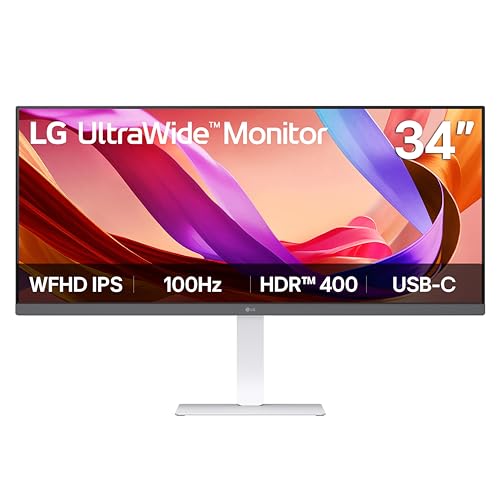
- IPS panel with 2560 x 1080 ultrawide resolution
- USB-C display and data connectivity
- Built-in speakers and height, tilt, and swivel adjustments
Best For: Home offices wanting IPS viewing angles and integrated audio
Best High-Refresh Value

- 3440 x 1440 curved display with 1800R curvature
- 120Hz refresh rate for smoother motion
- LG Switch supports up to 11 screen layouts
Best For: Productivity users who also want smoother video and gaming
Budget Workspace Pick
Sceptre 34-inch Prime UWQHD Monitor

- 34-inch 3440 x 1440 ultrawide workspace
- 103% sRGB color gamut and matte VA panel
- Built-in speakers with HDMI and DisplayPort connectivity
Best For: Budget multitasking and everyday office work
Feature-Rich Hybrid Pick
INNOCN 34-inch 180Hz IPS Ultrawide

- 3440 x 1440 IPS display with 100% sRGB coverage
- PIP/PBP supports two-device workflows
- Height-adjustable stand and 180Hz refresh rate
Best For: Mixed productivity, creative work, and gaming
Curved Performance Pick
Sceptre 34-inch Curved WQHD Monitor
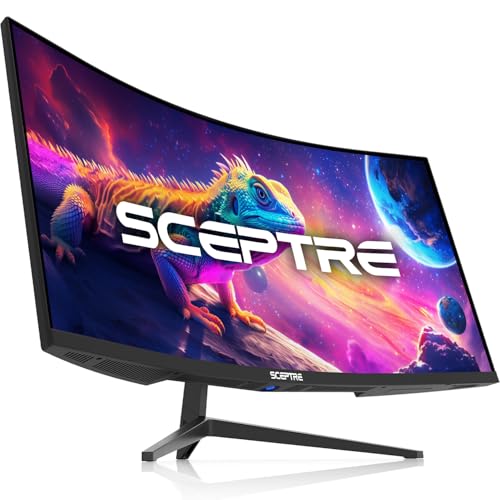
- Curved 3440 x 1440 ultrawide display
- 100% sRGB, 1ms MPRT, and FreeSync Premium
- PIP/PBP with built-in speakers and dual DisplayPort
Best For: Immersive multitasking with gaming capability
Best Budget Dual-QHD Pick
Amzfast 49-Inch DQHD Curved Monitor

- 49-inch 5120×1440 workspace
- PIP/PBP supports two sources
- Adjustable stand and 120Hz refresh
Best For: Large-scale multitasking on a budget
Best Mid-Size Value Option
Sceptre 34-Inch WQHD Ultrawide Monitor

- 3440×1440 WQHD resolution
- 165Hz refresh and 1ms MPRT
- Built-in speakers and blue-light filter
Best For: Compact home-office and mixed-use setups
Best Business Connectivity
Samsung 49-Inch Dual-QHD USB-C Monitor

- 5120×1440 productivity workspace
- USB-C with up to 90W charging
- Built-in hub, speakers, and height adjustment
Best For: Laptop-centered professional workstations
Best All-Around Value – LG 34WR55QK-B 34-inch UltraWide
For shoppers comparing budget ultrawide productivity monitors, the LG 34WR55QK-B stands out with a sharp 3440 x 1440 resolution, useful laptop connectivity, and a height-adjustable stand. Its 21:9 curved VA display provides ample room for side-by-side windows without requiring a dual-monitor setup.
Best For: Multitaskers who want high-resolution workspace flexibility and USB-C laptop connectivity.
Pros:
- UltraWide WQHD resolution provides detailed workspace room for multiple windows.
- USB-C supports display output and up to 65W power delivery.
- Picture-by-Picture and OnScreen Control support flexible multitasking.
- Height and tilt adjustments improve ergonomic positioning.
Cons:
- Its 100Hz refresh rate is suited to general use rather than high-refresh gaming.
- The VA panel’s 178-degree viewing angle may not match IPS viewing consistency.
This is a particularly versatile choice when productivity features matter as much as screen space. HDR10, Reader Mode, multiple video inputs, and the included USB-C cable add practical value for mixed work and entertainment setups.
Best for Eye-Care Features – Samsung ViewFinity S50GC 34-inch
The Samsung ViewFinity S50GC is a strong option among budget ultrawide productivity monitors for users who spend long hours at a desk. Its 34-inch Ultra-WQHD panel combines a 21:9 workspace with ambient brightness adjustment, Eye Saver Mode, and a virtually borderless design.
Best For: Office users who prioritize comfortable extended viewing and two-source multitasking.
Pros:
- 3440 x 1440 resolution offers generous room for documents and applications.
- Ambient light sensing and Eye Saver Mode support longer viewing sessions.
- Picture-by-Picture and Picture-in-Picture enable simultaneous source monitoring.
- 100Hz refresh rate and FreeSync provide smoother everyday motion.
Cons:
- It lacks USB-C connectivity for one-cable laptop connection.
- The listed 72% color gamut is less extensive than some competing options.
The S50GC makes the most sense for productivity-first setups that value eye-care tools and source flexibility over USB-C convenience. Its dual HDMI inputs, DisplayPort connection, HDR10, and minimal bezel design keep the feature set practical without excessive extras.
Best IPS Budget Pick – LG 34U530A-W 34-inch UltraWide
The LG 34U530A-W takes a productivity-focused approach to budget ultrawide productivity monitors with an IPS panel, USB-C connectivity, built-in speakers, and an adjustable stand. Its 2560 x 1080 resolution gives you a wide horizontal canvas while keeping the feature set approachable for everyday work.
Best For: Home-office users who want IPS viewing angles, built-in audio, and straightforward laptop connectivity.
Pros:
- IPS technology provides consistent viewing from broad angles.
- USB-C supports display output and data transfer through one cable.
- Built-in Waves MaxxAudio stereo speakers reduce the need for external speakers.
- Height, tilt, and swivel adjustments make positioning easier.
Cons:
- 2560 x 1080 resolution is less detailed than Ultra-WQHD alternatives.
- The supplied details list only one HDMI port and one USB port.
This LG is a sensible choice when everyday usability matters more than maximum pixel density. DisplayHDR 400, up to 99% sRGB coverage, a 100Hz refresh rate, Reader Mode, and screen-layout controls round out a practical home-office package.
Best High-Refresh Value – LG 34U60ZB-B 34-inch Curved
For buyers seeking budget ultrawide productivity monitors that can also handle smoother entertainment, the LG 34U60ZB-B offers a 120Hz refresh rate alongside a 3440 x 1440 curved display. Its 1800R curve, Reader Mode, and screen-layout controls make it suitable for both focused work and occasional gaming.
Best For: Users who want detailed ultrawide productivity with a faster refresh rate for video and gaming.
Pros:
- 3440 x 1440 resolution provides a detailed, spacious desktop.
- 120Hz refresh rate delivers smoother motion than typical 60Hz displays.
- 1800R curvature supports an immersive viewing position.
- LG Switch offers up to 11 screen-layout options and desktop controls.
Cons:
- It does not list USB-C connectivity or built-in speakers.
- The 250-nit brightness is lower than some HDR-capable competitors.
- The supplied details list only one HDMI port.
This model is compelling when refresh rate is a priority but you still need a high-resolution work canvas. The VA panel, HDR10, up to 99% sRGB coverage, height and tilt adjustment, and Black Stabilizer extend its usefulness beyond basic office tasks.
Budget Workspace Pick – Sceptre 34-inch Prime UWQHD Monitor
For shoppers comparing budget ultrawide productivity monitors, the Sceptre E345W offers a spacious 34-inch 21:9 workspace with 3440 x 1440 resolution. Its wide layout is suited to keeping spreadsheets, documents, and timelines visible together, while the matte VA panel, blue-light technology, and built-in speakers support extended everyday use.
Best For: Budget-conscious multitasking, office work, spreadsheets, and media viewing.
Pros:
- 34-inch UWQHD display provides ample horizontal space for multiple windows.
- 103% sRGB color gamut supports vivid, detailed visuals.
- Two HDMI ports, two DisplayPort inputs, built-in speakers, and audio out offer flexible connectivity.
- Blue-Light Shift technology and a matte finish can make long sessions more comfortable.
Cons:
- Flat VA panel and 5ms response time are less gaming-focused than faster alternatives.
- The included stand does not list height adjustment.
This is a practical value option when screen width and resolution matter more than premium ergonomics or high-refresh gaming performance. The 115Hz DisplayPort refresh rate adds smoothness without moving far beyond a productivity-focused design.
Feature-Rich Hybrid Pick – INNOCN 34-inch 180Hz IPS Ultrawide
The INNOCN 34C1R stands out among budget ultrawide productivity monitors for combining a 34-inch 3440 x 1440 IPS display with productivity-friendly PIP and PBP modes. Its adjustable stand, wide viewing angles, HDR400 support, and high refresh rate make it suitable for work, creative tasks, and gaming from one desk.
Best For: Users who want one monitor for multitasking, editing, gaming, and multiple input sources.
Pros:
- 3440 x 1440 resolution and 21:9 format provide substantial workspace for documents, timelines, and charts.
- PIP and PBP can display two connected devices simultaneously.
- IPS panel offers 178-degree viewing angles, 100% sRGB coverage, and HDR400 support.
- Height, tilt, and swivel adjustments improve ergonomic flexibility.
Cons:
- Its 180Hz gaming capability may be more than productivity-focused users need.
- The listed 1000:1 contrast ratio may provide less contrast than some VA alternatives.
Choose this model when flexibility is a priority. PIP/PBP and the ergonomic stand directly support a mixed-device workflow, while Adaptive-Sync and the 1ms MPRT response time add gaming capability without sacrificing the core ultrawide productivity format.
Curved Performance Pick – Sceptre 34-inch Curved WQHD Monitor
The Sceptre C345B-QUT168 is a strong option for shoppers seeking budget ultrawide productivity monitors with a more immersive design. Its curved 34-inch 3440 x 1440 screen adds workspace for side-by-side applications, while 100% sRGB coverage, PIP/PBP features, and a high refresh rate broaden its usefulness beyond basic office work.
Best For: Curved-screen multitasking, photo or video work, and users who also play fast-paced games.
Pros:
- 34-inch 21:9 WQHD display offers about 30% more screen space than a conventional monitor.
- Curved R1500 design creates a more immersive viewing experience.
- 100% sRGB coverage, 1ms MPRT response time, and FreeSync Premium support versatile use.
- PIP/PBP, built-in speakers, dual DisplayPort, and HDMI connectivity add convenience.
Cons:
- The curved screen may be less suitable for users who prefer a flat display for precise layout work.
- The supplied details do not specify stand height adjustment.
This model makes sense for buyers who want productivity space without giving up gaming-oriented specifications. The curved format, WQHD resolution, and PIP/PBP tools support multitasking, while the 180Hz-class refresh rate and 1ms response time provide extra headroom for entertainment.
Best Budget Dual-QHD Pick – Amzfast 49-Inch DQHD Curved Monitor
For shoppers comparing budget ultrawide productivity monitors, the Amzfast stands out with a 49-inch Dual QHD panel, a 32:9 layout, and PIP/PBP support for viewing two sources at once. Its adjustable stand and broad connectivity also make it practical for a multi-window desk setup.
Best For: Users who want maximum workspace and dual-source multitasking at a comparatively budget-focused price.
Pros:
- 5120×1440 resolution provides expansive Dual QHD workspace.
- PIP/PBP can divide the display between two signal sources.
- Height, swivel, and tilt adjustments support flexible desk positioning.
- 120Hz refresh rate, HDR, and 120% sRGB coverage add versatility for entertainment and creative work.
Cons:
- The very wide 49-inch footprint requires substantial desk space.
- 120Hz is specified through DisplayPort 1.4, so connection choice matters.
The Amzfast is a strong value-oriented option when screen width and multitasking matter more than premium docking features. Confirm that your desk and computer can accommodate its size and native resolution.
Best Mid-Size Value Option – Sceptre 34-Inch WQHD Ultrawide Monitor
The Sceptre is a practical choice among budget ultrawide productivity monitors for shoppers who want a more manageable 34-inch footprint. Its 3440×1440 WQHD resolution offers substantially more horizontal workspace than a standard 1080p display while remaining suitable for business, editing, and gaming.
Best For: Home offices and mixed-use desks that need ultrawide space without moving to a 49-inch display.
Pros:
- 3440×1440 WQHD resolution delivers detailed text and room for multiple windows.
- 21:9 format provides more workspace than a conventional monitor.
- 165Hz refresh rate and 1ms MPRT response support smooth motion.
- Built-in speakers, blue-light filtering, and dual DisplayPort connections add convenience.
Cons:
- At 280 cd/m², brightness is more modest than some larger alternatives.
- The listed contrast specification may not translate to the same HDR-like experience as a dedicated HDR monitor.
Choose the Sceptre if you want the productivity benefits of an ultrawide without dedicating an entire desk to it. It is especially compelling for users who also value a high refresh rate and built-in audio.
Best Business Connectivity – Samsung 49-Inch Dual-QHD USB-C Monitor
For buyers seeking budget ultrawide productivity monitors with a built-in docking role, the Samsung combines a 49-inch 5120×1440 display with USB-C connectivity and up to 90W charging. Its height-adjustable stand, built-in speakers, and business-oriented warranty make it well suited to a streamlined workstation.
Best For: Laptop-based professionals who want one large screen to serve as both monitor and connectivity hub.
Pros:
- Dual QHD resolution and a 32:9 aspect ratio provide broad project and document space.
- USB-C supports up to 90W charging, while DisplayPort, HDMI, USB, and Ethernet expand connectivity.
- 120Hz refresh rate improves scrolling and provides smoother gaming visuals.
- DisplayHDR 400, built-in speakers, and a height-adjustable stand support a cleaner office setup.
Cons:
- The 49-inch display is large and weighs 32.2 pounds, so installation and desk planning are important.
- Its 5ms response time is less gaming-focused than the faster alternatives in this roundup.
The Samsung is the most workstation-focused option here, especially if USB-C charging and fewer desk connections are priorities. It may cost more than basic ultrawides, but its hub features can reduce the need for a separate dock.
How We Picked the Best Budget Ultrawide Productivity Monitors
We focused on features that make a measurable difference during everyday work: usable screen area, text clarity, refresh rate, panel type, connectivity, viewing comfort, and workspace flexibility. Most of the 34-inch models use a 21:9 aspect ratio, while the 49-inch options provide a dual-QHD-style canvas for users who want to keep several full-size windows visible.
Resolution was an important consideration. WQHD models with a 3440 × 1440 resolution generally offer crisper text and more desktop space than 2560 × 1080 displays, although lower-resolution models can be a better value for basic office work. We also considered USB-C, picture-in-picture and picture-by-picture modes, adaptive sync, built-in speakers, HDR support, and VESA compatibility where listed.
Quick Comparison
| Best For | What to Look For | Recommended Size |
|---|---|---|
| Everyday office work | WQHD resolution, 100Hz refresh rate, reader or eye-care modes | 34 inches |
| USB-C laptop desks | USB-C input, simple cable management, VESA support | 34 inches |
| Heavy multitasking | Dual QHD resolution, PBP/PIP, wide desktop space | 49 inches |
| Work and gaming | 120Hz or higher, adaptive sync, low response time | 34 inches |
Key Buying Factors for Budget Ultrawide Productivity Monitors
Resolution and Text Clarity
For a 34-inch display, 3440 × 1440 is usually the best productivity sweet spot. It provides room for multiple windows while keeping documents and fine interface text reasonably sharp. A 2560 × 1080 model costs less and can work well for email, spreadsheets, and general browsing, but it offers less vertical detail and lower pixel density.
Connectivity and Laptop Compatibility
Check whether the monitor includes the ports your setup needs. DisplayPort and HDMI cover most desktops, while USB-C can simplify laptop use. Do not assume every USB-C port supports charging or video; verify the manufacturer’s specifications before buying. PIP and PBP are especially useful for viewing two computers or sources at once.
Ergonomics, Comfort, and Size
Look for height adjustment, tilt range, VESA mounting, and a stand that fits your desk. Curved panels can make a wide screen easier to scan, but a 49-inch monitor needs substantial desk depth and width. Eye-care or reader modes may also help if you spend long hours reading.
Refresh Rate and Extra Features
A 100Hz refresh rate makes scrolling and window movement feel smoother than standard 60Hz. Higher rates such as 120Hz or 180Hz are useful for mixed work-and-gaming setups, but they should not outweigh better resolution or connectivity if productivity is your main goal. Built-in speakers are convenient for calls and alerts, though dedicated speakers usually sound better.
Who Should Buy Which Budget Ultrawide Productivity Monitors?
Choose a 34-inch WQHD model if you want the best all-around balance of workspace, clarity, and price. Pick a 34-inch WFHD display when keeping costs low matters more than maximum sharpness. A USB-C-equipped model is the practical choice for laptop users who want a cleaner desk and fewer adapters.
If you routinely manage several large spreadsheets, timelines, dashboards, or creative applications, a 49-inch dual-QHD monitor can replace two displays with one continuous desktop. Finally, choose a high-refresh-rate model if the monitor will also serve as a gaming screen. Before purchasing, confirm your computer can output the monitor’s native resolution and refresh rate, and measure your desk for the stand and panel width.
