
Finding a responsive drawing display without overspending is easier when you know which specifications matter most. The best budget drawing display tablets balance screen quality, pen accuracy, shortcut controls, connectivity, and software compatibility.
We’ve gathered 10 affordable options for beginners, students, hobbyists, and working artists, from compact 11.6-inch pen displays to larger models and standalone tablets.
Best 10 Budget Drawing Display Tablets Picks for 2026
Best Color Accuracy
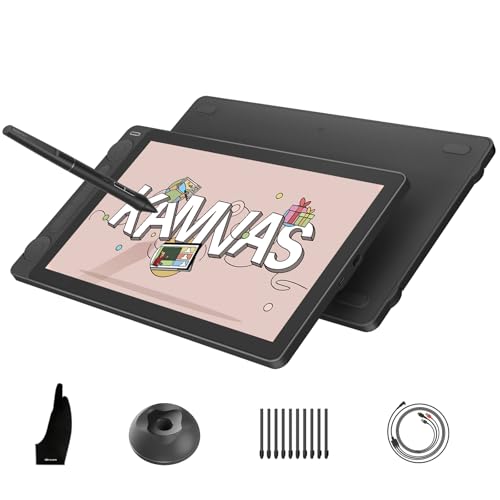
- 16,384 pressure levels with PenTech 4.0
- 99% sRGB and factory ΔE<1.5 calibration
- Full-laminated anti-glare Canvas Glass 2.0
Best For: Color-focused artists and designers
Best Compact Starter Display

- 11.6-inch 1920×1080 IPS display
- Battery-free 8,192-level pressure pen
- Six shortcut keys and programmable touch bar
Best For: Students, teachers, and beginner creators
Best Full-Laminated Value

- Full-laminated 11.6-inch anti-glare display
- Battery-free pen with 8,192 pressure levels
- Includes two pens and 28 replacement nibs
Best For: Portable drawing and teaching setups
Best Large Non-Display Pad

- 10×6-inch active area with battery-free stylus
- 12 customizable keys and 10 Windows multimedia keys
- Includes 20 replacement nibs and OTG adapters
Best For: Budget drawing, online teaching, and monitor-based workflows
Best Standalone Pick

- Works without a computer
- 10.1-inch Full HD IPS display
- Includes battery-free pen and drawing apps
Best For: Portable sketching, notes, and beginner digital art
Best Budget Pen Display
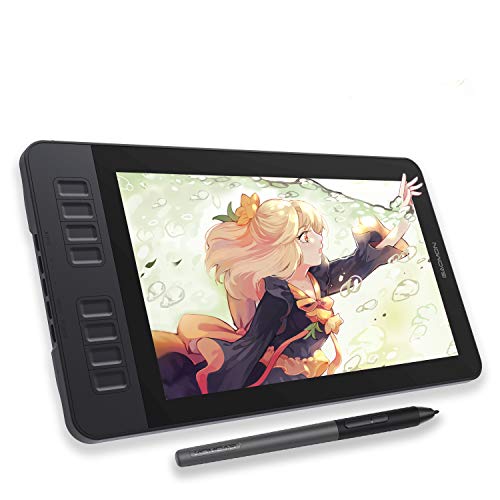
- 11.6-inch Full HD drawing screen
- 8,192 pressure levels with tilt support
- Eight programmable shortcut keys
Best For: Computer-connected digital art and design
Best Large-Surface Drawing Pad

- Spacious 8×5-inch active area
- 16,384 pressure levels with tilt support
- 10 keys and a quick dial
Best For: Portable screenless drawing and shortcut-heavy workflows
Best Color and Comfort Pick
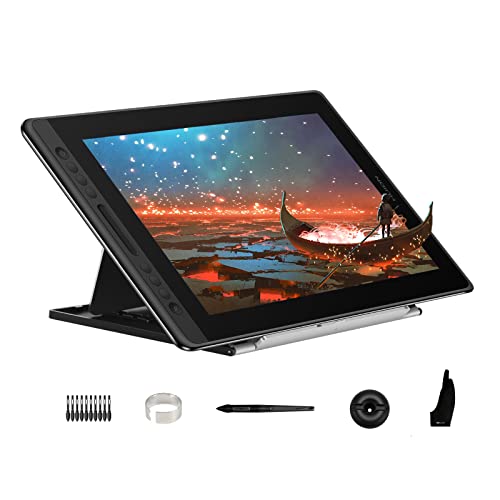
- 15.6-inch laminated anti-glare display
- 120% sRGB color coverage
- Includes adjustable stand and battery-free pen
Best For: Artists wanting a spacious, color-rich desktop pen display
Best Compact Workflow Pick

- 11.6-inch laminated anti-glare display
- Red dial and eight shortcut keys
- Battery-free pen with tilt support
Best For: Students and artists with limited desk space
Best Advanced Features Pick

- 16K-pressure battery-free stylus
- Wide 99% sRGB color coverage
- USB-C and pen-tablet dual modes
Best For: Artists seeking modern connectivity and flexible workflow options
Best Color Accuracy – HUION Kamvas 13 (Gen 3)
The HUION Kamvas 13 (Gen 3) is a strong option among budget drawing display tablets for creators who prioritize accurate color and a refined drawing surface. Its 13.3-inch full-laminated display requires a Windows, Mac, Linux, or compatible Android device to operate.
Best For: Artists, designers, and students who want professional-style color performance in a portable pen display.
Pros:
- Full-laminated Canvas Glass 2.0 with anti-glare, nano-etched texture
- 16,384 pressure levels and tilt auto-alignment via PenTech 4.0
- 99% sRGB/Rec.709, 90% Adobe RGB, and factory calibration to ΔE<1.5
- Two dials, five shortcut keys, and a slim 11.7mm design
Cons:
- Must be connected to a computer or compatible Android device
- May require careful cable and port planning for setup
The Kamvas 13 (Gen 3) stands out when color fidelity, surface feel, and shortcut controls matter more than getting the lowest-cost display. Its portable build also suits creators who work in multiple locations.
Best Compact Starter Display – XP-PEN Artist12
The XP-PEN Artist12 is a compact choice among budget drawing display tablets, pairing an 11.6-inch Full HD screen with customizable controls and a battery-free stylus. It must connect to a computer and uses HDMI and USB for connection.
Best For: Students, teachers, and beginner-to-intermediate creators who want a small screen tablet for drawing, editing, and online instruction.
Pros:
- 1920×1080 IPS display with 100% sRGB coverage listed
- Battery-free pen with 8,192 pressure levels and rear digital eraser
- Six customizable shortcut keys plus a programmable touch bar
- Works with Windows, Mac, Linux, and major creative software
Cons:
- Requires a computer with HDMI and USB-A ports or suitable adapters
- Smaller 11.6-inch drawing area may feel limiting for some workflows
The Artist12 keeps the feature set straightforward while adding useful shortcut controls and a comfortable passive pen. It is especially practical for buyers who need a compact display for both creative work and remote teaching.
Best Full-Laminated Value – VEIKK VK1200 V2
The VEIKK VK1200 V2 offers useful display-tablet features at a value-oriented level, including full lamination, anti-glare glass, and a battery-free pen. Like other budget drawing display tablets, it must be connected to a computer to work.
Best For: Artists and students seeking a compact, portable pen display with simple controls and generous included accessories.
Pros:
- 11.6-inch 1920×1080 IPS display with 72% NTSC color gamut
- Full lamination reduces parallax, while anti-glare glass supports a paper-like feel
- Battery-free 8,192-level pen with 60-degree tilt recognition
- Includes two pens, 28 replacement nibs, six shortcut keys, and USB-C connectivity
Cons:
- Requires a Windows, Mac, or Linux computer
- Only six programmable shortcut keys are provided
The VK1200 V2 is a sensible pick when drawing feel and portability are priorities. Its full-screen metal design and extra pen supplies add practical value for frequent use or shared setups.
Best Large Non-Display Pad – XOPPOX 10×6 Drawing Tablet
The XOPPOX 10×6 is a graphics tablet rather than a screen-based pen display, making it a lower-cost alternative within the broader budget drawing display tablets category. You draw on its 10×6-inch active area while viewing the work on a connected computer or compatible Android device.
Best For: Beginners, online teachers, and creators who want a large active area, extensive shortcut controls, and a battery-free pen without paying for a built-in screen.
Pros:
- Large 10×6-inch active area with 8,192 pressure levels
- Battery-free stylus with 60-degree tilt support and 20 replacement nibs
- 12 customizable shortcut keys plus 10 Windows multimedia keys
- Supports Windows, macOS, and Android, along with drawing and office software
Cons:
- Does not have a built-in display
- Not compatible with iPhone, iPad, or Chromebook
- Mac users must enable several system permissions during setup
If an on-tablet screen is not essential, the XOPPOX provides a generous working surface and abundant controls for less display-hardware complexity. It is particularly useful for teaching, presentations, and traditional monitor-based workflows.
Best Standalone Pick – RubensTab T11 Pro
For shoppers comparing budget drawing display tablets, the RubensTab T11 Pro stands out because it works independently without a computer. Its 10.1-inch Full HD IPS display, built-in Android 12 system, and pre-installed drawing apps make it a portable option for sketching, notes, and basic creative work.
Best For: Beginners, students, teachers, and artists who want a self-contained drawing tablet for mobile use.
Pros:
- Standalone design does not require a laptop or desktop.
- 10.1-inch 1920×1200 Full HD IPS display with multi-touch support.
- Battery-free pressure-sensitive pen and pre-installed drawing apps.
- Built-in 5800mAh battery offers up to 5 hours of continuous use.
Cons:
- Smaller display than many computer-connected pen displays.
- Listed pressure sensitivity is 1,024 levels, below some competing models.
- Battery life may limit extended sessions away from a charger.
The T11 Pro is a practical choice when portability and independence matter more than a large workspace or advanced desktop specifications. Its included stand case and Wi-Fi support add flexibility for travel, classroom work, and everyday note-taking.
Best Budget Pen Display – GAOMON PD1161
The GAOMON PD1161 is a strong budget drawing display tablet for users who already have a compatible Windows PC or Mac. It lets you draw directly on an 11.6-inch Full HD screen, with an anti-glare matte film, programmable controls, and a battery-free stylus.
Best For: Beginners, students, and digital artists who want an affordable screen tablet connected to a computer.
Pros:
- 11.6-inch Full HD IPS display with 72% NTSC and 100% sRGB coverage.
- Battery-free stylus provides 8,192 pressure levels and tilt support.
- Eight programmable shortcut keys and two pen buttons can streamline workflow.
- Compatible with Windows, macOS, and software such as Krita, Photoshop, Blender, and SAI.
Cons:
- Not standalone; it must connect to a laptop or desktop.
- Requires available HDMI and USB ports, or an appropriate converter.
- May need the included power adapter if the computer cannot provide enough power.
The PD1161 offers the familiar on-screen drawing experience many beginners want without moving into a higher-priced professional display. Confirm your computer’s ports and operating system before buying, since the tablet depends on a wired setup.
Best Large-Surface Drawing Pad – VEIKK VK850
For budget drawing display tablets without a built-in screen, the VEIKK VK850 offers a spacious 8×5-inch active area and a feature-rich control layout. Its battery-free stylus, 16,384 pressure levels, tilt support, quick dial, and broad device compatibility make it a versatile computer-connected drawing pad.
Best For: Beginners and experienced users who prefer a lightweight screenless tablet with extra workspace and shortcut controls.
Pros:
- Large 8×5-inch active area provides room for broader strokes.
- 16,384 pressure levels, 60-degree tilt support, and 290 PPS reporting speed.
- Ten customizable shortcut keys plus a quick dial for frequently used commands.
- Supports Windows, macOS, Linux, Android, and software including Photoshop, Krita, and Blender.
Cons:
- It is a screenless tablet, so you draw while viewing a separate display.
- Requires a connected compatible device for operation.
- Android use requires the supplied USB-C adapter and compatible setup.
The VK850 is appealing if you value drawing space, portability, and shortcut access more than drawing directly on a display. Its thin, lightweight design and included accessory kit make it a flexible option for home, office, or travel use.
Best Color and Comfort Pick – HUION Kamvas Pro 16
For shoppers comparing budget drawing display tablets, the HUION Kamvas Pro 16 stands out with a spacious 15.6-inch laminated screen, wide color coverage, and useful on-device controls. It is a computer-dependent pen display rather than a standalone tablet, but its included stand and battery-free pen make it a practical setup for extended drawing sessions.
Best For: Artists who prioritize a larger workspace, vibrant color, and adjustable desk ergonomics.
Pros:
- 15.6-inch full-laminated, anti-glare 1920×1080 display with a lightly textured drawing feel.
- 120% sRGB coverage, 92% AdobeRGB, and a 1000:1 contrast ratio support vivid artwork and clearer shadow detail.
- Six customizable keys, a touch bar, 60-degree tilt support, and 8,192 pressure levels streamline drawing.
- Includes an adjustable ST200 stand, battery-free pen, and compatibility with Windows, macOS, and Linux.
Cons:
- Must be connected to a computer or laptop and is not standalone.
- The larger 15.6-inch design may take more desk space than smaller display tablets.
The Kamvas Pro 16 is a strong value when screen size, color performance, and physical comfort matter more than portability. Its included stand and shortcut controls help justify choosing it for a dedicated desktop art setup.
Best Compact Workflow Pick – XPPen Artist 12 Pro
The XPPen Artist 12 Pro is a compact option for buyers seeking budget drawing display tablets with direct-on-screen drawing and strong shortcut controls. Its 11.6-inch full-laminated display is easy to fit into a smaller workspace, while the red dial and eight express keys reduce reliance on a keyboard.
Best For: Students, beginners, and compact-workspace users who want tactile controls and a portable pen display.
Pros:
- Fully laminated anti-glare screen minimizes visual gaps and helps reduce parallax.
- Red dial plus eight customizable shortcut keys support zooming, brush adjustment, and faster editing.
- Battery-free stylus offers 8,192 pressure levels and 60-degree tilt support.
- Supports Windows, macOS, ChromeOS, and Linux, along with common creative software and remote teaching tools.
Cons:
- The 11.6-inch screen provides less drawing area than larger models.
- It must be connected to a host computer or other compatible device.
- The listed display gamut is 72% NTSC, which may be less appealing for color-critical work.
Choose the Artist 12 Pro when desk space and workflow controls are priorities. It delivers the core advantages of a screen tablet in a smaller format, though artists wanting the broadest color coverage or workspace may prefer a larger model.
Best Advanced Features Pick – XP-PEN Artist 13.3 Pro V2
Among budget drawing display tablets, the XP-PEN Artist 13.3 Pro V2 offers unusually advanced pen and connectivity features. Its 13.3-inch laminated Full HD display combines a 16K-pressure battery-free stylus with USB-C connectivity, dual-use pen display and pen tablet modes, and a foldable stand.
Best For: Digital artists and students who want modern connectivity, high pen sensitivity, and flexible working modes.
Pros:
- 16,384 pressure levels, low activation force, and a built-in digital eraser support detailed line work.
- Fully laminated 1920×1080 display offers 99% sRGB, 89% AdobeRGB, and 95% P3 coverage.
- Full-featured USB-C enables a cleaner connection with compatible Windows, Mac, Chromebook, and Android devices.
- Red dial, eight shortcut keys, pen-tablet mode, foldable stand, and replacement nibs add flexibility.
Cons:
- It is not standalone and requires a computer or compatible host device.
- Single-cable USB-C connection requires a device with USB 3.1 DisplayPort 1.2 support.
- Traditional HDMI setups require a separately sold 3-in-1 cable.
The Artist 13.3 Pro V2 is a compelling choice for buyers who want more than basic on-screen drawing. Its color range, 16K pen system, and dual modes make it particularly versatile, provided the intended host device supports the required connection.
How We Picked These Budget Drawing Display Tablets
We focused on models that offer a practical balance of drawing performance, screen usability, build quality, and price. Our selection includes both pen displays that connect to a computer and standalone drawing tablets, so you can compare different workflows rather than assuming every artist needs the same setup.
We considered active drawing area, display resolution, color coverage, pressure sensitivity, pen technology, shortcut controls, adjustable stands or portability, and compatibility with common operating systems and creative software. Specifications can vary by seller and region, so confirm the included accessories and supported devices before ordering.
Quick Comparison
| Type | Best For | What to Prioritize |
|---|---|---|
| Compact pen display | Beginners, students, and small desks | Full HD resolution, laminated glass, comfortable pen response |
| Mid-size pen display | Illustrators and frequent users | Larger active area, color accuracy, shortcut keys, stand support |
| Screenless graphics tablet | Budget-conscious users | Active area, driver stability, programmable buttons, pen comfort |
| Standalone drawing tablet | Portable, computer-free workflows | Operating system, battery life, storage, app support, display quality |
Key Buying Factors for Budget Drawing Display Tablets
Display Size and Resolution
An 11.6-inch display is compact and affordable, but larger screens provide more room for detailed work and reduce the need for constant zooming. Full HD is generally sufficient at this size. A larger 15.6-inch model can be more comfortable for illustration, though it needs more desk space.
Pen Performance
Battery-free pens are convenient because they do not require charging. Pressure sensitivity helps control line width and opacity, while tilt support can improve shading and brush behavior in compatible software. Higher sensitivity numbers are useful, but driver quality and real-world calibration matter just as much.
Color and Surface
For painting, photo editing, and design work, look for wide color coverage, reliable calibration, and a surface with enough texture to provide control without wearing down the nib too quickly. Fully laminated screens can reduce parallax between the pen tip and cursor.
Connections and Compatibility
Check whether the tablet uses USB-C, HDMI, or a proprietary cable, and verify that your computer has the required ports. Confirm compatibility with Windows, macOS, ChromeOS, Android, or other platforms you intend to use. Driver support is particularly important for shortcut keys and pressure settings.
Who Should Buy Which Budget Drawing Display Tablets?
Choose a compact pen display if you want to draw directly on screen while keeping costs and desk space low. A mid-size model is better for artists who work for long sessions or need more room for large canvases. A screenless tablet remains the best value if you are comfortable looking at a monitor while drawing. Choose a standalone model when portability and computer-free sketching matter more than maximum software flexibility.
