
A good boom arm keeps your microphone positioned consistently while clearing valuable desk space. The best budget models can deliver smooth adjustment and dependable support without the cost of studio-grade hardware.
We compared 10 affordable desk-mounted options for gaming, streaming, podcasting, and recording, focusing on compatibility, clamp design, reach, load capacity, cable management, and low-profile versatility.
Best 10 Budget Desk Boom Arms Picks for 2026
Best QuadCast-Compatible Value

- Dual suspension springs help improve stability
- Includes 3/8-inch-to-5/8-inch adapter
- Padded clamp fits desks up to 1.89 inches
Best For: Blue Yeti, HyperX QuadCast, and SoloCast users
Best Low-Profile Design

- Folds away to conserve desk space
- Supports equipment up to 2.8 pounds
- Includes three common thread adapters
Best For: Lightweight microphones and compact creator desks
Best Beginner-Friendly Arm
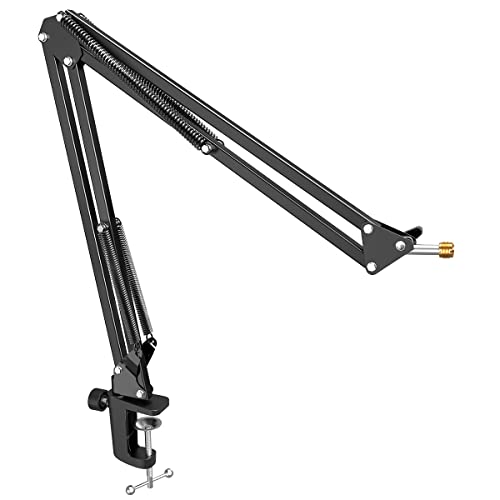
- Anti-scratch clamp fits desks up to 2 inches
- 180-degree vertical adjustment
- Foldable metal arm with included adapter
Best For: Beginners, gamers, and FIFINE microphone owners
Best Heavy-Mic Support
InnoGear Extended Cable-Managed Arm

- Supports microphones up to 3.5 pounds
- Reaches 32.3 inches horizontally with riser
- Built-in channels manage microphone cables
Best For: Heavy microphones and extended monitor-clearing setups
Best Value Heavy-Duty Arm
Stable Scissor Suspension Boom Arm

- Supports microphones up to 3.3 pounds
- Clamp fits desks up to 2.36 inches thick
- Includes adapters, clip, and cable ties
Best For: Recording, podcasting, and gaming setups needing a stable scissor arm
Best Low-Profile White Arm

- Extends up to 29 inches
- Includes built-in cable management
- Supports microphones up to 1.5 kg
Best For: Clean home-office, gaming, podcasting, and streaming setups
Best Desk Clearance
InnoGear MU-LP26 Low-Profile Arm

- Tucks beneath a monitor
- Rotates 360 degrees horizontally
- Clamp fits desks up to 2.75 inches thick
Best For: Compact streaming, recording, and office setups
Best Adjustable Pick
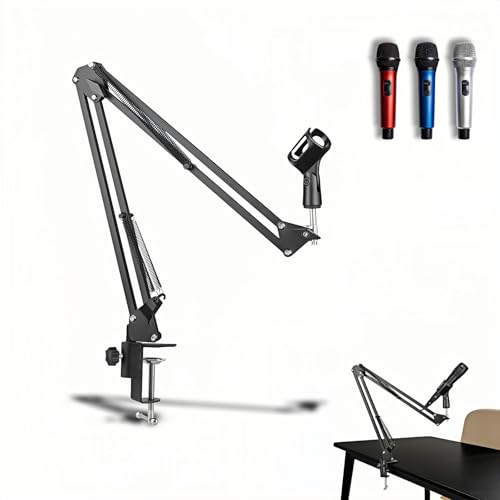
- Supports up to 4.4 pounds
- Multiple rotation and tilt adjustments
- Clamp fits desks up to 1.97 inches thick
Best For: Flexible home-office, gaming, and recording setups
Best Low-Profile Value

- Low-profile design reduces visual distraction
- Supports up to 2 kilograms
- Includes 1/4-inch and 5/8-inch adapters
Best For: Tidy gaming, streaming, and recording desks
Best for Heavy Microphones
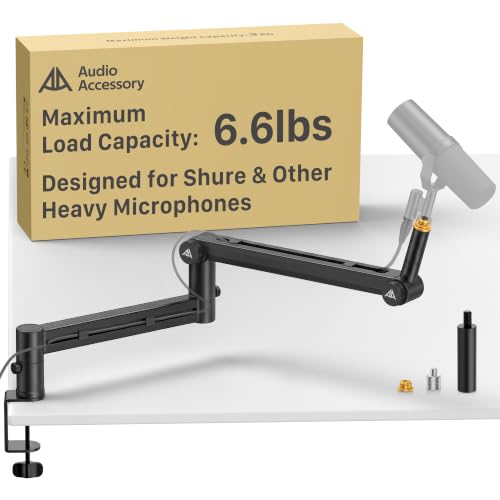
- Supports up to 6.6 pounds
- Gear-lock mechanism helps prevent sagging
- 780-millimeter reach with cable channels
Best For: Heavy podcasting and studio microphones
Best QuadCast-Compatible Value – SUNMON QuadCast Boom Arm
For shoppers comparing budget desk boom arms, the SUNMON QuadCast Boom Arm offers a straightforward setup for popular USB and dynamic microphones. Its dual suspension springs, adjustable joints, and included 3/8-inch-to-5/8-inch adapter make it especially practical for home streaming and recording.
Best For: Blue Yeti, HyperX QuadCast, SoloCast, and similar microphones.
Pros:
- Dual suspension springs and reinforced knobs help reduce shaking and sinking.
- Includes a pre-installed 3/8-inch-to-5/8-inch adapter for broad microphone compatibility.
- Desk clamp fits surfaces up to 1.89 inches thick and includes protective padding.
Cons:
- Microphone is not included.
- Its stated maximum load is 1.4 kg, so heavier setups should be checked carefully.
This is a sensible budget pick when compatibility with the QuadCast or Yeti family matters most. The included adapter and padded clamp add convenience without requiring extra mounting hardware.
Best Low-Profile Design – Foldable Lightweight Mic Arm
This low-profile option stands out among budget desk boom arms for its foldable design and broad mounting support. It extends up to 27.1 inches, rotates through 360 degrees, and includes several adapters for microphones and lightweight accessories.
Best For: Lightweight microphones, webcams, phone holders, LED lights, and compact creator setups.
Pros:
- Foldable construction helps save desk space when the arm is not in use.
- Carbon-steel clamp fits desks from 0.4 to 2.36 inches thick and has silicone protection pads.
- Includes 1/4-inch, 3/8-inch, and 5/8-inch adapters plus a universal mic clip.
- Built-in cable management helps keep the workspace tidy.
Cons:
- Not recommended for equipment weighing more than 2.8 pounds.
- Designed for lightweight equipment rather than especially heavy microphones.
Choose this arm when desk clearance, portability, and accessory flexibility are more important than maximum load capacity. Its low-profile format is particularly useful for smaller workspaces.
Best Beginner-Friendly Arm – FIFINE CS1 Scissor Boom Arm
The FIFINE CS1 is a practical choice for buyers seeking budget desk boom arms for gaming, streaming, or voice recording. Its metal construction, 180-degree vertical adjustment, and upgraded clamp provide a simple foundation for positioning a microphone close to your mouth.
Best For: Recording beginners and FIFINE microphone owners with desks up to 2 inches thick.
Pros:
- Metal clamp includes an anti-scratch pad and a fixed knob for more secure positioning.
- Offers 180-degree up-and-down adjustment and a foldable design.
- Strong springs and metal construction help limit movement during adjustments.
- Includes a 5/8-inch-to-3/8-inch adapter for compatible microphones.
Cons:
- Desk clamp is intended for desktops 2 inches thick or less.
- Microphone is not included.
The CS1 keeps the feature set focused and approachable, making it a good starting point for a basic recording station. Its narrower clamp range is the main consideration before buying.
Best Heavy-Mic Support – InnoGear Extended Cable-Managed Arm
For buyers who need more reach from budget desk boom arms, the InnoGear MU-PSA28 combines an extension riser with integrated cable channels. It reaches up to 32.3 inches horizontally and supports up to 3.5 pounds, making it suitable for heavier microphones such as the Blue Yeti or Shure SM7B.
Best For: Heavy microphones, extended reach over monitors, and tidy streaming or podcasting desks.
Pros:
- Supports up to 3.5 pounds with internal springs and thickened steel construction.
- Includes a 6.3-inch extension riser for up to 32.3 inches of horizontal reach.
- Built-in cable channels and removable rubber covers help organize microphone cables.
- Provides 135-degree back-and-forth and 180-degree up-and-down adjustment with a 360-degree rotating base.
Cons:
- Desk clamp fits surfaces up to 2 inches thick.
- Shock mount is not included.
This is the strongest fit of the group for users prioritizing load capacity and reach. The extension riser and cable management are useful additions for setups where the microphone must clear a monitor or stay visually tidy.
Best Value Heavy-Duty Arm – Stable Scissor Suspension Boom Arm
For shoppers comparing budget desk boom arms, this heavy-duty scissor model emphasizes a secure clamp, vibration control, and broad microphone compatibility. Its reinforced clamp fits desks up to 2.36 inches thick, while the suspension arm supports microphones weighing up to 3.3 pounds.
Best For: Recording, podcasting, and gaming setups that need a stable, foldable arm for compatible microphones.
Pros:
- Reinforced clamp grips desks up to 2.36 inches thick and helps protect against scratches.
- Suspension spring absorbs vibration and supports up to 1.5 kg.
- Offers 360-degree rotation, 135-degree reach, 180-degree vertical tilt, and a 270-degree swivel adapter.
- Includes a mic clip, thread adapter, and five cable ties.
Cons:
- The clamp supports desks only up to 2.36 inches thick.
- The kit is designed around a scissor-arm form factor rather than a low-profile design.
With its strong clamp, suspension spring, and included mounting accessories, this is a practical budget desk boom arm for users prioritizing stability and compatibility.
Best Low-Profile White Arm – FIFINE BM88W Boom Arm
This FIFINE model is a strong option among budget desk boom arms for users who want a low-profile setup beneath a monitor. Its metal arm extends to 29 inches, includes built-in cable management, and supports microphones up to 1.5 kg.
Best For: Home-office, gaming, podcasting, and streaming setups that benefit from a clean white low-profile arm.
Pros:
- Low-profile design extends from below the screen to help keep the workspace unobstructed.
- Provides up to 220 degrees of vertical adjustment and 360 degrees of horizontal adjustment.
- Built-in cable channels help keep the recording area tidy.
- Includes a rotatable ball-head with 1/4-inch, 3/8-inch, and 5/8-inch adapter options.
Cons:
- The clamp is intended for desktops between 0.8 and 2.4 inches thick.
- The microphone is not included.
- The section near the C-clamp cannot be adjusted vertically.
The BM88W combines a space-conscious profile with useful cable management and flexible positioning, making it a sensible choice when desk clearance and appearance matter.
Best Desk Clearance – InnoGear MU-LP26 Low-Profile Arm
For budget desk boom arms that stay beneath a monitor, the InnoGear MU-LP26 offers a compact low-profile design with broad adjustment range. Its alloy-steel arm extends up to 25.6 inches, rotates horizontally 360 degrees, and supports up to 3.3 pounds.
Best For: Streamers, creators, and office users who want a low-profile arm with a wide desk-clamp range.
Pros:
- Low-profile design tucks beneath a monitor to preserve an unobstructed view.
- Provides 360-degree horizontal rotation and 250 degrees of vertical adjustment.
- Alloy-steel construction supports microphones up to 3.3 pounds.
- C-style clamp fits desks up to 2.75 inches thick and can also serve as a headphone hook.
Cons:
- The arm extends to 25.6 inches, shorter than some full-length boom arms.
- Its listed maximum payload is 3.3 pounds, so heavier microphones may not be suitable.
With its generous 2.75-inch clamp capacity, smooth positioning range, and included adapters, the MU-LP26 is well suited to compact workstations and monitor-centered setups.
Best Adjustable Pick – Heavy-Duty Scissor Arm
This heavy-duty scissor arm is a practical choice for shoppers comparing budget desk boom arms with broad positioning flexibility. Its metal construction, 360° base rotation, and multiple adjustment points make it easy to place a microphone for streaming, podcasting, gaming, or voice-over work.
Best For: Home-office, gaming, podcasting, and recording setups that need flexible positioning and a sturdy clamp.
Pros:
- Supports microphones weighing up to 4.4 pounds.
- Offers 360° base rotation, 135° forward/backward tilt, and 180° arm-joint rotation.
- Metal clamp fits desks up to 1.97 inches thick and includes anti-scratch pads.
- Folds to a compact length when not in use.
Cons:
- The included clip supports microphones up to 1.77 inches in diameter, so larger microphones may need another mount.
- The microphone is not included.
With its 4.4-pound capacity and wide adjustment range, this arm offers a well-rounded feature set for budget buyers who want more flexibility than a basic stand. Check your desk thickness and microphone dimensions before ordering.
Best Low-Profile Value – Aokeo AK-58i Boom Arm
The Aokeo AK-58i is a sensible option for shoppers seeking budget desk boom arms that stay visually unobtrusive. Its low-profile design keeps the arm near the bottom of the screen, while the cable-routing area and broad compatibility help maintain a tidy streaming or recording workspace.
Best For: Gaming, streaming, and recording setups where a low-profile arm and reduced visual distraction matter.
Pros:
- Low center of gravity is designed to improve stability and reduce shaking or shifting.
- Both arms rotate 360°, while the microphone arm swings vertically through 180°.
- Supports up to 2 kilograms and includes 3/8-inch to 1/4-inch and 5/8-inch adapters.
- Fits tables less than 7 centimeters thick and helps conceal the microphone cable.
Cons:
- Its 2-kilogram capacity is lower than that of the heavier-duty options in this roundup.
- The microphone is not included.
This arm prioritizes a clean sightline and stable low-profile placement rather than maximum load capacity. It is a good fit for compatible microphones and shock mounts when keeping the desk area visually tidy is a priority.
Best for Heavy Microphones – Gear-Lock Low-Profile Arm
For buyers comparing budget desk boom arms for heavier microphones, this low-profile model stands out for its 6.6-pound load rating and gear-lock mechanism. The extra-long reach, tool-free adjustments, and cable channels are useful for studio microphones that need a stable position without a bulky desktop footprint.
Best For: Heavy microphones such as the Shure SM7B, MV7, RODE PodMic, and Blue Yeti in podcasting or studio-style setups.
Pros:
- Supports up to 6.6 pounds, or approximately 3 kilograms.
- Gear-lock design is intended to resist sagging over time.
- Provides a 780-millimeter reach with 360° horizontal and 120° vertical adjustment.
- Deep cable channels and included thread adapters help organize and connect compatible microphones.
Cons:
- At 1.63 kilograms, the arm is heavier than simpler desk-mount options.
- The microphone is not included.
This is the strongest choice here when load capacity and long-term positioning are more important than minimal weight. Its low-profile layout and gear-lock adjustment make it especially compelling for users with heavier broadcast-style microphones.
How We Picked the Best Budget Desk Boom Arms
We evaluated these Budget Desk Boom Arms around the features that matter most in everyday use: microphone support, adjustment range, desk compatibility, stability, and ease of installation. We also considered whether each arm includes useful adapters, a practical clamp, cable-management features, or a low-profile design for smaller workspaces.
Because product specifications and included accessories can vary, confirm the arm’s current load rating, thread size, clamp opening, and contents before ordering. A model that works well with a lightweight USB microphone may not be suitable for a heavier dynamic microphone and shock mount.
Quick Comparison
| Best For | What to Look For |
|---|---|
| General gaming and streaming | Compatible adapters, smooth positioning, and a stable clamp |
| Small desks | Low-profile arms with short or foldable positioning |
| Heavy microphones | Higher load capacity, reinforced joints, and a locking mechanism |
| Podcasting and recording | Quiet adjustment, reliable reach, and cable management |
| Flexible microphone setups | 360-degree rotation and multiple thread adapters |
Key Buying Factors for Budget Desk Boom Arms
Microphone Compatibility and Load Capacity
Check both the thread standard and maximum supported weight. Common sizes include 3/8-inch and 5/8-inch, while some microphones or accessories use 1/4-inch connections. Include the microphone, shock mount, pop filter, and any other attached equipment when estimating the total load.
Clamp Strength and Desk Fit
Measure your desktop thickness and inspect the clamp’s contact area. A broad, padded clamp is usually more secure and less likely to damage the surface. Arms intended for heavier microphones should have a firm tightening mechanism and minimal play at the base.
Reach, Movement, and Profile
Choose an arm that can place the microphone close enough without extending awkwardly across your workspace. Low-profile models are useful when the microphone needs to sit below monitor level, while traditional scissor arms may offer greater vertical reach.
Cable Management and Adjustment Noise
Built-in clips or channels help keep the cable away from the keyboard and reduce visual clutter. For recording, look for joints that reposition smoothly and quietly; stiff or rattling hinges can become distracting during live use.
Who Should Buy Which Budget Desk Boom Arms?
Choose a low-profile arm if you have a compact desk, multiple monitors, or want the microphone out of your camera frame when not in use. A traditional scissor arm is the more versatile choice for users who need broad height and reach adjustment.
For lightweight USB microphones and casual gaming, prioritize easy setup, included adapters, and smooth positioning over maximum load capacity. Streamers and podcasters using a heavier microphone should spend more attention on the stated weight rating, clamp stability, and joint-locking design. If you frequently switch microphones or accessories, select a model with broad thread compatibility and 360-degree adjustment.
