
A reliable charging dock keeps your controllers ready without relying on disposable batteries, loose cables, or last-minute charging breaks. The best budget controller charging docks balance compatibility, charging speed, battery capacity, and desk-friendly design.
This roundup compares affordable options for Xbox Wireless Controllers, PlayStation DualSense and PS4 controllers, Nintendo Switch Joy-Cons, and Pro Controllers. Use the guide below to narrow the choices by console, charging needs, and household size.
Best 10 Budget Controller Charging Docks Picks for 2026
Official Xbox Pick

- Officially licensed for Xbox Series X|S and Xbox One
- Magnetic dock with charge-status lighting
- Includes 1100 mAh battery pack and two battery doors
Best For: Xbox players wanting a tidy single-controller charging setup
Multi-Platform Value

- Charges four Joy-Cons plus two Pro or PS5 controllers
- USB-C powered with LED charging indicators
- Includes multiple charging-protection features
Best For: Multi-console households charging several controllers
Licensed PS5 Stand

- Officially licensed for the DualSense controller
- Snap-down charging and display design
- Includes a two-year limited warranty
Best For: PS5 owners needing a simple single-controller stand
Simple Joy-Con Organizer

- Charges up to four Joy-Cons simultaneously
- Individual LEDs show charging status
- Doubles as a storage and display stand
Best For: Switch owners seeking an affordable four-Joy-Con dock
Best Xbox Value

- Charges one Xbox Series X|S or Xbox One controller
- Includes 1100 mAh battery and two battery doors
- Snap-down design with color-change LED
Best For: Xbox players charging and displaying one controller
Best Four-Controller Dock
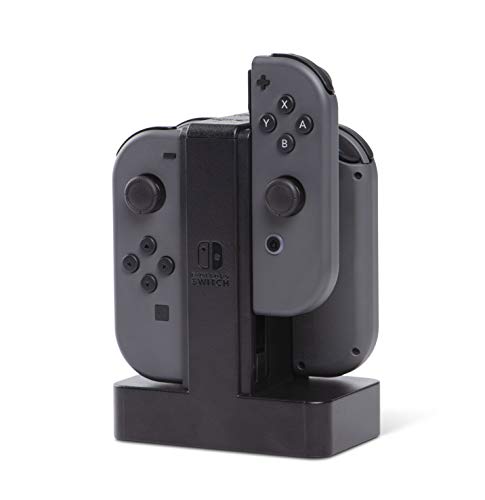
- Charges up to four Joy-Con controllers together
- Individual LEDs indicate each controller’s charge level
- Weighted base and slide-in design
Best For: Nintendo Switch households with multiple Joy-Con controllers
Best Fast-Charging PS4 Dock

- Charges two PS4 controllers simultaneously
- Lists a 1.8-hour full-charge time
- Includes protection circuitry and red/green LEDs
Best For: PS4, PS4 Slim, and PS4 Pro owners
Magnetic Dual-Dock Pick

- Dual dock with two 1100mAh battery packs
- Magnetic charging contacts and status LEDs
- Adjustable ambient lighting
Best For: Xbox players wanting a tidy, illuminated dual charging setup
Long-Play Value Pick

- Two 2200mAh rechargeable batteries included
- Rated for up to 40–45 hours per charge
- Protection features and limited lifetime warranty
Best For: Xbox gamers seeking longer stated battery life
USB-C Budget Pick
NealGamefy Dual Controller Dock

- Two 4320mWh rechargeable battery packs
- USB-C cable and charging connection
- Four covers for Xbox One and Series controllers
Best For: Xbox owners wanting USB-C charging and included replacement covers
Official Xbox Pick – 8BitDo Xbox Charging Dock
For shoppers comparing budget controller charging docks for Xbox, the 8BitDo Charging Dock combines a compact storage stand with magnetic charging for Xbox Series X|S and Xbox One wireless controllers. It includes a rechargeable battery pack and two battery doors, making it a practical replacement for disposable batteries.
Best For: Xbox players who want an officially licensed, organized charging stand with a bundled rechargeable battery.
Pros:
- Officially licensed for Xbox Series X|S and Xbox One wireless controllers
- Magnetic secure charging with amber and white LED status indicators
- Includes a 1100 mAh rechargeable battery pack and two battery doors
- Built-in storage compartment and adjustable lighting
Cons:
- Designed for Xbox wireless controllers rather than multi-platform charging
- Only one controller charging position is specified
This is a strong budget-friendly choice when a clean Xbox setup and included battery solution matter more than charging multiple controllers at once.
Multi-Platform Value – 6-in-1 Switch and PS5 Dock
This budget controller charging dock is built for households with several compatible controllers. The station can charge four Nintendo Switch Joy-Cons plus either two Switch Pro controllers or two PS5 controllers, while USB-C power and LED indicators keep setup straightforward.
Best For: Nintendo and PlayStation users who need one charging station for multiple controller types.
Pros:
- Supports four Joy-Cons and two Switch Pro or PS5 controllers at the same time
- USB-C power connection supports console, hub, or wall-charger input
- Includes overcharge, over-voltage, over-current, and short-circuit protection
- Plug-and-play design with charging-status LED indicators
Cons:
- Controllers are not included
- Compatibility is limited to the listed Joy-Con, Switch Pro, and PS5 controllers
Its broad compatibility and six-controller capacity make it one of the more flexible choices here, especially for mixed Nintendo and PlayStation setups.
Licensed PS5 Stand – PowerA DualSense Solo Station
For a straightforward budget controller charging dock for PS5, the PowerA Solo Charging Station offers a dedicated tabletop stand for one DualSense Wireless Controller. Its snap-down charging design also displays the controller between sessions.
Best For: PS5 owners who want a simple, officially licensed single-controller charging stand.
Pros:
- Officially licensed to charge the DualSense Wireless Controller
- Snap-down design makes placing and removing the controller simple
- Charges and displays the controller in one tabletop stand
- Backed by a two-year limited warranty
Cons:
- Designed for one DualSense controller
- Does not provide a multi-controller charging setup
This is a sensible pick for PS5 users who prioritize a compact, branded charging stand and a longer stated warranty over higher capacity.
Simple Joy-Con Organizer – FASTSNAIL Switch Dock
The FASTSNAIL Switch Controller Charging Dock is a budget controller charging dock focused on Joy-Con organization. It charges up to four Joy-Cons simultaneously through USB power, with individual LED indicators and a slide-in design for easy placement.
Best For: Nintendo Switch and Switch OLED owners who want an inexpensive four-Joy-Con charging and display stand.
Pros:
- Charges up to four Joy-Cons at the same time
- Individual LED indicators show charging status
- Slide-in, plug-and-play design with USB-C connection
- Also functions as a storage and display stand
Cons:
- Joy-Con controllers are not included
- Designed for Joy-Cons rather than Pro or PS5 controllers
- Stated warranty period is 180 days
Its lightweight construction and four-controller capacity make it a practical low-cost organizer for Switch owners, provided the shorter warranty is acceptable.
Best Xbox Value – PowerA Solo Charging Stand
For Xbox owners comparing budget controller charging docks, the PowerA Solo Charging Stand combines a tabletop display stand with a rechargeable battery setup. It works with Xbox Series X|S and Xbox One Wireless Controllers and connects through the included USB cable.
Best For: Xbox players who want to charge and display one compatible controller while avoiding disposable battery replacements.
Pros:
- Charges and displays Xbox Series X|S or Xbox One Wireless Controllers.
- Includes an 1100 mAh rechargeable battery and two battery doors for compatibility across Xbox generations.
- Uses a snap-down charging design with a color-change LED indicator.
- Officially licensed and includes a 3.3-foot USB charging cable.
Cons:
- Designed to charge one controller at a time.
- Requires a USB power connection and is made primarily for Xbox controllers.
This is a practical low-cost choice if you need a dedicated charging spot for a single Xbox controller. Its included battery and display-oriented stand add convenience without requiring replacement batteries.
Best Four-Controller Dock – PowerA Joy-Con Charging Dock
Among budget controller charging docks, the PowerA Joy-Con Charging Dock stands out for charging up to four Nintendo Switch Joy-Con controllers simultaneously. Its weighted base and individual charge LEDs make it a convenient, organized option for multi-controller setups.
Best For: Nintendo Switch households that regularly need to charge several Joy-Con controllers at once.
Pros:
- Charges up to four Joy-Con controllers simultaneously.
- Individual LEDs show the charge level for each Joy-Con.
- Easy slide-in connections and a weighted base provide straightforward, stable use.
- Powered via USB and officially licensed for Nintendo Switch.
Cons:
- Designed specifically for Nintendo Switch Joy-Con controllers.
- Requires a USB power connection.
If you have multiple Joy-Con controllers, this dock offers more capacity than single-controller stands while keeping charging status visible. The weighted base is also useful for a permanent tabletop charging location.
Best Fast-Charging PS4 Dock – P4 Controller Charger Station
This P4 Controller Charger Dock is one of the more feature-focused budget controller charging docks for PlayStation 4. It charges two PS4 controllers simultaneously, lists a 1.8-hour full-charge time, and includes charging protections and clear LED status indicators.
Best For: PS4, PS4 Slim, and PS4 Pro users who want a compact dual-controller charging station.
Pros:
- Charges two compatible PS4 controllers at the same time.
- Lists a 1.8-hour full-charge time, with faster charging when used separately.
- Built-in protection helps guard against overcharging, over-voltage, and short circuits.
- Red and green LEDs indicate charging, full charge, or standby status.
Cons:
- Compatibility is focused on PS4, PS4 Slim, and PS4 Pro controllers.
- Draws power from a console USB port or another compatible USB power source.
- The supplied notes do not specify an official PlayStation license.
For PS4 owners who want simultaneous charging without a large setup, this dock offers useful capacity and status feedback. Its protection features and 12-month quality guarantee add reassurance for everyday charging.
Magnetic Dual-Dock Pick – 8Bitdo Xbox Charging Dock
If you want budget controller charging docks with a polished setup, the 8Bitdo Dual Charging Dock combines two charging bays with magnetic alignment and included rechargeable batteries. It works with Xbox Series X|S and Xbox One wireless controllers.
Best For: Xbox players who want a tidy dual-controller charging station with adjustable ambient lighting.
Pros:
- Includes two 1100mAh rechargeable battery packs and four battery doors.
- Magnetic contacts help secure controllers while charging.
- Amber and white LEDs show charging status.
- Ambient lighting brightness can be adjusted by touch.
Cons:
- Compatibility is limited to Xbox Series and Xbox One wireless controllers.
- Its listed 1100mAh battery packs have less capacity than some alternatives.
The 8Bitdo is a strong value when presentation and easy docking matter as much as basic charging. Its dual-bay design and included battery doors make it a convenient replacement for disposable batteries.
Long-Play Value Pick – Fosmon Dual 2 MAX Charger
Among budget controller charging docks, the Fosmon Dual 2 MAX stands out for its included 2200mAh rechargeable batteries and dual charging slots. It supports Xbox Series X/S and several Xbox One controllers, though not the Xbox Elite 2.
Best For: Gamers who prioritize longer stated playtime and charging protection over extra lighting features.
Pros:
- Includes two 2200mAh NiMH rechargeable batteries rated for up to 40–45 hours per charge.
- Dual slots charge and store two controllers.
- Automatic shutoff, overheating protection, and short-circuit protection are built in.
- Includes battery doors for Xbox One and Xbox Series X/S controllers.
Cons:
- Not compatible with the Xbox Elite 2 controller.
- Uses a Micro USB connector.
- No power plug is included in the listed package details.
Fosmon’s main advantage is battery capacity: its included packs are rated higher than many basic controller-bundle options. The limited lifetime warranty and SGS certification add reassurance for shoppers focused on practical long-term value.
USB-C Budget Pick – NealGamefy Dual Controller Dock
This NealGamefy model is a straightforward option for shoppers comparing budget controller charging docks with USB-C connectivity. It includes two 4320mWh rechargeable battery packs and four covers for Xbox One and Xbox Series controllers.
Best For: Xbox owners who want a compact dual charger with USB-C input and replacement battery covers.
Pros:
- Includes two 4320mWh rechargeable battery packs.
- Comes with four covers: two for Xbox One and two for Xbox Series controllers.
- Uses USB Type-C and includes a Type-C charging cable.
- Lists fast charging, charging indicators, and short-circuit protection.
Cons:
- The supplied compatibility note specifies original controllers only.
- The listed plug information indicates a Type-C European plug, so shoppers should verify power compatibility.
- The notes do not provide a stated playtime per charge.
This dock offers a useful combination of high listed battery capacity, USB-C connectivity, and broad cover support across Xbox One and Series controllers. Verify your controller model and regional power requirements before buying.
How We Picked the Best Budget Controller Charging Docks
We focused on docks that offer practical value rather than unnecessary extras. Each option was assessed for console compatibility, charging method, included rechargeable batteries or battery packs, charging indicators, dock stability, and ease of placing or removing a controller. We also considered whether a dock supports one controller, two controllers, or multiple Joy-Cons, since capacity can make a meaningful difference for families and multiplayer gaming.
Compatibility is especially important: Xbox, PlayStation, and Nintendo Switch controllers use different connections and battery arrangements. A dock designed for one platform should not be assumed to work with another, even when the product name uses broad terms such as “universal.”
Quick Comparison
- Xbox: The 8BitDo, PowerA, Fosmon, and multi-battery docks cover Xbox Series X|S, Xbox One, and some Elite controller setups.
- PlayStation: The PowerA Solo station is designed for DualSense controllers, while the P4 dock targets compatible PS4 controllers.
- Nintendo Switch: The PowerA Joy-Con dock and FASTSNAIL model focus on Joy-Cons, while combination docks may also support a Pro Controller.
- Best for two controllers: Dual docks are useful for couples, families, or keeping a spare controller charged.
- Best for a simple setup: Single-controller stands generally use less desk space and are easier to place beside a console.
Key Buying Factors for Budget Controller Charging Docks
Compatibility and Included Accessories
Check the exact controller generation before buying. Look for explicit support for Xbox Series X|S, Xbox One, PS5 DualSense, PS4, Joy-Con, or Switch Pro Controller. Also verify whether rechargeable battery packs, magnetic adapters, or replacement covers are included.
Charging Speed and Battery Capacity
Fast charging is useful when a controller needs a quick top-up, but battery capacity determines how long it lasts between charges. A stated charge time, such as roughly two hours, is more useful than vague “fast charging” language. Capacity claims should be treated as a guide because real runtime varies with use and battery age.
Dock Stability and Indicators
A magnetic or guided connection makes docking easier, especially in low light. LED indicators can show charging status, but consider whether their brightness may be distracting in a bedroom or living room. A weighted base and a secure fit also reduce accidental knocks.
Capacity and Cable Setup
Choose a single dock for one regular player, or a dual and multi-controller station for shared gaming. Confirm how the dock receives power and whether it includes the required cable or power adapter.
Who Should Buy Which Budget Controller Charging Docks?
Xbox owners should prioritize a dock that explicitly supports their Series X|S or Xbox One controller. 8BitDo and PowerA are sensible choices for a streamlined single- or dual-controller setup, while multi-battery kits suit households that want several charged controllers.
PS5 players should look first at the DualSense-compatible PowerA Solo station. PS4 players may prefer the P4 charging dock with its dual-controller format and charge indicators.
Nintendo Switch owners should match the dock to their controller mix. Joy-Con-focused docks work well for handheld or multiplayer use, while a model that also supports a Pro Controller is more flexible.
Finally, choose the simplest compatible dock that meets your capacity needs. Paying more for a premium design is rarely worthwhile if a stable, correctly matched budget model already provides the charging speed and battery life you need.
