
A budget all-in-one computer can clear desk space and simplify setup by combining the PC and display. But a low price is only a good deal if the screen, performance, and storage fit your daily tasks.
These 10 options span compact 19-inch systems, larger home-office models, and renewed business PCs. Use the guide below to narrow down the right fit—and check each listing’s exact configuration before you buy.
Best 10 Budget All in One Computers Picks for 2026
Best Larger Display
Lenovo IdeaCentre V100 23.8-Inch AIO

- 23.8-inch Full HD IPS screen
- 8GB RAM and 512GB SSD
- Wi-Fi 6, USB-C, and HDMI-out
Best For: Home-office users and students who want more screen space
Best Renewed Business Pick
HP ProOne 600 G4 21.5-Inch AIO

- Windows 11 Pro
- Core i5-8500T and 256GB SSD
- Renewed unit with keyboard and mouse
Best For: Basic office work on a renewed Windows Pro desktop
Best Desk Bundle
HP 21.5-Inch N100 AIO with Docking Hub

- Keyboard, mouse, and docking hub included
- 21.5-inch Full HD anti-glare display
- Confirm internal versus SD-card storage
Best For: A bundled study or everyday-use desk setup
Best Compact Footprint

- 19-inch space-saving design
- HDMI, VGA, Ethernet, and six USB ports
- DOS listed; Windows not stated as included
Best For: Small desks with room for a 19-inch screen
Business-Ready Pick
HP ProOne 600 G4 21.5-Inch AIO

- 21.5-inch Full HD display
- Windows 11 Pro included
- 8GB RAM and 256GB SSD
Best For: Compact home-office or study setups needing Windows 11 Pro
Small-Desk Pick
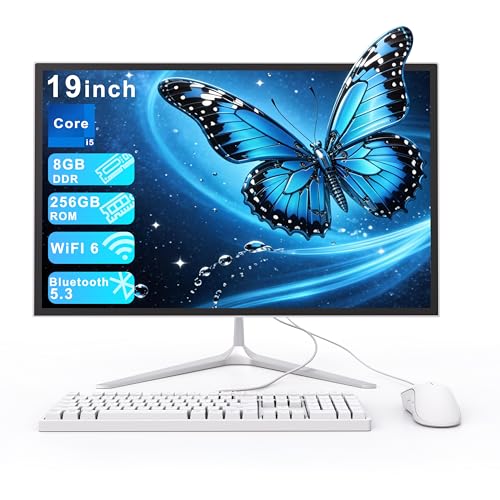
- Compact 19-inch 1080p screen
- 8GB RAM and 256GB SSD
- DOS listed as operating system
Best For: Space-constrained desks and routine tasks
Roomier-Screen Pick

- 24-inch tilting Full HD display
- 16GB RAM and 256GB SSD
- Webcam with privacy slider
Best For: Larger-screen daily work and video calls
Best with Extra Features
HP ProOne 600 G4 21.5-Inch All-in-One

- Six-core Core i5-8500T and 256GB SSD
- 21.5-inch Full HD display
- Renewed; 90-day listed warranty
Best For: Compact home-office or small-business setups
Best Compact Newer-Gen Pick

- Intel N100 with 8GB DDR5 RAM
- Anti-glare FHD screen and privacy-shutter webcam
- 128GB SSD limits local storage
Best For: Compact everyday computing and video calls
Best Larger-Screen Pick

- 23.8-inch FHD IPS anti-glare display
- 16GB RAM and 256GB SSD
- Wireless keyboard listed with UK layout
Best For: Larger-screen everyday home or office work
Best Larger Display – Lenovo IdeaCentre V100 23.8-Inch AIO
Among budget all in one computers, the Lenovo IdeaCentre V100 stands out for its roomy 23.8-inch Full HD IPS screen. Its Intel N100 processor, 8GB of RAM, and 512GB SSD make it a practical fit for documents, browsing, video calls, and everyday home-office work.
Best For: Students and home-office users who want a larger screen without a separate desktop tower.
Pros:
- 23.8-inch anti-glare IPS display with 99% sRGB coverage.
- 512GB SSD and support for up to 32GB of RAM.
- Wi-Fi 6, Ethernet, USB-C, and HDMI-out for an additional display.
Cons:
- Intel N100 and integrated graphics are aimed at everyday tasks, not demanding creative work or gaming.
- No optical drive.
The larger display and useful port selection give this Lenovo broad everyday appeal. Choose it when workspace and connectivity matter more than high-end processing power.
Best Renewed Business Pick – HP ProOne 600 G4 21.5-Inch AIO
The renewed HP ProOne 600 G4 is worth considering among budget all in one computers if Windows 11 Pro is a priority. It pairs a Core i5-8500T with 8GB of RAM, a 256GB SSD, and a 21.5-inch Full HD screen in a compact business-oriented setup.
Best For: Basic office work where Windows 11 Pro matters more than having a new computer.
Pros:
- Includes Windows 11 Pro and a Core i5-8500T processor.
- Full HD display, 256GB SSD, keyboard, and mouse.
- Professionally inspected, tested, and cleaned as a renewed product.
Cons:
- Pre-owned condition; compatible accessories may not be original.
- Wi-Fi and Bluetooth come via USB adapters rather than built-in wireless hardware.
This ProOne offers a straightforward way to get a Windows Pro all-in-one. Check the renewed condition and adapter package on arrival so you know the setup meets your needs.
Best Desk Bundle – HP 21.5-Inch N100 AIO with Docking Hub
If you are comparing budget all in one computers for a ready-to-use study desk, this HP bundle includes a keyboard, mouse, and 8-in-1 docking hub. The 21.5-inch Full HD anti-glare display, Intel N100 processor, and 8GB of DDR5 RAM suit browsing, documents, and video calls.
Best For: Students or home users who want an all-in-one with bundled desk accessories.
Pros:
- Includes a docking hub, keyboard, and mouse.
- Full HD anti-glare screen with an adjustable tilt stand.
- Wi-Fi 6, a 720p camera, USB-C, and Ethernet are listed.
Cons:
- Storage figures differ across the supplied specifications; the stated total includes an SD card used with the dock.
- The Intel N100 is intended for routine work rather than demanding workloads.
The included accessories make this a convenient desk package. Before ordering, confirm the configuration’s internal SSD size and what portion of its advertised storage comes from the SD card.
Best Compact Footprint – MECHAZER NX1-19 19-Inch AIO
The 19-inch MECHAZER NX1-19 is one of the smaller budget all in one computers here, making it an option for a crowded desk. Its listed Core i5-4590, 8GB of DDR3 RAM, and 256GB SSD are geared toward everyday browsing, documents, and video playback.
Best For: Small desks where a compact screen and a wide selection of ports take priority.
Pros:
- Compact all-in-one design with keyboard and mouse included.
- HDMI, VGA, Ethernet, and six USB ports are listed.
- Wi-Fi 6, Bluetooth 5.3, and built-in speakers.
Cons:
- Specifications list DOS, so Windows is not stated as included.
- Older Core i5-4590 and DDR3 memory, with an 8GB stated RAM maximum.
This model trades screen size and newer hardware for a small footprint and flexible wired connections. Confirm the operating system and screen specifications before buying, especially if you need a ready-to-use Windows PC.
Business-Ready Pick – HP ProOne 600 G4 21.5-Inch AIO
Among budget all in one computers, this renewed HP ProOne 600 G4 is a practical choice if you want a compact workstation with Windows 11 Pro already installed. Its 21.5-inch Full HD display, Core i3-8100 processor, 8GB RAM, and 256GB SSD suit everyday office and school tasks.
Best For: Home offices or study spaces that need Windows 11 Pro and a ready-to-use desktop setup.
Pros:
- Full HD screen saves space by combining the computer and display.
- Includes keyboard, mouse, and power adapter.
- DisplayPort, Ethernet, card reader, and multiple USB ports support common peripherals.
Cons:
- Renewed unit comes with a stated 90-day warranty.
- 8GB RAM and 256GB storage may feel limited for heavier workloads or large file collections.
Choose this HP when a familiar business-oriented Windows setup matters more than having the largest screen or most memory.
Small-Desk Pick – SAINTDISE NX5 19-Inch AIO
If desk space is your priority when comparing budget all in one computers, the SAINTDISE NX5 offers a compact 19-inch 1080p display. Its Core i5-4590, 8GB RAM, and 256GB SSD are aimed at routine office work and online learning.
Best For: Crowded desks where a smaller screen and basic daily computing make sense.
Pros:
- Compact all-in-one design keeps the work area clear.
- Wi-Fi 6 and Bluetooth 5.3 support wireless connectivity.
- Six USB ports, HDMI, and LAN provide useful wired connections.
Cons:
- Listed operating system is DOS, so plan for operating-system setup before assuming it is ready for Windows applications.
- The 19-inch TN screen offers less viewing space than the larger models here.
The NX5 makes the most sense when its small footprint is the main attraction; check the operating-system requirements before buying.
Roomier-Screen Pick – Qehi 24-Inch AIO
For shoppers looking at budget all in one computers with more screen space, this Qehi model pairs a 24-inch Full HD anti-glare display with 16GB RAM and a 256GB SSD. The tilting screen and built-in video-call features make it worth considering for a shared work or study desk.
Best For: Everyday multitasking and video calls on a larger, adjustable display.
Pros:
- 24-inch display tilts from −5° to 25°.
- 16GB RAM supports working across everyday apps.
- Built-in webcam has a privacy slider; keyboard and mouse are included.
Cons:
- DOS is listed as the operating system, so factor in software setup.
- 256GB SSD may be restrictive for extensive local storage.
This is the screen-and-memory choice of the three, but confirm that its operating-system setup fits your needs before ordering.
Best with Extra Features – HP ProOne 600 G4 21.5-Inch All-in-One
Among budget all in one computers, this renewed HP ProOne 600 G4 is a practical choice if you want a compact work setup with a 21.5-inch Full HD display. Its six-core Intel Core i5-8500T, 8GB of RAM, and 256GB SSD cover everyday office tasks, while Windows 11 Pro comes installed.
Best For: Home offices or small businesses that want a ready-to-use, space-saving PC and are comfortable buying renewed.
Pros:
- 21.5-inch 1080p display keeps the workspace compact.
- Includes a keyboard, mouse, and power adapter.
- DisplayPort, Ethernet, and multiple USB ports support common peripherals.
Cons:
- Renewed condition may not suit buyers who want a new PC.
- Listed warranty is 90 days.
The ProOne’s appeal is its complete business-oriented setup. Check the renewal terms and short warranty before choosing it over a new model.
Best Compact Newer-Gen Pick – HP 22-Inch FHD All-in-One
If you are comparing budget all in one computers for everyday use, this HP pairs a 21.5-inch anti-glare Full HD screen with an Intel N100 processor, 8GB of DDR5 RAM, and a 128GB SSD. It also includes Windows 11 Pro and a built-in HD webcam with a privacy shutter.
Best For: Everyday browsing, documents, and video calls in a compact workspace.
Pros:
- Anti-glare 1080p display and webcam with privacy shutter suit video calls.
- Wi-Fi 6, Bluetooth 5.3, Ethernet, HDMI-out, and USB-C provide varied connections.
- Windows 11 Pro comes preinstalled.
Cons:
- 128GB SSD leaves limited room for locally stored files.
- USB-C port supports data transfer only.
This is a well-connected everyday option, but the modest SSD makes it a better fit for buyers who do not keep large files on the PC.
Best Larger-Screen Pick – Lenovo 24-Inch FHD All-in-One
For shoppers considering budget all in one computers who want more screen space, this Lenovo offers a 23.8-inch Full HD IPS anti-glare display. Its Intel N100 processor, 16GB of RAM, and 256GB SSD make it a practical fit for routine home or office work.
Best For: Buyers who prioritize a larger display and extra RAM for everyday multitasking.
Pros:
- 23.8-inch IPS display offers more workspace than a 21.5-inch model.
- 16GB of RAM and a 256GB SSD are included.
- Wi-Fi 6, Ethernet, HDMI-out, and four USB-A ports support common connections.
- Includes a wireless keyboard and mouse.
Cons:
- Intel N100 is positioned for everyday tasks rather than demanding workloads.
- Supplied keyboard is listed with a UK layout.
The larger screen and 16GB of RAM distinguish this Lenovo for desk-based work. Check that the listed UK keyboard layout suits you before ordering.
How We Picked the Best Budget All in One Computers
We focused on practical differences shoppers can compare across the 10 selected listings: screen size and stated resolution, processor generation, memory, storage, connectivity, included accessories, and whether a system is sold renewed. The lineup includes compact 19-inch PCs, 21.5- and 22-inch HP models, 24-inch desktops, and several HP ProOne 600 G4 configurations. Listings with similar names may have different specifications, so treat the exact seller configuration as the final authority.
Quick Comparison: Which Type Fits Your Desk?
- Smallest footprint: The two 19-inch all-in-one listings suit tighter desks, provided their screen size and listed specifications meet your needs.
- Everyday home use: The HP 21.5-inch Intel N100 and HP 2025 22-inch models are worth comparing for browsing, documents, and video calls. Check storage capacity and ports before choosing.
- Business-style setup: The HP ProOne 600 G4 listings offer 21.5-inch FHD displays and 8GB RAM in the stated configurations. Compare their exact processor, SSD, condition, and seller terms.
- More screen space: The 24-inch Core i5 listing and Lenovo 24-inch model give you larger stated FHD displays. The Lenovo lists 16GB RAM, which may better suit heavier multitasking than an otherwise comparable 8GB configuration.
Key Buying Factors for Budget All-In-One Computers
Screen and Workspace
A 19-inch display saves room, while a 24-inch display provides more space for side-by-side windows. For text-heavy work, confirm the resolution rather than relying on screen size alone. An external monitor option is useful if you expect to expand your workspace.
Memory, Storage, and Processor
For everyday browsing, email, and office work, 8GB RAM is a sensible starting point; 16GB offers more breathing room with many tabs and apps open. Check both SSD capacity and the amount of free space you will need: 128GB may fill quickly, while 256GB or 512GB gives more room for files. Processor names alone do not tell the whole story, especially across older business CPUs and newer entry-level chips. Match the machine to your workload, not just the generation printed in the title.
Condition, Connections, and Total Cost
Renewed models can be attractive, but inspect the warranty, return window, cosmetic grade, and what accessories are included. Verify Wi-Fi, Bluetooth, USB, HDMI direction, webcam, microphone, and keyboard-and-mouse inclusion against the current listing. Budget for anything missing, and check whether memory or storage can be upgraded; all-in-one designs are often less flexible than desktop towers.
Who Should Buy Which Budget All in One Computers?
Choose a 19-inch option when desk space matters most and its specifications are sufficient. Pick a 21.5- or 22-inch model for a balance of size and everyday usability. Consider a ProOne 600 G4 if a renewed business PC fits your budget and you are comfortable checking its condition and support terms. Choose a 24-inch model for more viewing space, and prioritize the Lenovo 16GB configuration if multitasking is your main concern. Whatever you choose, verify the exact specs and seller policy at checkout.
