
If you’re looking to boost your workstation’s network performance, choosing the right 25GbE PCIe card is essential. These cards can considerably enhance your connectivity, especially for data-intensive applications. With options that offer impressive speeds and advanced features, finding the perfect fit for your needs can be overwhelming. Let’s explore the top contenders and what to take into account before making your decision.
TP-Link 2.5GB PCIe Network Card (TX201)

If you’re looking to upgrade your workstation with a reliable and high-speed networking solution, the TP-Link 2.5GB PCIe Network Card (TX201) is an excellent choice. This PCIe adapter delivers speeds up to 2.5 Gbps, making it 2.5 times faster than standard Gigabit cards. It supports various operating systems, including Windows 11 and Linux, ensuring compatibility with your setup. With automatic negotiation for different speeds and QoS technology prioritizing your gaming experience, you’ll enjoy seamless performance. Plus, it comes with low-profile and full-height brackets for easy installation and a 2-year warranty for peace of mind.
Best For: Gamers and professionals seeking a high-speed, reliable network connection for demanding applications.
Pros:
- Delivers speeds up to 2.5 Gbps, significantly enhancing data transfer rates compared to standard Gigabit adapters.
- Compatible with multiple operating systems, including Windows and Linux, ensuring broad usability across different setups.
- Includes low-profile and full-height brackets, making installation flexible for various computer cases.
Cons:
- May require a compatible motherboard with an available PCIe slot for installation, which could limit use for some users.
- Performance may depend on network infrastructure, requiring compatible routers and cables to achieve maximum speeds.
- Limited support for older systems, as it primarily targets more recent operating systems.
TP-Link 10GB PCIe Network Card (TX401)

The TP-Link 10GB PCIe Network Card (TX401) is an excellent choice for gamers and professionals who demand high-speed network performance. With support for speeds up to 10 Gbps, it outpaces typical Gigabit adapters tenfold, ensuring smooth data transmissions. This card is fully compatible with various Windows versions and Linux, and it offers backward compatibility with multiple data rates. Utilizing 10GBase-T technology, you’ll experience extreme speed and ultra-low latency. Plus, it includes a 1.5 m CAT6A Ethernet cable for enhanced performance and comes with both low-profile and full-height brackets for easy installation. Enjoy peace of mind with a 2-year warranty and 24/7 support.
Best For: Gamers and professionals seeking high-speed network performance for seamless online activities and data transfers.
Pros:
- Supports speeds up to 10 Gbps, ensuring exceptional data transmission rates.
- Fully compatible with a wide range of operating systems, including Windows and Linux.
- Includes a high-quality CAT6A Ethernet cable for optimal performance.
Cons:
- Requires a compatible PCIe slot, which may not be available in all systems.
- Higher cost compared to standard Gigabit network cards.
- May require additional setup for optimal performance in certain configurations.
Mellanox ConnectX-4 Lx 25Gb/s Ethernet Adapter (CX4121A)
For professionals working with data-intensive applications, the Mellanox ConnectX-4 Lx 25Gb/s Ethernet Adapter (CX4121A) stands out as an ideal choice. This dual 25GbE SFP28 fiber port adapter leverages PCIe Gen 3.0 technology, offering exceptional bandwidth of 64Gb/s. It supports advanced features like RDMA over RoCE, I/O virtualization, and jumbo frames up to 9.6KB. Compatible with various operating systems, including Windows and Linux, it guarantees seamless integration into your workstation. With a one-year warranty and a stellar 4.9-star rating, you can trust the CX4121A to elevate your network performance effectively.
Best For: Professionals working with data-intensive applications who require high-speed network performance and advanced features.
Pros:
- High Bandwidth: Offers a total bandwidth of 64Gb/s with dual 25GbE ports, ideal for data-heavy tasks.
- Advanced Features: Supports RDMA over RoCE, I/O virtualization, and jumbo frames, enhancing data transfer efficiency.
- Broad Compatibility: Works seamlessly with various operating systems, including Windows and Linux, ensuring easy integration.
Cons:
- Limited Warranty: Comes with a one-year warranty, which may be shorter than some users prefer.
- Cost: Higher price point compared to standard Ethernet adapters could be a barrier for some users.
- Requires SFP28 Transceivers: Needs specific transceivers and cables for optimal performance, potentially increasing overall setup costs.
Synology 2-Port 25GbE SFP28 PCIe Network Adapter E25G30-F2

Designed specifically for high-performance storage applications, the Synology 2-Port 25GbE SFP28 PCIe Network Adapter E25G30-F2 stands out as an ideal choice for users seeking to enhance their workstation builds. With two 25GbE ports, it supports simultaneous throughput, port failover, and load balancing, ensuring excellent performance. This adapter requires DSM 7.1.1-42962 Update 5 or above, making it purpose-built for Synology systems. Offering a data transfer rate of 25 Gbps, it operates through a PCI Express x16 interface. Weighing just 6.88 ounces, it also comes with a 5-year warranty, providing peace of mind for your investment.
Best For: Users seeking to enhance their Synology systems with high-performance networking capabilities for demanding storage applications.
Pros:
- Supports high data transfer rates of up to 25 Gbps for optimal performance.
- Provides features such as port failover and load balancing for enhanced reliability.
- Backed by a 5-year warranty, ensuring long-term support and peace of mind.
Cons:
- Requires specific DSM version (7.1.1-42962 Update 5 or above) for compatibility.
- Designed primarily for Synology systems, limiting versatility with other brands.
- The physical dimensions may require adequate space in the workstation for installation.
SABRENT 10 Gigabit Ethernet PCIe Network Adapter
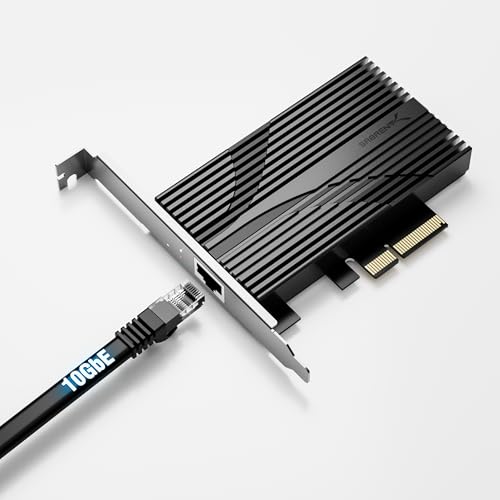
If you’re looking to supercharge your workstation’s networking capabilities, the SABRENT 10 Gigabit Ethernet PCIe Network Adapter stands out with its impressive 10 Gbps data transfer rate. This PCIe 3.0 x4 card fits seamlessly into x4, x8, or x16 slots, ensuring compatibility across generations. Weighing just 6.2 ounces, it features an aluminum alloy heatsink for effective cooling. Plus, you’ll appreciate the built-in LEDs that keep you informed about connection status and activity. With a solid 4.1-star rating from users and a one-year warranty (extendable to two), this adapter is a reliable choice for boosting your network performance.
Best For: Users looking to significantly enhance their workstation’s networking capabilities with high-speed 10 Gbps connectivity.
Pros:
- High Data Transfer Rate: Offers a fast 10 Gbps speed for demanding applications and data transfers.
- Wide Compatibility: Fits in x4, x8, or x16 PCIe slots, ensuring it works with a variety of systems.
- Effective Cooling: Equipped with an aluminum alloy heatsink for improved stability and heat dissipation.
Cons:
- Limited Warranty: The standard warranty is only one year, which may be short for some users.
- Weight: At 6.2 ounces, it may be heavier than other lightweight network cards.
- Potential Complexity: Installation may require some technical knowledge, especially for less experienced users.
Vogzone 25GbE NIC Card for Mellanox MCX512A-ACAT
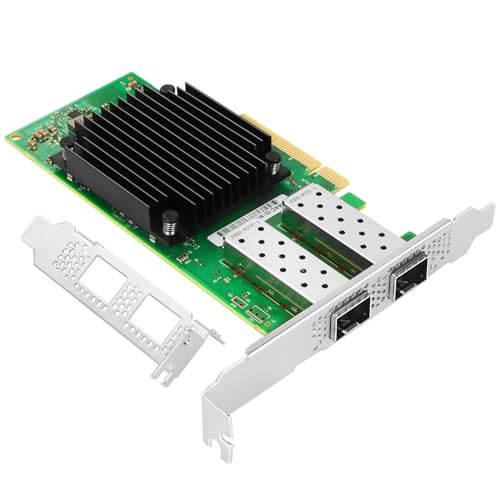
The Vogzone 25GbE NIC Card for Mellanox MCX512A-ACAT is an excellent choice for professionals who demand high-speed connectivity in data-intensive environments. With its PCIe 3.0 x8 design and powerful Mellanox ConnectX-5 En chipset, this card delivers an impressive 25 gigabytes per second data rate. You’ll appreciate the dual SFP28 ports, supporting 1GbE, 10GbE, and 25GbE connections. Advanced features like SR-IOV and Infiniband guarantee efficient resource management and low latency for big data tasks. Compatible with various operating systems, it’s backed by a 3-year warranty and boasts a solid customer rating of 4.8 out of 5 stars.
Best For: Professionals in data-intensive environments seeking high-speed connectivity and efficient resource management.
Pros:
- High Data Rate: Offers an impressive 25 Gb/s data rate for rapid data transfers.
- Advanced Features: Equipped with SR-IOV and Infiniband technology for low latency and efficient I/O resource management.
- Wide Compatibility: Supports various operating systems, making it versatile for different environments.
Cons:
- Cost: May be more expensive compared to standard Ethernet NICs.
- Size: Requires a PCIe 3.0 x8 slot, which may limit compatibility with some older systems.
- Complex Setup: Advanced features may require technical knowledge for optimal configuration.
ASUS XG-C100C 10G Network Adapter

For those seeking to supercharge their network capabilities, the ASUS XG-C100C 10G Network Adapter stands out as an exceptional choice. This PCI-E x4 card provides speeds up to 10Gbps, making it ten times faster than standard Gigabit Ethernet. It’s compatible with a variety of operating systems, including Windows and Linux, and supports multiple speeds like 10/5/2.5/1Gbps. With built-in Quality of Service (QoS), it prioritizes bandwidth for demanding tasks. Weighing just 0.2 pounds and measuring 4.73 x 3.33 inches, it easily upgrades your desktop PC to handle robust networking needs. Enjoy a 2-year warranty for peace of mind.
Best For: Individuals or businesses looking to upgrade their network capabilities with ultra-fast speeds for bandwidth-intensive applications.
Pros:
- High Speed: Offers speeds up to 10Gbps, significantly enhancing network performance.
- Versatile Compatibility: Supports multiple network speeds and is compatible with various operating systems.
- Quality of Service: Built-in QoS technology ensures efficient bandwidth management for demanding tasks.
Cons:
- Requires PCI-E Slot: Limited to systems with available PCI-E x4 slots for installation.
- Not Wireless: Does not support wireless connectivity, requiring a wired setup.
- Potential Cost: Higher price point compared to standard Gigabit Ethernet adapters.
Vogzone 25Gb PCI-E NIC Network Card

Engineered for high-performance workstation builds, the Vogzone 25Gb PCI-E NIC Network Card stands out with its dual SFP28 ports, offering flexibility with connections up to 25GbE. Powered by the Intel E810-XXVAM2 controller, it supports advanced features like single-root I/O virtualization for enhanced server stability. With a data rate of 16.0GT/s via PCIe v4.0, you’ll experience seamless performance. This card also supports iWARP/RDMA, TCP checksum offloading, and Jumbo Frames, ensuring efficient data handling. Compatible with major operating systems, it’s a solid choice for any workstation. Just remember, the SFP28 adapter isn’t included, so plan accordingly!
Best For: High-performance workstations and servers requiring fast and reliable network connectivity.
Pros:
- Dual SFP28 ports provide flexibility for high-speed connections up to 25GbE.
- Advanced features like single-root I/O virtualization enhance server stability and performance.
- Wide operating system compatibility ensures versatile use across various platforms.
Cons:
- SFP28 adapter not included, requiring additional purchase for full functionality.
- May require specific hardware configurations to maximize performance.
- Potentially higher cost compared to standard NICs may deter budget-conscious buyers.
Vogzone 25GbE NIC Card for Mellanox

Experience blazing-fast data transfer speeds with the Vogzone 25GbE NIC Card for Mellanox, making it an ideal choice for professionals who demand high performance in their workstation builds. This PCIe 3.0 x4 card features the powerful Mellanox ConnectX-4 Lx chipset, supporting a single SFP28 port for 1GbE, 10GbE, and 25GbE connections. With a data transfer rate of 25 GBps, you’ll enjoy seamless data handling. It’s compatible with various operating systems, including Windows, Linux, and VMware. Plus, the included low-profile bracket guarantees easy installation, while a 30-day return policy provides added peace of mind.
Best For: Professionals and enterprises seeking high-performance networking solutions for demanding applications and workstation builds.
Pros:
- High Data Transfer Rate: Offers an impressive 25 GBps, ensuring fast and efficient data handling.
- Wide Compatibility: Supports various operating systems, making it versatile for different setups.
- Easy Installation: Comes with a low-profile bracket for straightforward installation in various systems.
Cons:
- Single Port Limitation: Only has one SFP28 port, which may not be enough for users needing multiple connections.
- Potential Overkill for Casual Users: The high performance may be unnecessary for typical home or casual users.
- Weight: At 7 ounces, it may be heavier than some users prefer for lightweight setups.
StarTech.com 1-Port 2.5Gbps PCIe Network Card

The StarTech.com 1-Port 2.5Gbps PCIe Network Card stands out as an ideal choice for users seeking enhanced network performance in data-intensive environments. Featuring the Intel I225-V chipset, this card supports variable speeds up to 2.5 Gbps, ensuring seamless integration with existing Cat5e/Cat6 cabling. Its full-duplex operation and 9K jumbo frame support reduce packet overhead, while the built-in heat sink optimizes performance. Compatible with multiple operating systems, including Windows and Linux, it also offers Intel vPro technology for remote management. With a 2-year warranty and lifetime technical support, you can rely on StarTech for your networking needs.
Best For: Users seeking enhanced network performance in data-intensive environments who require a reliable multi-gigabit Ethernet interface.
Pros:
- High-speed performance with data transfer rates of up to 2.5 Gbps, ideal for demanding applications.
- Versatile compatibility with various operating systems, including Windows, Linux, and VMware.
- Integrated Intel vPro technology allows for remote management and troubleshooting capabilities.
Cons:
- Requires a PCI Express slot, which may not be available on all older systems.
- Limited to 2.5 Gbps, which may not meet the needs of users requiring higher speeds for specific applications.
- Potentially higher cost compared to standard 1 Gbps network cards.
Factors to Consider When Choosing 25GBE Pcie Cards for Workstation Builds
When choosing a 25GbE PCIe card for your workstation, you’ll want to contemplate several key factors. Data transfer speed, compatibility with your systems, and port configuration options can greatly impact performance. Additionally, pay attention to thermal management features and the warranty and support provided by the manufacturer.
Data Transfer Speed
Choosing the right 25GbE PCIe card can greatly impact your workstation’s performance, especially for data-intensive tasks. With speeds up to 25 gigabits per second, these cards provide a significant boost over traditional 1GbE connections. You’ll benefit from advanced technologies like SFP28 interfaces and support for jumbo frames, allowing your system to handle larger data packets more efficiently. This increased speed is essential for environments such as cloud computing, data analytics, and large-scale storage solutions. When selecting a card, focus on the total bandwidth and latency improvements it offers, and guarantee it meets the specific needs of your applications and workloads. This careful consideration will maximize your network performance and enhance your productivity.
Compatibility With Systems
Verifying compatibility with your workstation’s system is essential for getting the most out of your 25GbE PCIe card. First, check that the card fits your motherboard’s PCIe slot version; different cards may need PCIe 3.0, 4.0, or other standards for the best performance. Next, verify that your operating system supports the card, as compatibility can differ across Windows, Linux, and server environments. Don’t forget to look for the necessary drivers to guarantee proper functionality. Additionally, confirm that the card’s physical dimensions and form factor—like low-profile or full-height—match your workstation case to prevent installation issues. Finally, assess the card’s backward compatibility with existing network standards for seamless integration into your current setup.
Port Configuration Options
Selecting the right port configuration for your 25GbE PCIe card can greatly impact your workstation’s performance. First, decide if you need single or dual ports. Dual ports offer redundancy and increased bandwidth, which is beneficial for demanding applications. Verify the card features SFP28 ports for compatibility with 25GbE fiber optics, as these provide superior speeds compared to copper connections. Check the PCIe lane configuration (e.g., x4, x8) to confirm it fits your motherboard and maximizes bandwidth without bottlenecks. Additionally, evaluate support for advanced networking features like SR-IOV, which enhances virtualization and resource allocation among virtual machines. Finally, look for jumbo frame support to reduce overhead and improve performance in high-throughput environments.
Thermal Management Features
Effective thermal management features are essential in 25GbE PCIe cards to maintain peak performance and prevent overheating. Overheating can lead to performance throttling and even hardware failure, so you’ll want to choose cards with robust cooling solutions. Many high-performance models utilize aluminum alloy heatsinks that enhance heat dissipation, keeping temperatures stable. Additionally, look for cards that support jumbo frames up to 9.6KB, as they can lower CPU load and reduce heat generation during data-intensive tasks. Some cards come with built-in thermal sensors and status indicators, allowing you to monitor temperature levels in real-time. Remember, proper airflow within your workstation case, combined with effective thermal management features, greatly boosts system reliability and longevity.
Warranty and Support
While thermal management is essential for ideal performance, warranty and support also play a significant role in your decision-making when choosing a 25GbE PCIe card for your workstation build. Start by considering the warranty duration; longer warranties can give you peace of mind against hardware failures. Check for customer support options like 24/7 technical assistance, which can be invaluable if you encounter issues. A money-back return policy can also be helpful if the card doesn’t meet your expectations. Verify the warranty covers both parts and labor to avoid unexpected costs. Finally, research customer feedback on support responsiveness, as high satisfaction can greatly enhance your overall experience with the product.
